
Every website that uses cookies — from a basic analytics script to a full advertising stack — is legally required to display a privacy policy and cookie policy under GDPR, CCPA, and a growing list of global regulations. Yet most website owners face the same painful options: pay a lawyer to draft policies from scratch, copy-paste a generic template that may not reflect your actual data practices, or wrestle with a bloated plugin that breaks your site on every update.
Secure Privacy was built to replace all three of those headaches. Its Templates → Policies page gives you a purpose-built, cookie consent management platform where GDPR-compliant privacy policies and cookie declarations are preconfigured, pre-translated, and kept accurate automatically — without requiring any legal expertise on your part.
By the end of this guide, you will know how to enable your policies, customize their content for your domain, and embed them on your website — in any format and any language you need.
Who Is This Guide For?
This article is for website owners, developers, and compliance managers who:
Need to publish or update a GDPR-compliant privacy policy or cookie policy
Are setting up Secure Privacy for the first time and want to configure their policy templates
Want to embed a cookie declaration or privacy policy directly on a page — as a button, hyperlink, or full inline embed
Manage multiple domains and need per-domain policy customization
Accessing the Templates → Policies Page
To open your privacy and cookie policy settings in Secure Privacy:
Step 1 — Log in to your Secure Privacy account.
Step 2 — Click "Templates" in the dashboard navigation.
Step 3 — Select and open the template you want to configure.
Step 4 — Navigate to the "Policies" section within that template.
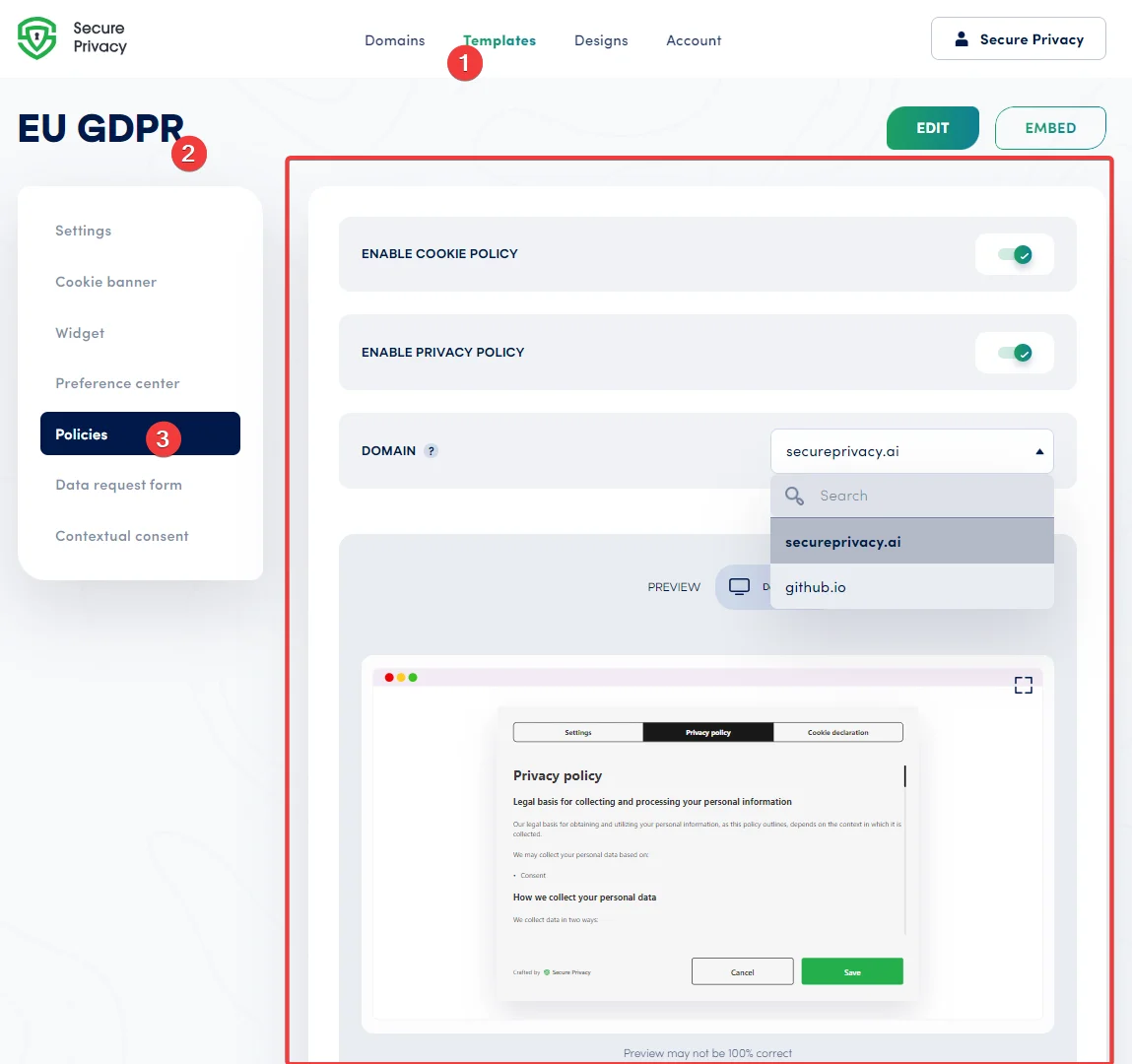
The Templates → Policies page in Secure Privacy, where you enable and manage your GDPR-compliant cookie and privacy policies.
Policy Toggle Settings and Domain Preview
Once on the Policies page, you will see the following controls:
Enable Cookie Policy
Toggle this switch to activate a cookie policy on your website. Cookie policies are preconfigured for each pre-loaded template, simplifying your initial GDPR compliance setup.
Enable Privacy Policy
Toggle this switch to publish a privacy policy on your website. Like the cookie policy, privacy policies are already preconfigured for each pre-loaded template and cover the core disclosure requirements of GDPR, CCPA, and similar regulations.
Domain
Use this dropdown to select a specific domain and preview how its policies will appear. The preview widget below updates automatically to reflect the selected domain — useful if you manage multiple websites from a single Secure Privacy account.
Preview: View Policies Across Devices
The Preview widget lets you visualize how your privacy policy and cookie declaration will appear on desktop, tablet, and mobile devices. Note that the preview may not be 100% pixel-perfect. Switch to full-screen mode for a more detailed view.
Click the "Edit" button at the top to switch to Editor mode and make direct adjustments to your policy content.
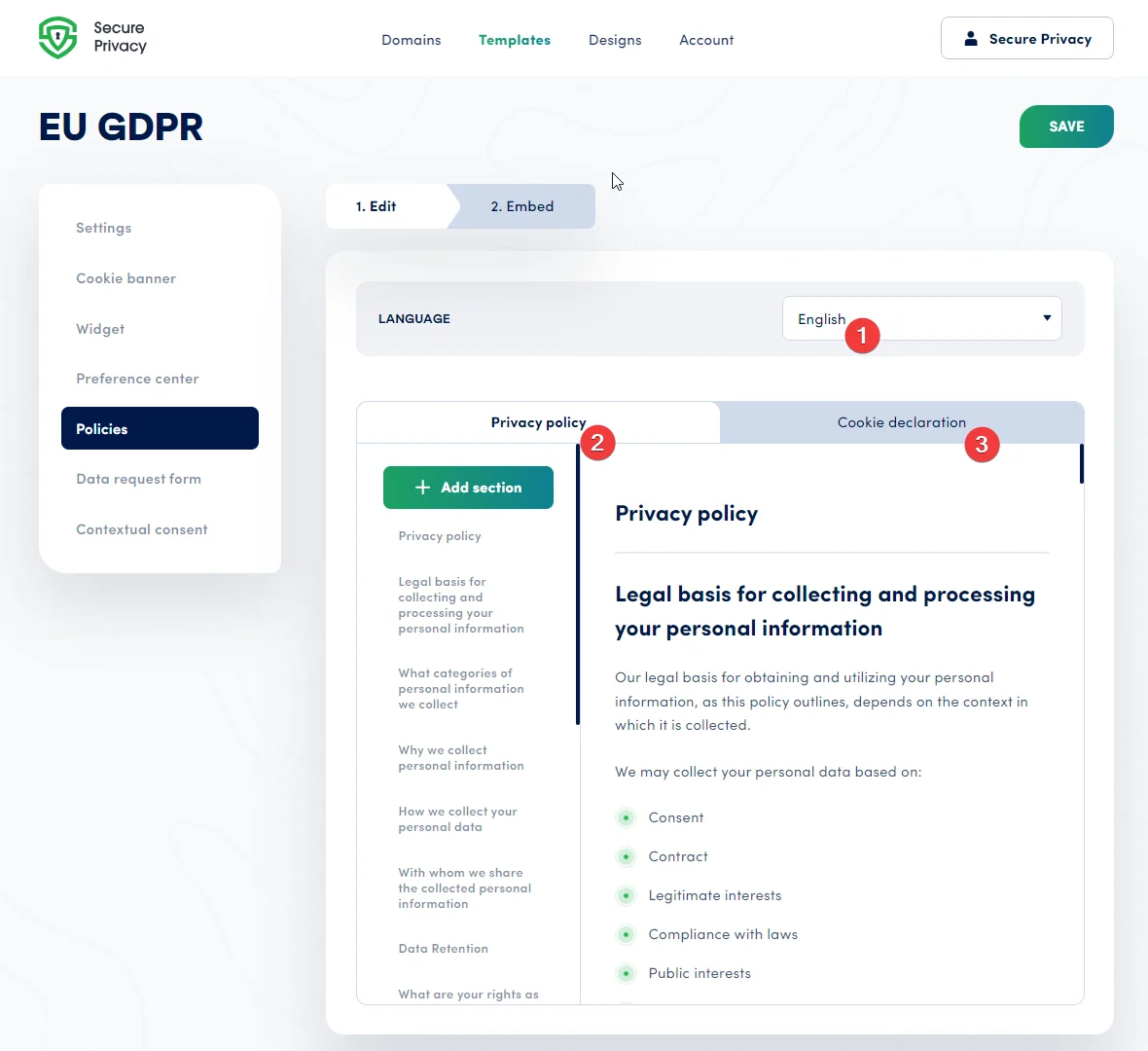
Editor mode in Secure Privacy lets you customize your privacy policy content, switch languages, and navigate between policy sections.
Editor Mode: Customizing Your GDPR-Compliant Policies
Step 1 — Select a Language
Each policy comes preconfigured and pre-translated into multiple languages. You can review and edit translations as needed. Additional languages can be added or removed under Template → Settings.
Step 2 — Edit Your Privacy Policy Content
The Privacy Policy editor lets you fully customize your site's privacy policy to meet your legal requirements. Available actions include:
Edit text, add hyperlinks, and adjust heading levels
Add new sections using "+ Add section" at the top or bottom of the policy
Click a section name in the sidebar to scroll directly to that section
Use shortcodes such as
[sp-legal-basis]to automatically populate domain-specific legal information generated from the domain's Policies page
The policy closes with a 'Contact us' section, which is auto-filled with your domain data.
Step 3 — Configure the Cookie Declaration
The Cookie Declaration section informs visitors about the specific cookies used on your website — a key GDPR transparency requirement. It works similarly to the Privacy Policy editor, with the addition of pre-defined sections that describe cookies detected on your implemented domain. Available actions include:
Edit text, add hyperlinks, and change heading levels
Add sections at the top or bottom using "+ Add section"
Use cookie-specific shortcodes such as
[sp-cookie-categories]or[sp-preferences-cookies], which are automatically populated with correct domain data when viewed on your live websiteUse the
[sp-gdpr-trust-badge]shortcode to add a link that lets visitors open the preference center and adjust their consent options directly from the cookie declaration page
The Cookie Declaration editor in Secure Privacy, with pre-defined cookie sections and shortcodes that auto-populate with your live domain's cookie data.
Click the "Next Step" or "Embed" button at the top to proceed to the Embed page, where you can publish your configured policies on your domain.
Embed Settings: Publishing Your Privacy Policy on Your Website
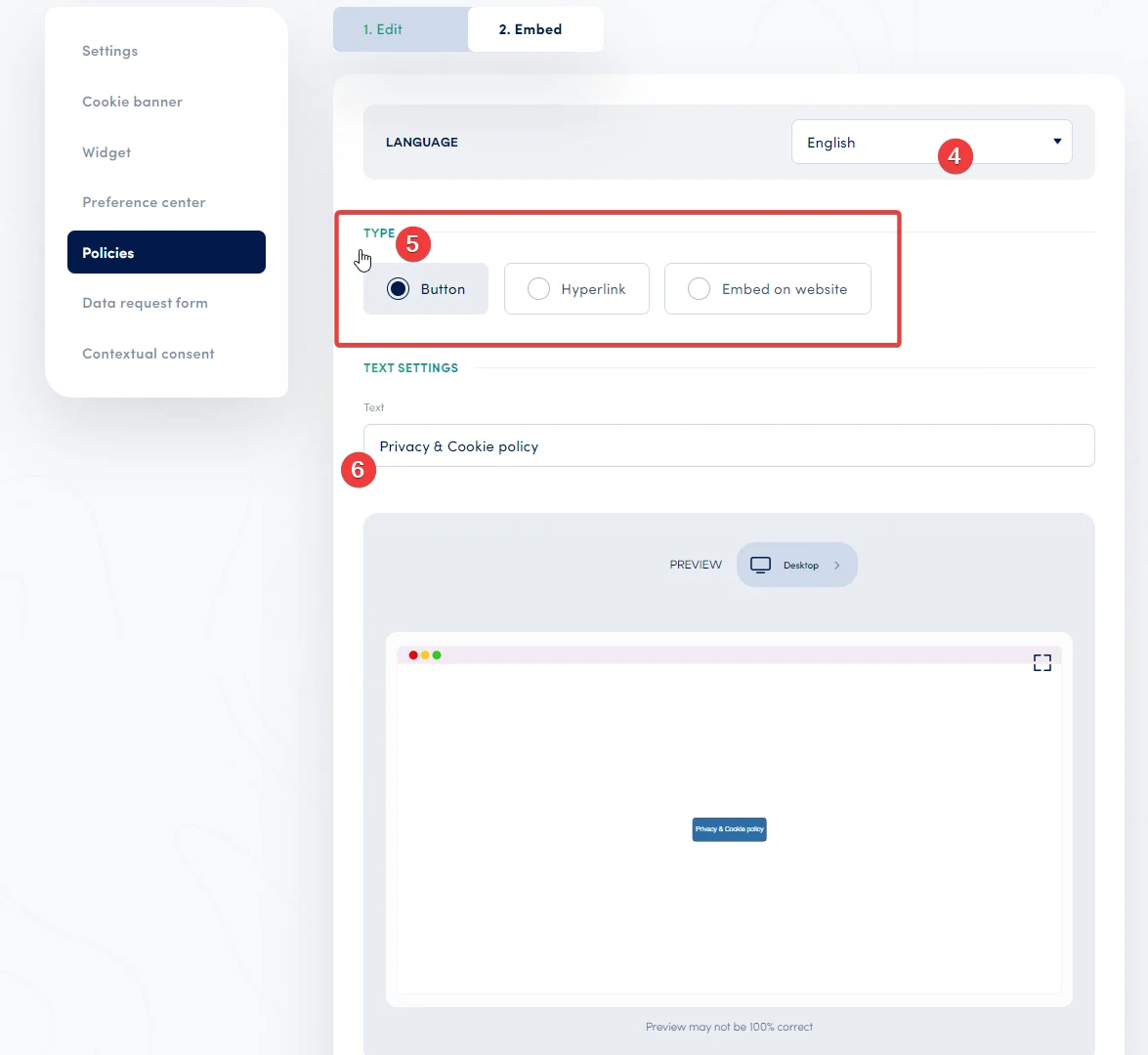
Step 4 — Select a Language for the Embed
Customize the text for your embed button or hyperlink in any of the languages assigned to your template.
Step 5 — Choose Your Embed Type
Choose how your policy appears on your website. Three embed types are available:
Button — Creates a clickable icon that directs visitors to your policy page when clicked.
Hyperlink — Generates a clickable inline link, suitable for embedding in your footer or alongside other legal information.
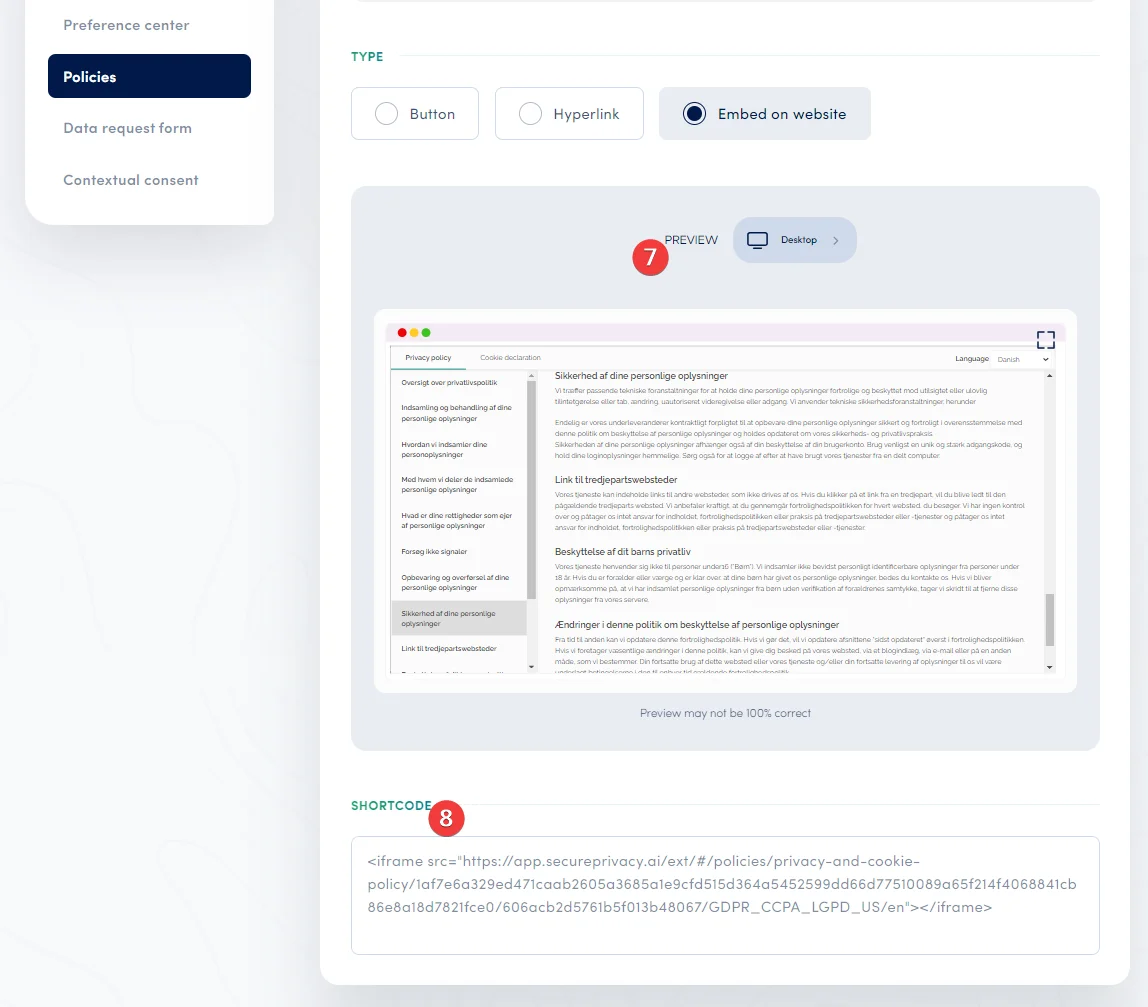
Embed on Website — Integrates the full policy directly into your page as an iframe, making it immediately visible to all visitors without requiring a click.
Step 6 — Configure Text Settings
Define the display text for your embed button or hyperlink, using any of the languages assigned to your template.
The Embed Settings page in Secure Privacy, where you choose your policy display format and generate the embed shortcode for your website.
Step 7 — Preview the Embed
Visualize how your policy embed will appear across desktop, tablet, and mobile devices. The preview provides a close approximation of the final appearance, though it may not be 100% exact.
Step 8 — Copy and Paste the Shortcode
This section generates the embed shortcode you need to insert on your website to display your policy. The code generated depends on your selected embed type — button, hyperlink, or direct iframe embed. Copy the shortcode and paste it into the relevant location in your website's page template or footer.
Tip: Shortcodes like [sp-cookie-categories] and [sp-legal-basis] are resolved dynamically when a visitor loads the page on your live domain — so your policy content stays accurate as your cookie setup changes, without requiring manual edits each time.
Troubleshooting Common Issues
Policy toggle is enabled but the policy isn't appearing on my website
Confirm that the Secure Privacy embed shortcode has been pasted into the correct location in your website template (typically the footer or a dedicated legal page). Also verify that the domain selected in the dropdown matches the domain where the script is installed.
Shortcodes are displaying as plain text instead of resolved content
Shortcodes are resolved only on your live website where the Secure Privacy script is active — they will not render inside the Secure Privacy dashboard editor or in a staging environment that does not have the script installed. Preview your live page to confirm correct rendering.
Frequently Asked Questions
Do I need a privacy policy and cookie policy on my website?
Yes — if you collect any personal data or use cookies (including analytics or advertising cookies), GDPR, CCPA, and most other privacy regulations require you to publish a privacy policy and a cookie policy. Failing to do so can result in significant fines and a loss of visitor trust.
What is a cookie declaration and why do I need one?
A cookie declaration is a detailed list of all cookies active on your website — their purpose, duration, and provider. Regulators, particularly under GDPR, require transparency about which cookies you set, making an up-to-date cookie declaration a legal necessity for most websites.
Can Secure Privacy generate a privacy policy automatically?
Yes. Secure Privacy's pre-loaded templates include preconfigured, pre-translated privacy policies. You can customize the content in the built-in editor and use shortcodes like [sp-legal-basis] to automatically populate domain-specific legal information.
How do I embed a privacy policy on my website using Secure Privacy?
Navigate to Templates → Policies → Embed in your Secure Privacy dashboard. Choose your embed type (button, hyperlink, or direct iframe), configure the display text, then copy the generated shortcode and paste it into your website's page template or footer.
Does Secure Privacy support multiple languages for privacy policies?
Yes. Each policy template comes pre-translated into multiple languages. You can review, edit, and add or remove languages under Template → Settings.
What are Secure Privacy shortcodes and how do they work?
Shortcodes are placeholders you insert into your policy content — for example, [sp-cookie-categories] or [sp-legal-basis]. When a visitor views the live policy on your website, Secure Privacy automatically replaces each shortcode with the correct domain-specific data, keeping your policies accurate without manual updates.
Related Articles
Managing Template Settings: Languages, Domains, and Branding[?]
How Secure Privacy Scans and Categorizes Cookies on Your Domain[?]
Configuring CCPA Compliance Settings in Secure Privacy[?]