
The data retention period setting in Secure Privacy controls how long consent data collected by a legal template is stored. This guide walks through how to navigate to a template's settings, select a retention period (12 months, 6 months, or Do not store), and apply the change to specific domains — helping you stay aligned with GDPR, CCPA, and other applicable privacy regulations.
Who Is This For?
Privacy and compliance managers configuring data retention for GDPR, CCPA, or other legal templates
Website administrators adjusting consent data storage settings per jurisdiction
DPOs reviewing and enforcing data minimisation policies across multiple domains
Step 1 — Log in and open the Templates page
Log in to your Secure Privacy account using your credentials.
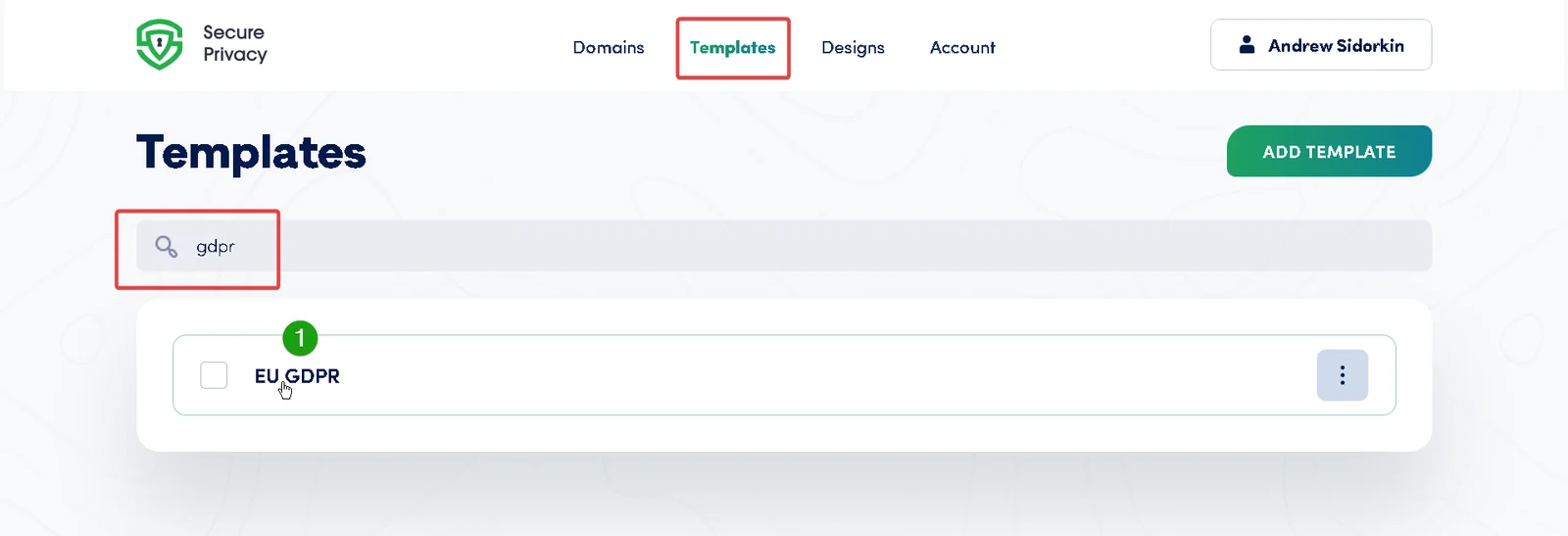
Once logged in, navigate to the Templates page via the top navigation bar.
Step 2 — Access the template's Settings tab
On the Templates page, locate the legal template for which you want to modify the data retention period.
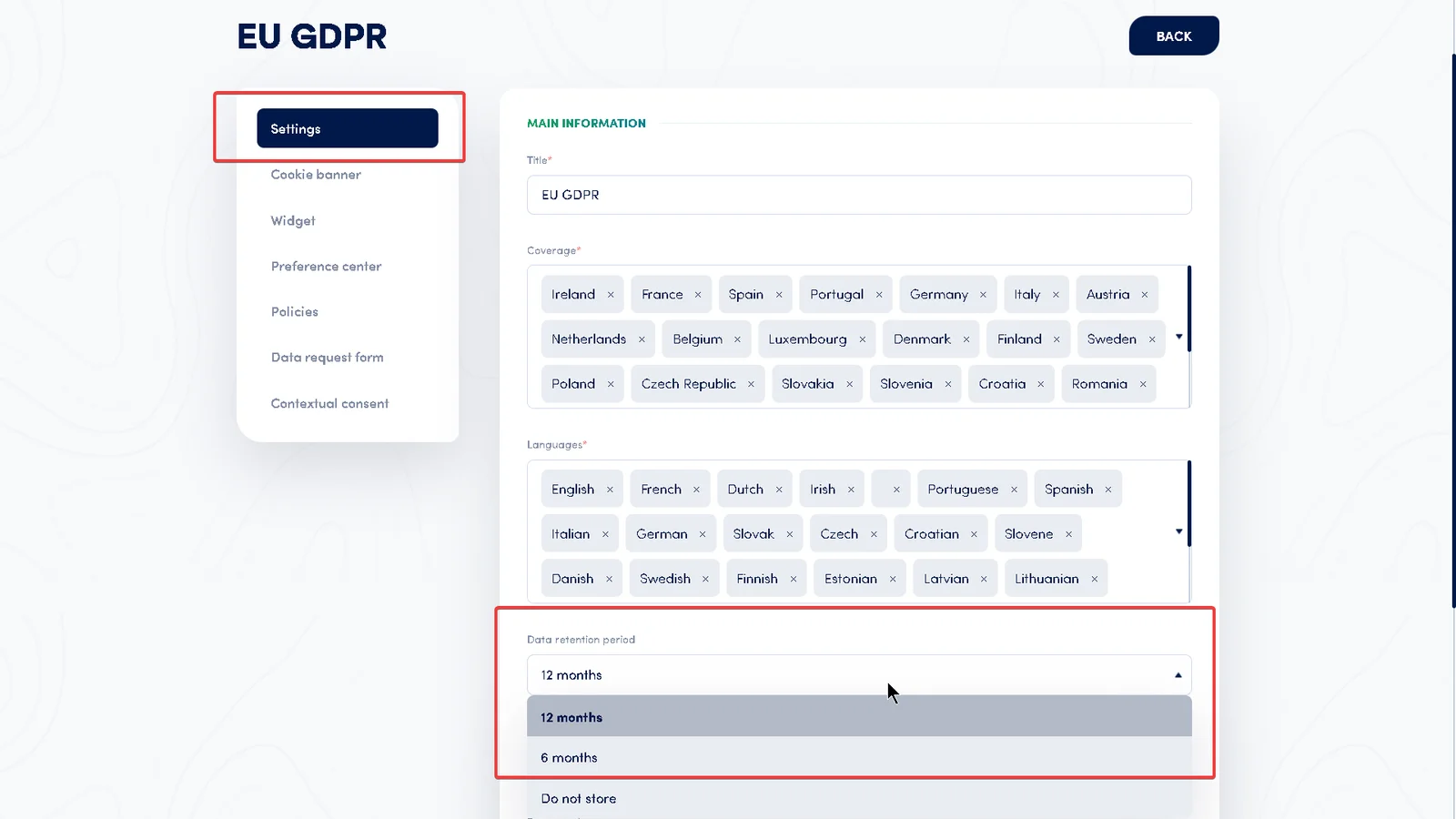
Open the template and navigate to its Settings tab. The data retention period setting is listed there.
Step 3 — Choose the data retention period
Click the dropdown menu and select one of the three available data retention options:
12 months
Consent data collected by this template is retained for 12 months before being automatically deleted.
6 months
Consent data collected by this template is retained for 6 months. This is the default for EU GDPR templates, reflecting the data minimisation principle under Article 5(1)(e).
Do not store
No consent data collected by this template is retained. This is the default for all US state privacy law templates (CCPA, CDPA, CPA, and others), where storage of consent records is not required.
Compliance note: Review applicable privacy laws and regulations before changing the retention period for any template. Retention periods should reflect the principle of data minimisation — storing consent data only as long as necessary for the purpose it was collected.
Step 4 — Apply and save the changes
If you want the updated retention period to apply to specific domains only, select the relevant domains from the dropdown list provided.
Once you have selected the retention period and any applicable domains, save the changes to update the template settings.
Default Data Retention Periods by Legal Template
The table below shows the preconfigured default retention period for each legal template in Secure Privacy. These defaults are set based on common regulatory practice for each jurisdiction and can be changed at any time from the template's Settings tab.
A value of 0 means the template defaults to Do not store — no consent data is retained. This applies to all US state privacy law templates.
Default data retention periods for Secure Privacy legal templates (in months; 0 = Do not store) | |
Template | Default retention (months) |
|---|---|
EU GDPR | 6 |
UK DPA | 12 |
Norway DPA | 12 |
Switzerland FADP | 12 |
North Macedonia ZZLP | 12 |
Serbia ZZPL | 12 |
Russia FLDP | 12 |
Belarus LPDP | 12 |
Turkiye KVKK | 12 |
Canada PIPEDA | 12 |
Quebec Law 25 | 12 |
India DPDPA | 12 |
UAE PDPL | 12 |
Dubai DIFC DPL | 12 |
Saudi Arabia DPL | 12 |
Oman PDPL | 12 |
China PIPL | 12 |
Israel PPL | 12 |
Thailand PDPA | 12 |
Australia APP | 12 |
New Zealand Privacy Act 2020 | 12 |
Philippine DPA | 12 |
South Korea PIPA | 12 |
Malaysia PDPA | 12 |
Hong Kong PDPO | 12 |
South Africa POPIA | 12 |
Singapore PDPA | 12 |
Vietnam PDPA | 12 |
Japan APPI | 12 |
Kenya DPA | 12 |
Egypt DPL | 12 |
Morocco DPL | 12 |
Brazil LGPD | 12 |
Panama LSPDP | 12 |
Colombia DPL | 12 |
Argentina PLDP | 12 |
EU GDPR (with Google disclaimer) | 12 |
[US] California CCPA | 0 |
[US] Virginia CDPA | 0 |
[US] Colorado CPA | 0 |
[US] Connecticut DPA | 0 |
[US] All Other States | 0 |
[US] Tennessee IPA | 0 |
[US] New Jersey CDPB | 0 |
[US] Iowa DPA | 0 |
[US] Utah CPA | 0 |
[US] Indiana CDPA | 0 |
[US] Montana CDPA | 0 |
[US] Oregon CPA | 0 |
[US] Delaware PDPA | 0 |
[US] Texas DPSA | 0 |
[US] Kentucky CDPA | 0 |
[US] New Hampshire CDPA | 0 |
[US] Maryland ODPA | 0 |
[US] Vermont DPA | 0 |
[US] Minnesota CDPA | 0 |
[US] Nebraska DPA | 0 |
Frequently Asked Questions
Why does the EU GDPR template default to 6 months instead of 12?
The EU GDPR template defaults to 6 months to reflect the data minimisation principle under GDPR Article 5(1)(e), which requires that personal data is kept no longer than necessary. Storing consent records for 6 months is considered sufficient for most compliance audit purposes under GDPR. You can extend this to 12 months from the template's Settings tab if your organisation's data retention policy requires it.
Why do US state privacy law templates default to "Do not store"?
US state privacy laws such as CCPA, CDPA, and CPA do not require organisations to retain a record of cookie consent in the same way that GDPR does. The default of "Do not store" (shown as 0 in the table) reflects this. If your legal or compliance team requires consent records to be kept, you can change this setting to 6 or 12 months.
Can I apply a different retention period to specific domains only?
Yes. In Step 4, after selecting the retention period, use the domain dropdown to apply the change to one or more specific domains rather than all domains using that template.
Can I set a custom data retention period (e.g. 3 months or 24 months)?
Currently, Secure Privacy supports three preset options: 12 months, 6 months, and Do not store. Custom durations outside these options are not available in the template settings.
Does changing the retention period affect data already collected?
The retention period setting applies to data collected going forward. Review your organisation's data handling policies and consult with your DPO to determine how previously collected consent data should be managed when changing retention settings.