
If you run a Magento 2 store and sell to customers in the EU, UK, California, or beyond, displaying a cookie consent banner isn't optional — it's a legal requirement under GDPR, ePrivacy, and CCPA. Without one, your store may be setting tracking and analytics cookies before visitors have given consent, exposing your business to regulatory fines and compliance risk.
Many Magento store owners start by searching for a Magento cookie consent extension or a Magento 2 GDPR plugin — only to find solutions that are complex to configure, require a developer, or don't keep up with evolving privacy laws. Secure Privacy solves this differently: it's a fully managed cookie consent management platform (CMP) that installs on Magento in minutes via a single JavaScript snippet — no Magento module, no FTP, no theme editing required.
With Secure Privacy on your Magento store you get:
An automatic cookie scanner that detects all cookies and trackers on your storefront
A customizable cookie consent popup that matches your Magento theme
Granular consent categories (Analytics, Marketing, Functional) with opt-in/opt-out controls
A consent log and audit trail to prove compliance to regulators
Automatic updates as GDPR, CCPA, and ePrivacy regulations evolve — without touching your Magento code
This guide shows you exactly how to set up a Magento cookie consent banner using Secure Privacy — from copying your script to verifying the cookie notice is live on your storefront. The whole process takes under five minutes.
Who Is This For?
This article is for Magento store owners and administrators who need to add a GDPR-compliant cookie banner to their Magento 2 website without hiring a developer or installing a heavy Magento extension. It applies to both Magento Open Source and Adobe Commerce (Magento Commerce).
Before You Begin
You have an active Secure Privacy account. (Sign up free[?] if you don't have one yet.)
You have Magento Admin access with permissions to edit System Configuration.
Your Magento store is running Magento 2.x (Open Source or Commerce).
You know which Secure Privacy cookie consent plan is assigned to your domain.
Step-by-Step: Installing Secure Privacy Cookie Consent on Magento 2
Follow the steps below to add the Secure Privacy cookie consent script to your Magento store's <head> — no Magento extension or module installation needed.
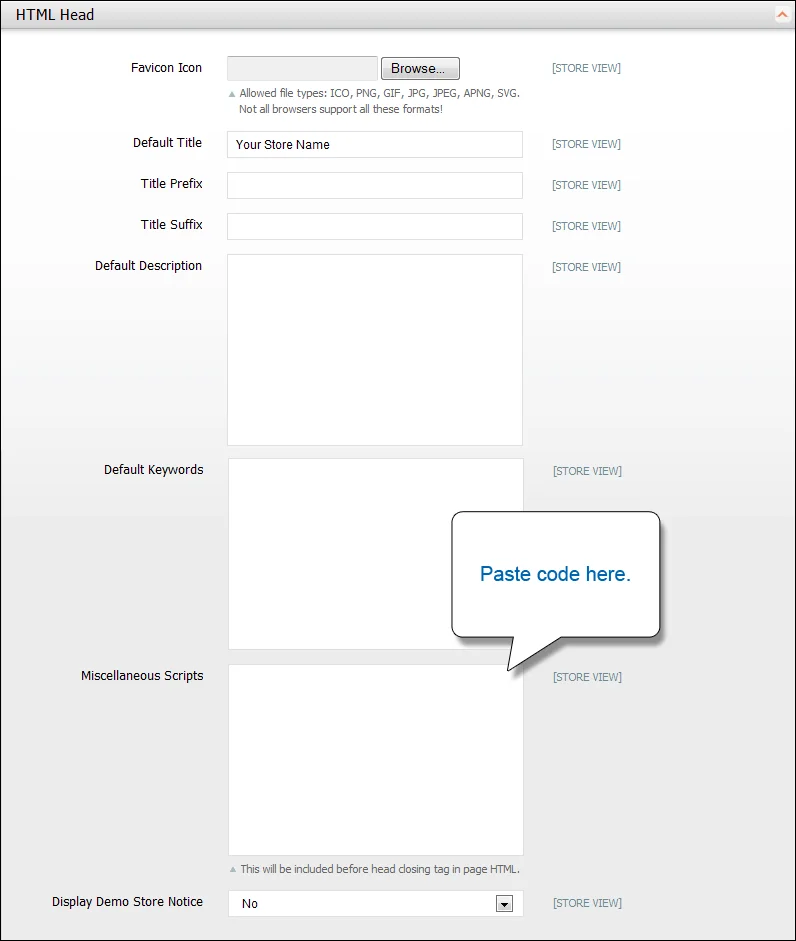
Paste the Secure Privacy cookie consent script into System > Configuration > Design > HTML Head > Miscellaneous Scripts in your Magento Admin panel.
Copy your Secure Privacy script. Log in to your Secure Privacy dashboard, navigate to the Installation page for your domain, and copy the unique JavaScript snippet provided. This is the script that powers your Magento cookie consent banner.
Open Magento Admin. In your Magento backend, go to the Admin menu and select System > Configuration.
Navigate to Design settings. In the left-hand configuration panel, click Design under the General section.
Expand the HTML Head section. Click the arrow next to the HTML Head accordion to expand it and reveal the head-injection options.
Paste the Secure Privacy script. Locate the Miscellaneous Scripts text field and paste your Secure Privacy cookie consent script directly into it. This field injects the script into the
<head>of every page on your Magento storefront — ensuring your cookie notice loads on all pages, including checkout.💡 Tip: Make sure you paste the full script tag, including the opening
<script>and closing</script>tags. Pasting only the inner content will prevent the cookie banner from loading.Save your configuration. Click the Save Config button in the top-right corner of the page.
Verify the cookie banner is live. Open your Magento storefront in a fresh browser window or incognito tab. The Secure Privacy GDPR cookie consent popup should appear automatically. Your Magento store is now cookie-law compliant.
What Happens After Your Magento Cookie Banner Is Live?
Once the Secure Privacy script is active on your Magento store, the platform works continuously in the background to keep your store compliant:
Automatic cookie scanning — Secure Privacy scans your Magento storefront and categorizes all cookies and third-party trackers (Google Analytics, Facebook Pixel, etc.).
Consent-based script blocking — tracking scripts are blocked until a visitor actively consents, keeping you compliant with GDPR's "prior consent" requirement.
Consent records and audit logs — every consent decision is logged in your dashboard so you can demonstrate compliance to data protection authorities if required.
No-code banner customization — adjust banner text, colors, button labels, and consent categories from your Secure Privacy dashboard without touching Magento.
Troubleshooting: Magento Cookie Consent Banner Not Showing
Banner not appearing after installation? Clear your Magento full-page cache: go to System > Cache Management and click Flush Magento Cache. The cookie banner should appear on the next page load.
Script saved but cookie popup still not loading? Confirm your Magento admin role has permission to edit Design configuration. If the Miscellaneous Scripts field is greyed out, contact your Magento administrator.
Cookie notice appears on some pages but not others? A full-page cache layer (e.g., Varnish) or a third-party performance plugin may be stripping custom head scripts. Whitelist the Secure Privacy script domain in your caching configuration.
Running multiple Magento store views? Switch the configuration scope (top-left dropdown in System > Configuration) to each store view and repeat step 5 for each, or set scope to Default Config to apply the cookie banner globally.
Frequently Asked Questions — Magento Cookie Consent & GDPR
Do I need a cookie consent banner on my Magento store?
Yes — if your Magento store uses cookies for analytics, advertising, or personalization and serves visitors in the EU, UK, or California, you are legally required to display a cookie consent banner under GDPR, ePrivacy, and CCPA. Operating without one can result in regulatory fines of up to €20 million or 4% of global annual turnover under GDPR.
Do I need a Magento extension or module to install a cookie banner?
No. Secure Privacy installs on Magento 2 as a lightweight JavaScript snippet — no Magento extension, module, or Composer package is required.