
Microsoft is updating its Microsoft Advertising Platform (MAP) to align with evolving data protection laws, including GDPR. Websites using MAP must now obtain explicit consent from users before using first- and third-party cookies for advertising and tracking. Personal data is only collected through MAP if the website visitor has specifically agreed to it. If you use MAP on your website, these updates are essential for maintaining compliance.
Microsoft Consent Mode, working together with Universal Event Tracking (UET), helps businesses respect user privacy while still gathering valuable data for their advertising campaigns. It is designed to comply with data protection regulations such as GDPR and similar laws worldwide — and is compatible with Microsoft Consent Mode v2 requirements.
Key Features of Microsoft UET Consent Mode
Tailoring data collection: Adjust how UET tracks website visitors based on whether they have given their consent.
Controlling cookie access: The ad_storage setting lets you manage how cookies are used, ensuring they are only activated when the user has permitted it.
Collecting limited anonymous data: Even when a user does not fully consent, you can still gather anonymized information to better understand your ad performance without violating privacy rules.
Who Is This For?
This guide is for website owners, developers, and digital marketers who use the Microsoft Advertising Platform (MAP) with Universal Event Tracking (UET) and want to ensure their implementation is compliant with GDPR and other data privacy regulations. It is particularly relevant if you use a Consent Management Platform (CMP) like Secure Privacy.
How Microsoft UET Consent Mode Works (Technical Implementation)
Consent Mode is configured via a property in UET called ad_storage. Unlike Google Consent Mode — which uses a JavaScript array called dataLayer on the window object — Microsoft UET Consent Mode uses a JavaScript array called uetq on the window object. The possible values for ad_storage are:
Value for ad_storage | Description |
|---|---|
granted | First-party and third-party cookies may be read and written for UET. If no default is set, UET uses granted by default. |
denied | First-party cookies are not read or written for UET. Third-party cookies are not written. Third-party cookies are read-only for fraud and spam prevention — not for advertising purposes. |
Secure Privacy sets a default value for ad_storage on each page load, before consent is captured. For the EU and countries with stricter data privacy laws such as GDPR, Secure Privacy sets ad_storage to denied by default. For countries with less strict regulations, such as most US states, Secure Privacy sets ad_storage to granted by default.
How to Enable Microsoft UET Consent Mode with Secure Privacy
To activate Microsoft UET Consent Mode through your Secure Privacy dashboard, follow these steps:
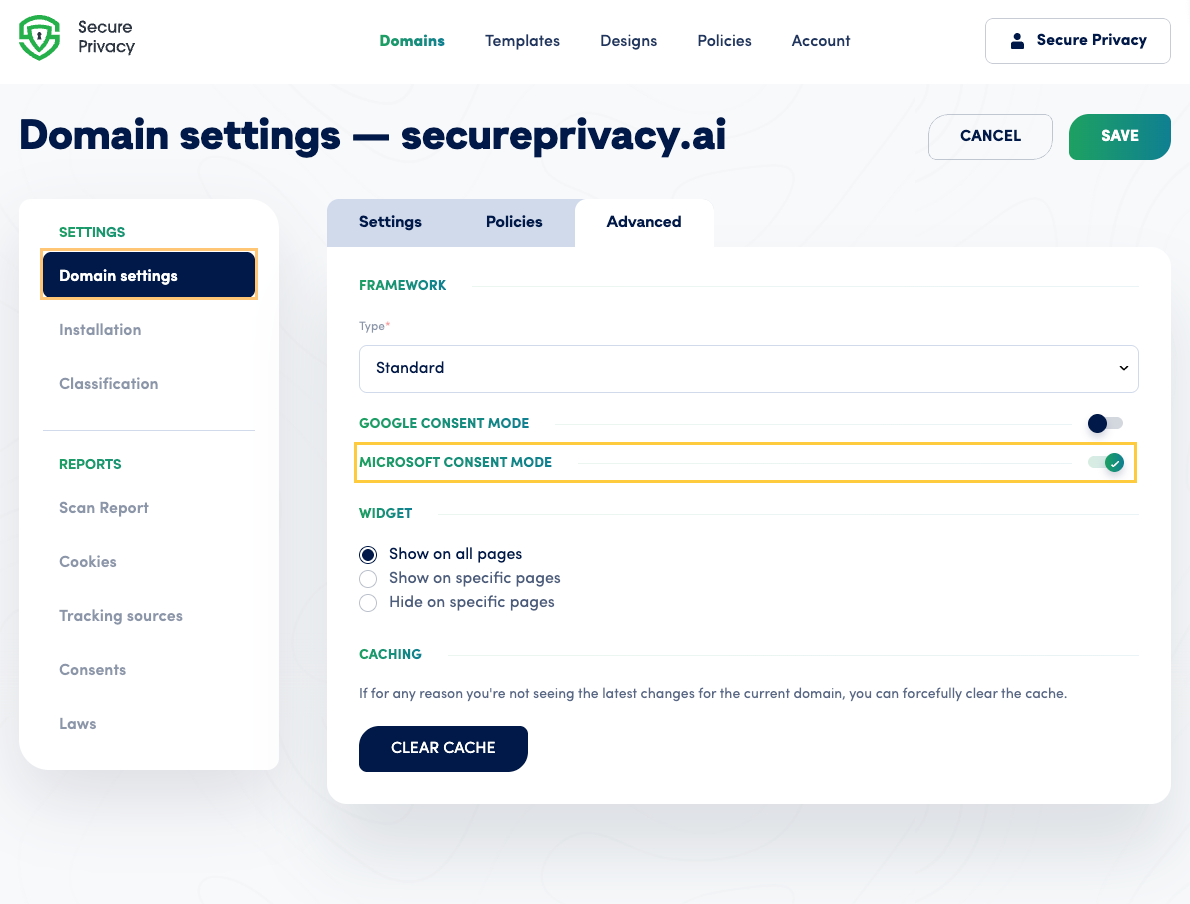
Navigate to Domain Settings: Log in to your Secure Privacy dashboard and go to Domain Settings.
Access the Advanced Tab: Inside Domain Settings, click on the Advanced tab.
Enable the Microsoft Consent Mode Toggle: Within the Advanced tab, find the toggle for Microsoft Consent Mode and switch it on. You're all set!
Frequently Asked Questions (FAQ)
What is Microsoft UET Consent Mode?
Microsoft UET Consent Mode is a feature of Universal Event Tracking (UET) that allows website owners to control whether cookies are set based on a visitor's consent status. It helps businesses stay compliant with GDPR and other data privacy regulations while continuing to use Microsoft Advertising.
Is Microsoft Consent Mode the same as Google Consent Mode?
They work similarly, but Microsoft Consent Mode uses a JavaScript array called uetq on the window object, whereas Google Consent Mode uses dataLayer. Both are designed to respect user consent before setting advertising cookies.
What happens if a user denies consent?
If a user denies consent, ad_storage is set to denied. First-party cookies will not be read or written, and third-party cookies will only be used in a limited read-only capacity for fraud and spam prevention — not for advertising.
Does Secure Privacy support Microsoft Consent Mode v2?
Yes. Secure Privacy's integration with Microsoft UET Consent Mode is designed to support current Microsoft Advertising compliance requirements, including the expectations of Microsoft Consent Mode v2.