
Same platform, more performant, global reach. A guided v1 to v2 migration that is included with your existing plan.
What is happening, and what it means for your account
If you are running Secure Privacy v1, the platform you installed years ago is approaching the end of its lifecycle. Secure Privacy v1 reaches end-of-support in Q2 2026. After that date, v1 will no longer receive security patches, new compliance signals, or feature updates - and emerging requirements like Google Consent Mode v2 enforcement, IAB TCF v2.3, GPC, and DSAR governance will only be supported on the v2 platform.
For most teams, the painful alternative is a full re-platform: choosing a new consent management platform, re-implementing tags, retraining legal and marketing, rebuilding banner customisations, and re-mapping every domain. That is months of work, plus the risk of breaking conversion tracking on the way through.
Secure Privacy v2 is the elegant fix. It is the next evolution of the platform you already trust, rebuilt for everything coming next - and the upgrade is guided, free, and included with your existing plan. Your account, your domains, your consent records, and your banner customisations come with you.
By the end of this article you will know exactly when v1 support ends, what is new in v2, what it costs, and the two short onboarding articles to read next so your team can be live on v2 in days, not months.
The v1 sunset timeline at a glance
Date | What happens |
|---|---|
Now | Secure Privacy v2 is generally available. v1 customers can migrate at any time at no extra cost. |
Q1 2026 | Final reminder window. The customer success team reaches out to remaining v1 accounts to schedule guided migration. |
Q2 2026 | v1 reaches end-of-support. No new security patches, no new compliance signals (GCM v2 updates, TCF revisions, new regional templates), and no further product fixes on v1. |
After Q2 2026 | v1 instances continue to render existing banners, but new regulatory features land only on v2. We strongly recommend migrating before this point. |
Why upgrade: what is new in Secure Privacy v2
v2 is a same-platform evolution, not a rebrand. The architecture is more performant, the global coverage is wider, and the controls your security and legal teams have been asking for are now built in. There are five pillars worth knowing.
Pillar 01 - Universal Consent Management
One platform across every surface your users touch.
Universal Consent - web, mobile, and TV apps from a single account
Consent Hub - all web consents unified under one record
Mobile SDKs - native iOS and Android consent collection
Custom Consent - configurable consent workflows for non-standard use cases
Explore the full Secure Privacy consent solution and the dedicated Consent Hub feature page for a closer look at how v2 unifies consent across web, mobile, and TV.
Pillar 02 - Smarter signals (Google Consent Mode v2 and beyond)
v2 keeps measurement working where other consent platforms stop tracking entirely.
Google Consent Mode v2 - Gold CMP Partner integration, with full
ad_storage,analytics_storage,ad_user_data, andad_personalizationsupportMeta and Bing consent - full-stack ads coverage outside the Google ecosystem
IAB TCF v2.3 - the latest programmatic advertising standard
GPC and DNT+ - browser-level signals honored automatically
See the full Google Consent Mode integration and the IAB TCF v2.3 integration for the implementation details and supported parameters.
Pillar 03 - Beautiful, on-brand banners (no coding required)
The v2 banner designer ships fresh shapes, new positions, and a wider gallery of pre-built templates - all customisable without writing CSS or JavaScript.
Fresh banner designs - new sizes, positions, and layout types
55+ legal templates - GDPR, CCPA, LGPD, PIPEDA, VCDPA and more
Policy generator - cookie and privacy policies that match your active templates
70+ languages - auto-localised banners based on visitor region
You can browse the live brand-aligned cookie consent banner gallery on the main site to see the new designs in context. Every layout is a starting point you can apply to your domain in clicks - no developer ticket required. Pair the banner with the automated cookie and privacy policy generator so your declarations stay in sync with the cookies actually present on the site.
Pillar 04 - Enterprise-grade controls
The features your security and IT teams have been asking for, finally in one place.
SSO - Okta and Microsoft Entra ID
Platform connectors - 19+ native integrations for CMS platforms and tag managers
Cross-domain consent - share consent decisions across all properties under one organisation
Governance portal - DSAR handling, DPIA workflows, and vendor risk tracking
Read more on the full Privacy Governance suite and the complete platform integrations library Secure Privacy ships with.
Pillar 05 - Compliance Plus (the edge cases, covered)
Beyond the banner, v2 closes the compliance gaps that come up in real-world audits.
VPPA-safe embeds - iframe overlays for video to address Video Privacy Protection Act exposure
Trust Widget - share your live compliance posture as a public link
Flexible DSAR forms - configurable, spam-resistant data subject request intake
Cryptographic audit logs - immutable consent records aligned with GDPR Article 30
See the consent logging and audit trail feature for how cryptographic records are stored, and the DSAR forms feature for the configurable, spam-resistant request intake.
New banner designs, applied without code
One of the largest visible changes in v2 is the redesigned banner gallery. Fashion, e-commerce, image-led editorial, dark mode, mobile-first - the gallery covers every common site aesthetic with banners that already meet GDPR, CCPA, LGPD and IAB TCF v2.3 requirements out of the box.
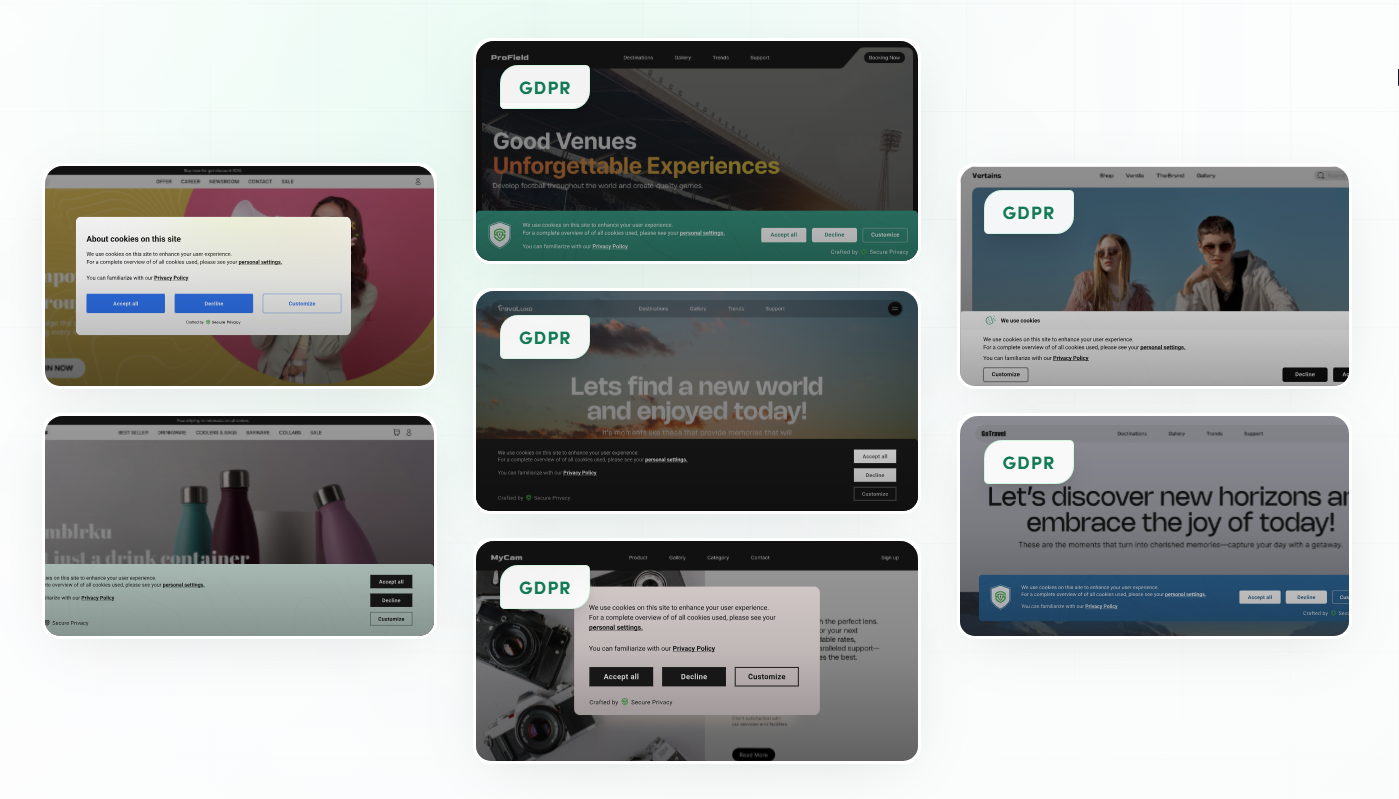
A sample of the v2 brand-aligned cookie consent banners. Each design is applied through the dashboard - no coding, no developer involvement.
Pick a template, adjust colours and copy to match your brand, set your default consent states per region, and publish. Behind the scenes the banner is already wired to Google Consent Mode v2, IAB TCF v2.3, and any regional template you have selected.
See the full gallery: secureprivacy.ai/feature/cookie-consent
Does the v2 upgrade cost extra?
If you are an existing Secure Privacy v1 customer, your migration to v2 is a set of steps performed on both ends using migration guide. However, your domain count, your active templates, and your billing cadence stay the same. The customer success team handles the heavy lifting on the data side, moving data from old system into new, while keeping most of your in-product configurations.
For new customers, or for existing customers considering an expansion (more domains, mobile SDKs, enterprise SSO, governance portal), pricing is documented on the main site. The free tier and 30-day trial are still available.
View the current plans: secureprivacy.ai/pricing
Who this article is for
Existing Secure Privacy v1 administrators who need to understand the sunset timeline and start the migration
Privacy, legal, and DPO teams evaluating whether to stay on v1 or move to v2 ahead of the EOS date
Developers and tag managers who own the consent implementation and will run the script swap
New customers who are choosing Secure Privacy and want to start directly on v2
How to migrate or onboard
If you are an existing v1 customer
Migration is guided. Reach out to your customer success contact or [email protected] to schedule a session. Most v1 to v2 migrations complete inside one working week, including domain re-mapping, banner template refresh, and Google Consent Mode v2 validation.
During the session the team will:
Walk your team through the new dashboard, new enities added with enhanced and expanded feature sets
Universal Consent Hub, DSAR module, Governance portal overview
Heavy lifting done off the call:
Provision your v2 workspace with your existing domains pre-loaded
Migrate your active legal templates and customised banner copy
If you are a new user starting on v2
Two short articles will get your account, your first domain, and your first banner live - in roughly the time it takes to brew a coffee.
Secure Privacy onboarding guide: quick setup steps - account creation, dashboard tour, and the first-day setup checklist every new admin should run through.
Installing the Secure Privacy script on a new domain - the technical install walkthrough, including the snippet, placement guidance, and verification steps.
After those two, you can pick a template from the banner gallery, set your default consent states by region, and you are live.
What happens after you migrate
Once you are on v2, three things are immediately better:
Measurement holds up under denied consent. With Google Consent Mode v2 active, conversion modeling fills in the gaps that v1 (and most legacy CMPs) leave open after a "decline all" click.
Audits get easier. Cryptographic, immutable consent logs are exportable directly for Article 30 records and regulator requests.
Your team stops being the bottleneck. Marketing can redesign banners without a developer; legal can update templates without a marketing handover; IT gets SSO and audit logs without a support ticket.
Troubleshooting and common questions during migration
A few things typically come up. None are blockers; all have a documented fix.
Old v1 script still on the page after install. Perform the website rescan to refresh the loader and start using v2 designed cookie banners.
Google Consent Mode signals not firing. Confirm default consent states are set in the dashboard, then re-verify with Tag Assistant. The consent mode verification guide covers the exact
gcsparameter values to expect.Banner not localising. Make sure the visitor-region coverage is nocifugred on a template, this template is enabled and the language you need is present and translated for this template. v2 ships 70+ languages out of the box with required languages pre-translated for you.
Cross-domain consent not sharing. The cross-domain feature is enabled for Business and Advanced plans - check that all relevant domains are listed under the same cross-domain consent group.
Frequently asked questions
When does Secure Privacy v1 reach end-of-support?
Secure Privacy v1 reaches end-of-support in Q2 2026. After that date, v1 will not receive security patches, new compliance features, or updates for emerging standards like new IAB TCF revisions or Google Consent Mode iterations. We recommend migrating to v2 well before Q2 2026.
What does "end-of-support" mean for my v1 banner?
Existing v1 banners will continue to render after EOS - any new regulatory requirement (a new Google Consent Mode parameter, a new IAB TCF version, a new regional template) will only ship on v2. To stay compliant going forward, v1 customers must migrate to v2.
Does the upgrade to v2 cost extra?
For existing v1 customers, the migration to v2 is a guided process that may require some changes. However, your billing cadence, domain count, and template entitlements transfer across without additional fees.
What is the difference between Secure Privacy v1 and v2?
v2 is the next evolution of the same platform. It adds Google Consent Mode v2 (Gold CMP Partner), IAB TCF v2.3, mobile and TV-app SDKs, SSO with Okta and Microsoft Entra, cross-domain consent, a governance portal with DSAR and DPIA workflows, cryptographic audit logs, VPPA-safe video embeds, a Trust Widget, and a redesigned banner gallery with 70+ languages and 55+ legal templates.
Will my existing banners and consent records transfer to v2?
Yes. The guided migration brings across your domains, your active legal templates, your customised banner copy, and your historical consent records. The customer success team handles the data move; your team handles the script swap (via website rescan) on the website.
Does Secure Privacy v2 support Google Consent Mode v2?
Yes. Secure Privacy is a Google Gold CMP Partner. v2 supports the full Google Consent Mode v2 parameter set including ad_storage, analytics_storage, ad_user_data, and ad_personalization, with both Basic and Advanced implementation modes available.
Does Secure Privacy v2 support IAB TCF v2.3?
Yes. v2 supports the IAB TCF v2.3 specification, which is the current programmatic advertising standard. v1 was built for earlier TCF revisions and will not be updated to TCF v2.3 or future revisions.
How long does the v1 to v2 migration take?
For most accounts, the guided migration completes within one working week. That includes the workspace provisioning, template and banner transfer, and a quick onboarding walkthrough for the new dashboard.
Can I redesign my cookie banner without writing code?
Yes. The v2 banner designer lets non-developers pick from the pre-built design gallery, adjust colours, fonts, and copy to match your brand, and publish - all from the dashboard. You can preview the design options at secureprivacy.ai/feature/cookie-consent.
I am a new customer. Where do I start?
Start directly on v2. Read the Secure Privacy onboarding guide for account setup, then follow the script installation guide to add your first domain. A free 30-day trial is available - no credit card required.
Ready to upgrade?
Existing v1 customers: contact your customer success manager or email [email protected] to book your guided migration.
New customers: view plans and start your free trial.