
Your compliance scan just flagged it: non-essential cookies — marketing pixels, analytics trackers, ad-network scripts — are firing on your site before any visitor has clicked "Accept." That single issue puts you in direct breach of GDPR and the ePrivacy Directive, and it's the kind of finding that regulators and privacy watchdogs act on.
The instinctive workaround — adding a banner that warns users while still loading cookies in the background, or relying on a basic tag manager delay — doesn't actually solve the problem. Those approaches still set cookies before consent is recorded, and they offer no tamper-proof audit trail if a regulator asks for proof. A half-measure here is almost as risky as no measure at all.
The clean fix is a Consent Management Platform (CMP) that blocks all non-essential scripts at the network level until explicit, informed consent is received. Secure Privacy does exactly that: it intercepts every cookie-setting script, pixel, and iframe before it runs, releases them only once the right consent signal arrives, and logs a timestamped record of every user decision.
By the end of this guide you will have:
Identified every cookie or script currently loading before consent on your site
Configured Secure Privacy to block them automatically — and manually for edge cases
Run a verification scan confirming your site now meets GDPR cookie consent requirements
Who Is This Guide For?
This article is for website owners, developers, and compliance managers who:
Have received a Secure Privacy scan report flagging pre-consent cookie loading
Are working to meet GDPR cookie consent requirements or ePrivacy Directive obligations
Need to block third-party scripts (Facebook Pixel, Google Analytics, YouTube iframes, etc.) until a user actively consents
Want documented, auditable proof of consent in case of a regulatory inquiry
Issue Detected: Non-Essential Cookies Loading Before User Consent
Your website is currently loading non-essential cookies (e.g., marketing, analytics) before obtaining explicit user consent, which violates GDPR and the ePrivacy Directive. Specifically, this breaches:
GDPR Recitals 30 & 32, Article 6
ePrivacy Directive Recital 25
Failing to address this issue creates a risk of legal non-compliance, user mistrust, and significant regulatory penalties.
What Is Pre-Consent Cookie Loading — and Why Does It Violate GDPR?
The GDPR requires that:
"Cookies or other tracking technologies that are not strictly necessary must not be set on a user's device until the user has given informed, unambiguous, and explicit consent."
Your current setup loads cookies used for marketing and tracking before consent is captured, making your site non-compliant with GDPR cookie consent requirements. Common culprits include Google Analytics (_ga), Facebook Pixel (_fbp, fr), and Google Ads (IDE) — all of which require prior user consent under GDPR.
Scan Report: Cookies Flagged for Pre-Consent Loading
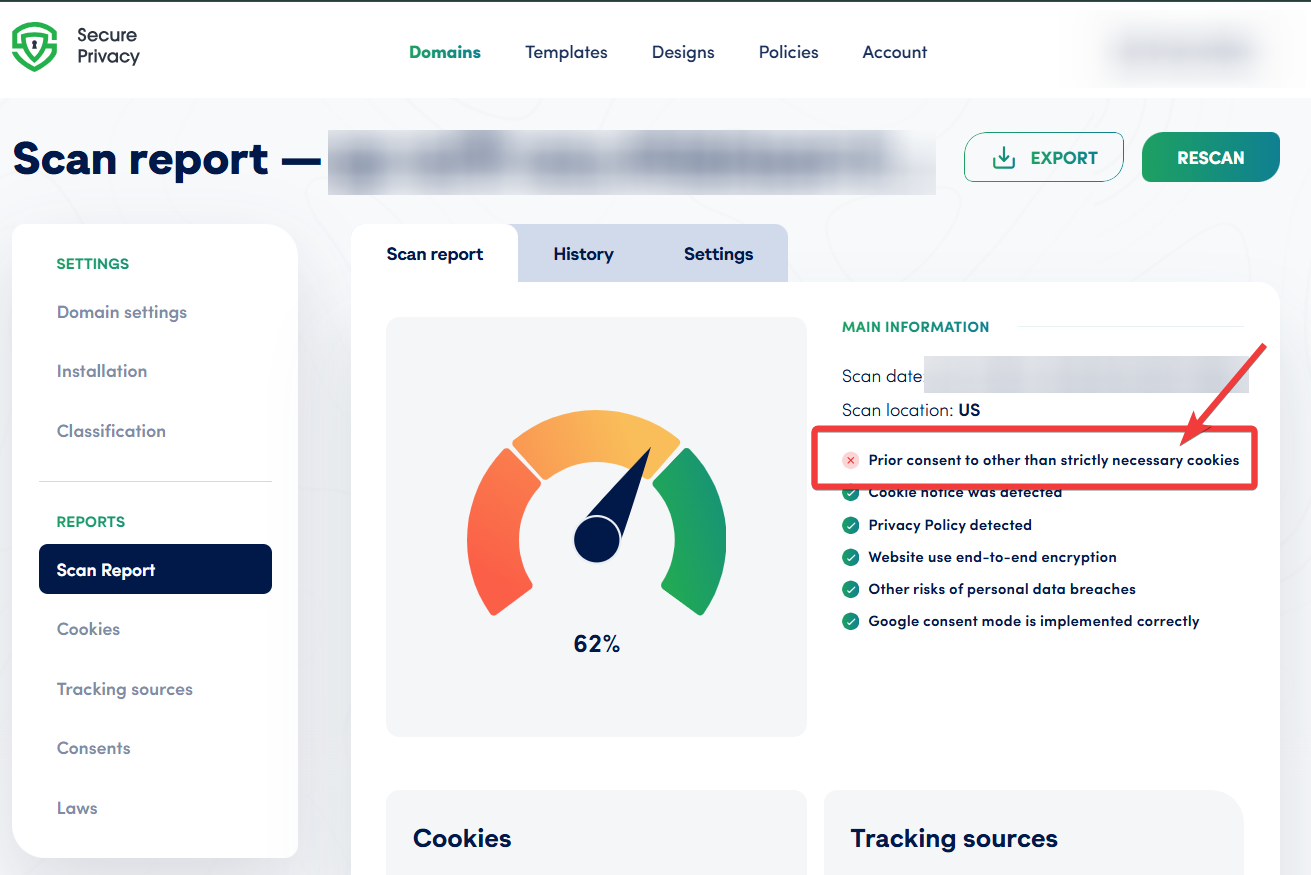
Secure Privacy scan report identifying cookies that fire before prior user consent is obtained.
How to Fix Cookies Loading Before Consent: Step-by-Step GDPR Compliance Guide
To achieve full GDPR cookie compliance, follow the steps below. Each step maps to a specific action inside the Secure Privacy consent management platform.
Step 1 — Implement a GDPR-Compliant Cookie Consent Banner
Use a Consent Management Platform (CMP) such as Secure Privacy that:
Blocks all non-essential cookies by default before consent is given
Does not load marketing or analytics scripts until explicit consent is received
Allows users to opt out as easily as they can opt in
Records and stores proof of consent (date, time, and user decision)
Step 2 — Identify Which Cookies Are Loading Before Consent
Most services are automatically detected and blocked by Secure Privacy's consent engine, but manual configuration may be needed in some setups. Follow this process to identify and resolve pre-consent cookie issues:
Step 2.1 — Review the Scan Report
Go to the Scan Report in your Secure Privacy dashboard.
Click on "Prior consent to other than strictly necessary cookies (GDPR)".
Scroll to the "Cookies loaded before prior consent" section.
Note the cookie name and related service for each flagged item.
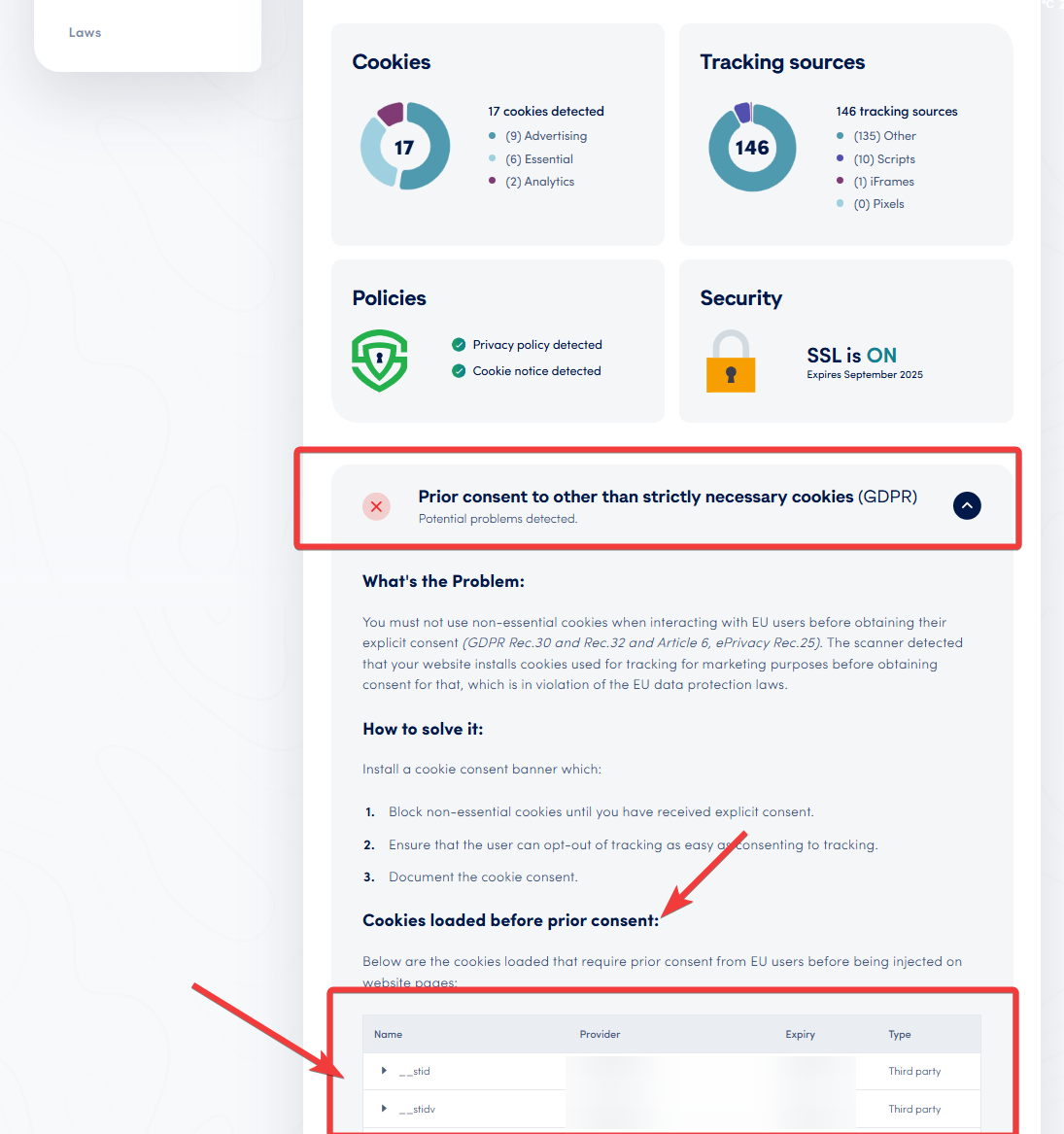
The "Cookies loaded before prior consent" section identifies every non-compliant tracking script on your site.
Step 2.2 — Consult Your Development Team
Determine how each flagged service (e.g., Facebook Pixel, YouTube iframe, Google Analytics) is installed on your site.
Check for scripts, pixels, or iframe embeds related to the flagged services.
Note whether the installation script uses the
asyncordeferattribute, as this affects load order and may cause scripts to fire before Secure Privacy initialises.
Step 2.3 — Apply Manual Blocking Configuration
Navigate to the "Classification" → "Services" tab in your CMP dashboard.
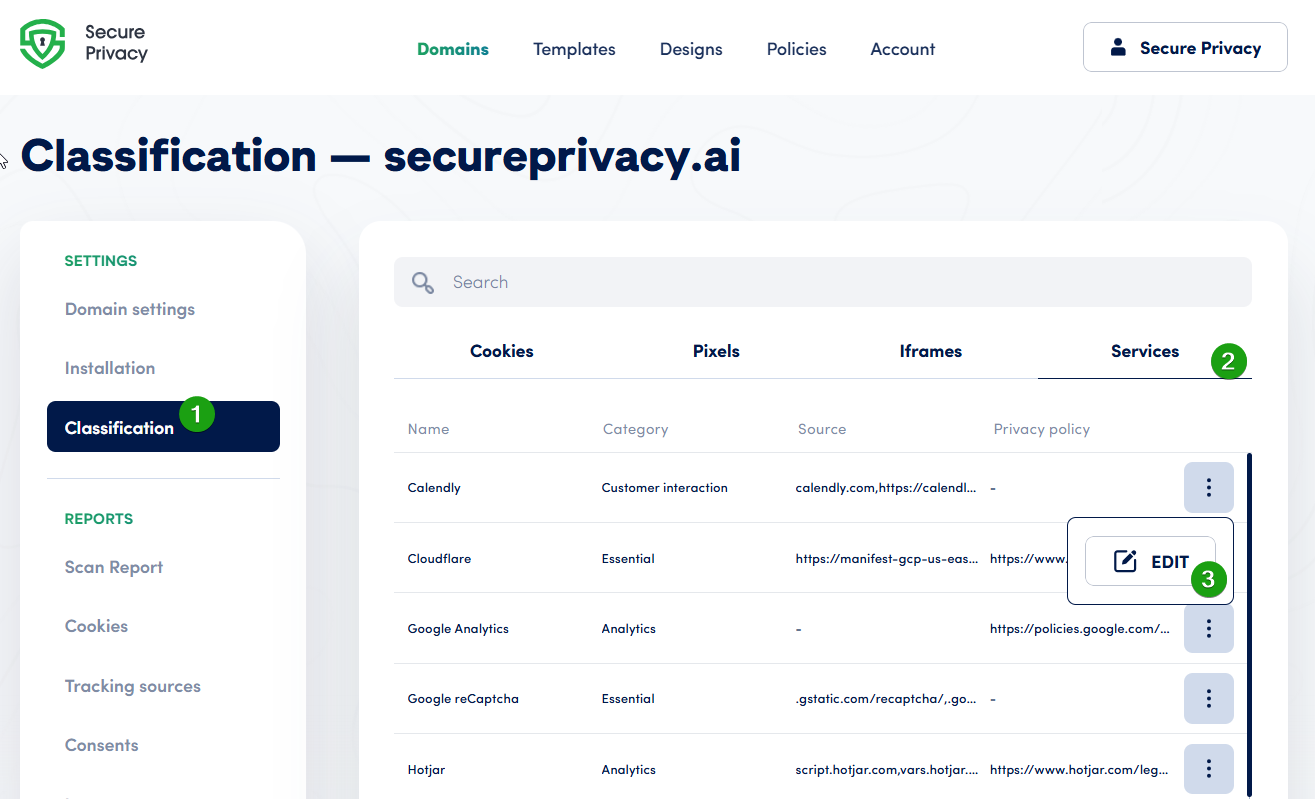
The Classification → Services tab is where you manually map scripts to consent categories.
Locate the service in question, click the "..." (three-dot menu), then select "Edit".
Add the correct script source URL reference to ensure the service is properly blocked before consent.
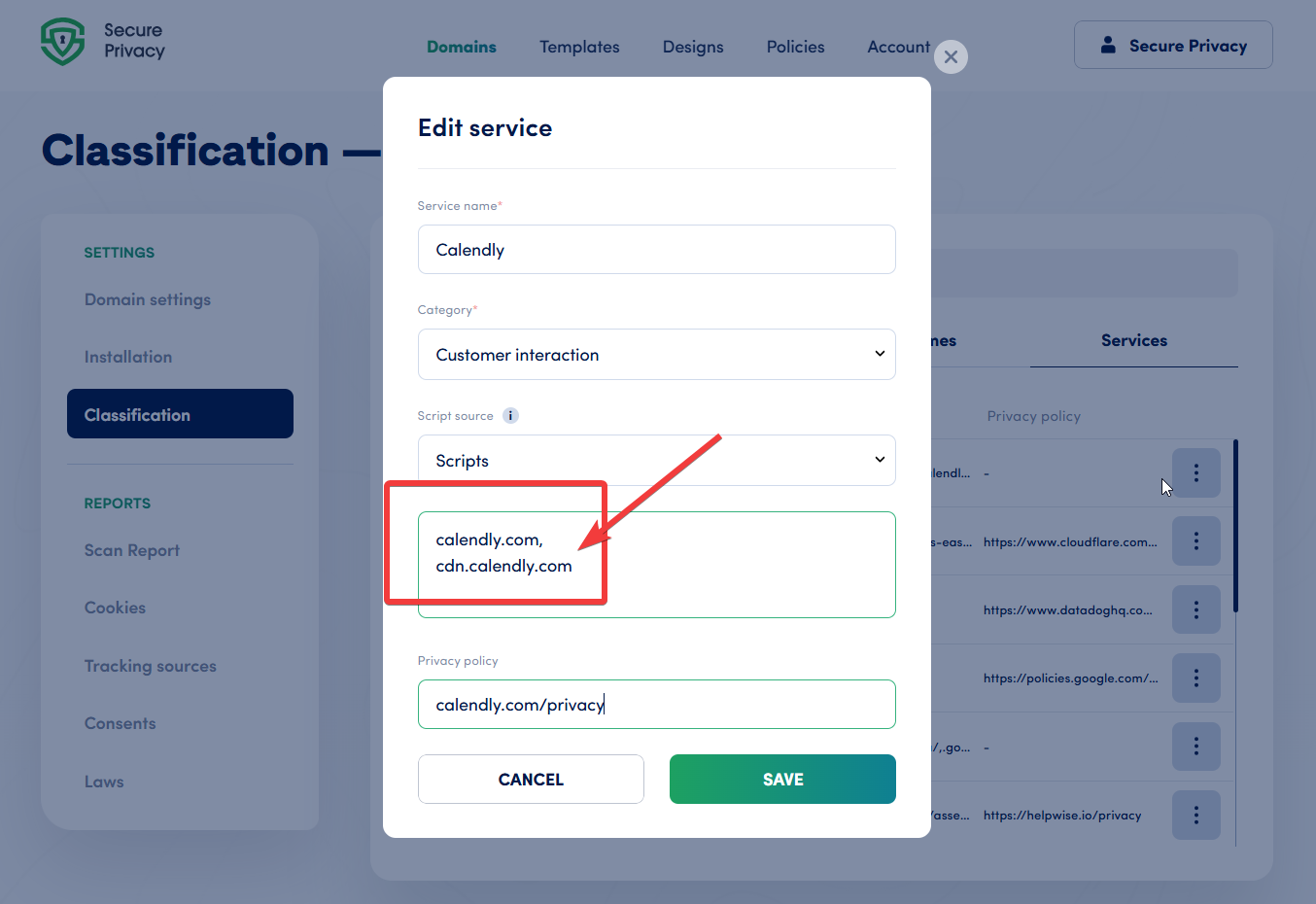
Add the script source URL to ensure Secure Privacy intercepts the service before any cookies are set.
If the service is not listed, you can manually create a new entry by associating a cookie with a service.
Step 2.3a — Configure Iframes and Pixels
If the service uses iframes or tracking pixels, ensure these are also:
Listed in the appropriate iframes/pixels tab of your CMP
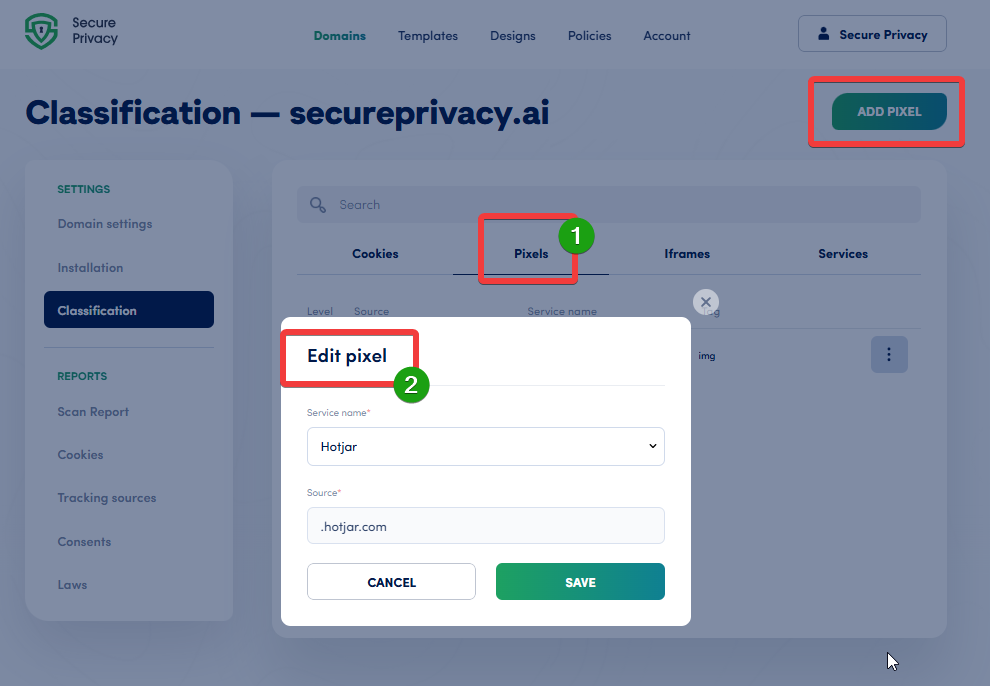
Map every iframe and tracking pixel to its source URL so Secure Privacy can block it prior to consent.
Accurately mapped to their source URLs to enable effective blocking before consent
Manually added if they were not automatically detected during the scan
Step 2.4 — Re-Scan Your Website to Confirm Compliance
Run a new website scan after applying your configuration changes.
Confirm that the flagged cookies and services are now blocked prior to consent.
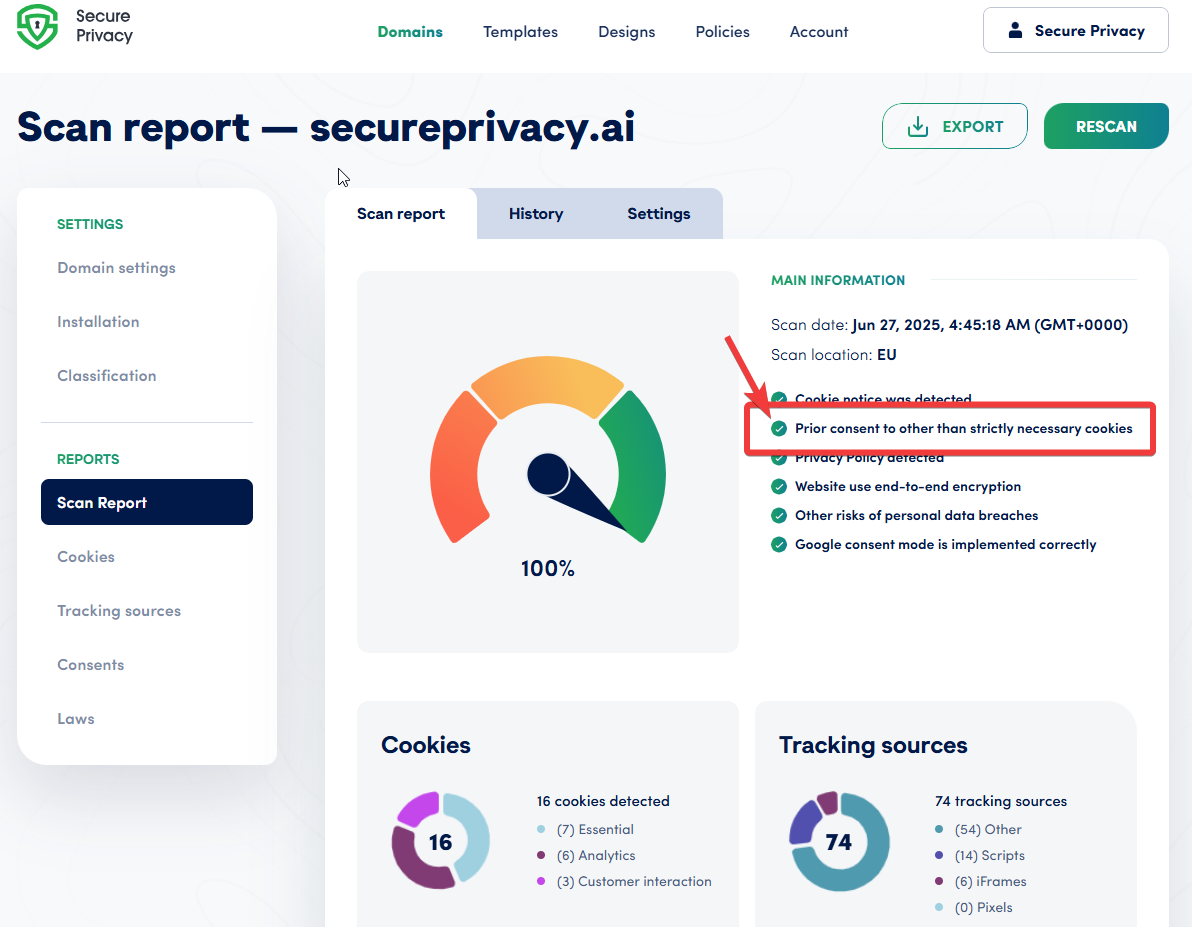
A clean re-scan confirms your site no longer loads non-essential cookies before user consent.
Verify that the service is not using
asyncordefer, as these attributes can cause scripts to run before Secure Privacy loads.Repeat the process for any remaining unblocked services.
Examples of Cookies That Require Prior User Consent Under GDPR
Cookie Name | Purpose | Consent Required |
|---|---|---|
| Facebook Tracking | ✅ Yes |
| Google Analytics | ✅ Yes |
| Facebook Ads | ✅ Yes |
| Google Ads | ✅ Yes |
GDPR Cookie Compliance Checklist: Key Actions to Take
To bring your website into full compliance with GDPR cookie consent requirements:
Do not load non-essential cookies until explicit user consent is obtained
Enable automatic cookie blocking via your CMP
Apply manual blocking configuration for services not automatically detected
Document all consent decisions with timestamps and user choices — these logs are your proof of compliance if a regulator requests an audit
Regularly re-scan your website to catch new or unblocked services
Frequently Asked Questions
Why are cookies loading on my website before users give consent?
Third-party scripts such as Google Analytics, Facebook Pixel, or Google Ads are typically added via a tag manager or hardcoded into the site. Without a CMP that actively intercepts these scripts, they execute as soon as the page loads — before any consent banner is shown or clicked. A GDPR-compliant CMP like Secure Privacy blocks these scripts at the network level until consent is recorded.
Is it a GDPR violation to load cookies before consent?
Yes. Under GDPR Article 6 and the ePrivacy Directive, non-essential cookies (marketing, analytics, tracking) must not be placed on a user's device until explicit, informed consent is obtained. Pre-consent cookie loading is one of the most commonly cited violations in regulatory enforcement actions across the EU.
What is a Consent Management Platform (CMP) and do I need one?
A CMP is a tool that manages cookie consent on your website — collecting user choices, blocking non-essential scripts until consent is given, and storing proof of each consent decision. If your site uses any marketing, analytics, or advertising cookies, a CMP is not optional under GDPR; it is the mechanism that makes compliant consent collection operationally feasible.
Why is my cookie still loading even after configuring Secure Privacy?
The most common cause is a script tag that uses the async or defer attribute, which can cause it to execute before Secure Privacy initialises. Other causes include the script not being mapped to a service in the Classification → Services tab, or an iframe/pixel that was not added to the iframes/pixels blocking list. Re-check the service mapping and remove async/defer if present, then re-run the compliance scan.
How often should I re-scan my website for GDPR cookie compliance?
Best practice is to run a new compliance scan any time you add or update a third-party script, marketing pixel, or analytics integration — and at minimum once per quarter. New marketing tools are frequently added by non-technical team members without realising they introduce new cookies that require consent.