
You tested it yourself, or a customer wrote in: someone clicks Reject or withdraws consent in the preference center, yet the cookies are still sitting in the browser. Cue the uncomfortable questions. Is the cookie banner broken? Is it a GDPR violation if cookies remain after opt-out? Do you have to delete cookies when a user withdraws consent?
Teams usually reach for one of two fixes, and both disappoint. Some write custom JavaScript to delete cookies on withdrawal, only to find that HttpOnly cookies are untouchable, third-party cookies cannot be deleted at all, and the script silently breaks whenever a vendor renames a cookie. Others say nothing in their cookie policy and leave visitors to draw their own conclusions, which is a trust gap waiting to happen.
There is a simpler, compliant answer: consent management platforms block, they do not delete. Secure Privacy stops the scripts that read and write cookies the moment a visitor opts out, which is what the GDPR and the ePrivacy Directive actually require. By the end of this article you will know why leftover cookies are not a compliance problem, what every major CMP does (and does not) delete, and the exact wording to put in your cookie policy so users are never confused.
Who is this for
DPOs and compliance managers answering "why are cookies still in the browser after opt-out"; support and customer success teams fielding that exact email; developers deciding whether to build a cookie deletion script; and marketers writing or updating the cookie policy.
The short answer: opting out does not delete cookies, and it does not have to
When a visitor withdraws cookie consent, the CMP saves the decision and blocks the scripts, pixels, and iframes tied to the declined categories. Cookies that were set earlier remain on the device until one of three things happens: the cookie reaches its natural expiry date, the visitor clears browser data manually, or the browser removes it through its own storage management.
Compliance hinges on processing, not presence. A cookie file sitting unread in local storage is not processing under the GDPR or the ePrivacy Directive. Processing happens when a script reads the cookie and transmits data to a server, and that is precisely what blocking prevents. For as long as the opt-out stands, the leftover cookie is an inert file with no active reader.
Why consent platforms block instead of delete
Two hard rules explain the design, and both come from the browser and the law rather than from any vendor's preference.
1. The Same-Origin Policy. Every cookie belongs to the domain that set it. A script running on your site cannot read, modify, or delete a cookie set by another domain, such as an ad network or a social platform. This is a foundational browser security rule, which means no cookie consent tool on the market can reliably delete third-party tracking cookies. The browser will not allow it.
2. Deletion after the fact protects nothing. The privacy risk of a cookie exists when it is set and when it is read, because that is when data moves. If a tracking script already transmitted data, deleting the file afterwards recalls none of it. Blocking the script before it runs is the protection; removing the leftover file is cosmetic. For the full technical walkthrough, including how to verify blocking in your browser's Network tab, see Cookies Still Showing After Opt-Out? Here's Why.
Do other CMPs delete cookies when consent is withdrawn?
No major consent platform deletes previously set cookies on withdrawal by default. Where deletion features exist at all, they are opt-in extras that ship disabled, and no vendor frames deletion as a compliance requirement. Here is how the market compares, based on each vendor's own documentation.
Consent platform | Deletes existing cookies on opt-out? | Documented approach |
|---|---|---|
Secure Privacy | No | Blocks the scripts in declined categories immediately; leftover cookies are inert and expire naturally. |
Usercentrics | No | Documents that it neither sets nor deletes cookies; when a user changes their mind, it blocks the technology's script instead. |
Cookiebot | No | Consent is changed through the banner or Cookie Declaration; users can alternatively clear cookies themselves in the browser. |
OneTrust | Not automatically | Publishes an optional developer snippet for first-party cleanup and explicitly notes it is not a recommendation. |
consentmanager | Not by default | Calls deletion technically limited and unnecessary once third-party code is blocked; an optional feature exists. |
CookieHub | Optional toggle | Offers an automatic cookie removal setting that is disabled by default. |
How major consent management platforms handle already-set cookies after a user opts out.
First-party cookies: should you delete them anyway?
Deleting first-party cookies such as _ga or _fbp when a preference changes is technically possible with custom JavaScript, but it is fragile in ways that surface only in production. HttpOnly cookies cannot be touched from JavaScript at all. The exact domain and path must match how each cookie was originally set, which usually means the apex domain rather than the current hostname. Scripts still loaded in the session can re-create a cookie the instant you remove it. And the routine breaks silently every time a vendor renames or adds a cookie.
It also adds no real privacy protection, because the scripts that could read those cookies are already blocked after opt-out. If the motivation is user perception rather than compliance, there are cleaner levers:
A page reload after withdrawal. Reloading guarantees nothing loaded under the previous consent state is still running in memory, which is the only state a blocking engine cannot rewind mid-session.
Google Consent Mode's ads_data_redaction. For Google tags there is one genuine, supported deletion mechanism in the ecosystem. When ads_data_redaction is enabled and ad_storage is denied, ad click identifiers are redacted from requests, and per Google's consent mode documentation, Google Ads deletes the information it previously stored when a user who once consented later denies consent. In Secure Privacy this is a single dashboard toggle rather than a code change, covered in the steps below.
If your team still wants custom cleanup logic, the Secure Privacy script exposes a public sp JavaScript object with consent events you can hook into; see the JS API developer guide. Treat it as an enhancement you own and test, not a compliance control.
Third-party cookies: prevention is the only mechanism
For cookies set by other domains, prevention is not just the recommended approach, it is the only one the browser permits. What blocking guarantees is meaningful: after opt-out, the third-party domain is never called from your pages, so its cookie is never transmitted, refreshed, or extended from your site's context. It simply ages out.
Full removal is in the user's hands, and your cookie policy should point them there: browser settings (link the official help pages for Chrome, Safari, Firefox, and Edge), plus vendor-side controls such as Google's My Ad Center, Your Online Choices for EU users, and the DAA opt-out tool for US users.
What your cookie policy should say about leftover cookies
Telling users that already-set cookies remain after opt-out is standard practice, and the strongest policies cover three things: what opting out does, what remains on the device, and what the user can do about it. Wording you can adapt with your legal team:
"You can change or withdraw your cookie consent at any time via Cookie Settings. When you opt out of a category, we immediately stop setting new cookies in that category and block the associated scripts from reading or using existing ones. Cookies placed before your opt-out are not automatically deleted; they remain stored on your device, unused, until they expire or you remove them through your browser settings. Cookies set by third parties can also be managed directly with those providers."
A shorter version for the preference center itself: "Opting out stops these cookies from being set or read going forward. Cookies already on your device remain until they expire or you clear them in your browser; while your opt-out is active, they are not used."
One legal nuance worth building into your internal process: under the UK ICO's guidance on storage and access technologies, a withdrawal of consent should be treated as a request to erase the personal data you hold that was gathered under that consent. That obligation concerns data in your systems, such as analytics records, and is separate from cookie files on the visitor's device. EU GDPR Article 17(1)(b) points the same direction. Have counsel confirm how it applies to your stack.
How to handle leftover cookies the right way: 5 steps
Step 1 - Verify blocking actually works after opt-out
Decline consent on your site, reload the page, and open the browser's Network tab. No requests should reach the blocked trackers. The Network tab, not the cookie jar, is the source of truth. Full walkthrough: how to confirm tracking stopped after declining consent.
Step 2 - Add leftover-cookie wording to your cookie policy
Use the sample wording above so visitors understand that opting out blocks use of cookies immediately while the files themselves persist until expiry. List each cookie's lifespan in your cookie declaration; transparency rules expect duration disclosures.
Step 3 - Link browser-clearing instructions and third-party opt-outs
Add links to the official cookie-clearing help pages for Chrome, Safari, Firefox, and Edge, plus vendor opt-out tools like Google's My Ad Center and Your Online Choices, so users who want the files gone can remove them in seconds.
Step 4 - Enable ads_data_redaction if you run Google tags
This is the one supported deletion mechanism in the Google ecosystem: when a user denies consent, ad click identifiers are redacted and Google Ads deletes the information it previously stored on its side. In Secure Privacy it is a built-in toggle, so no code is required.
Option A - Secure Privacy dashboard (no code). Open Domain settings, switch to the Advanced tab, and under Google Consent Mode turn on Ads data redaction. The same panel lets you toggle Advanced mode and URL passthrough and set your wait_for_update value in the same place.
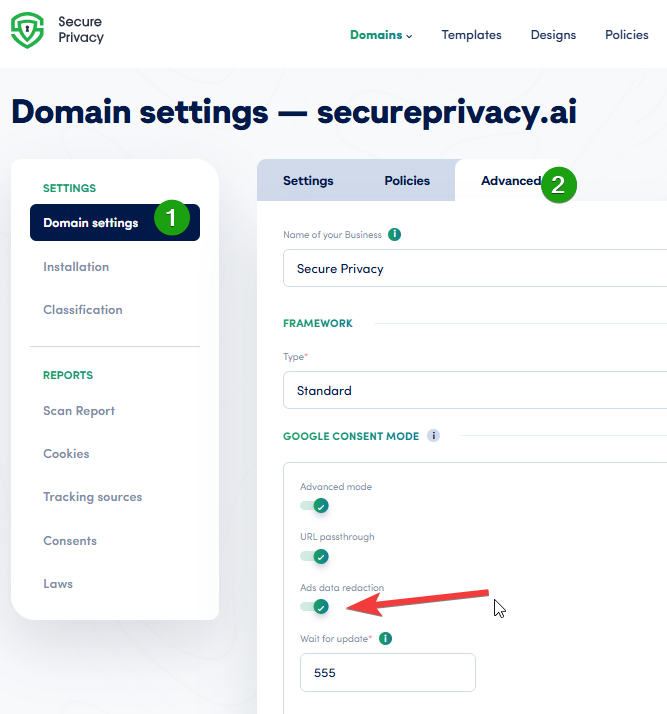
Enabling ads_data_redaction in the Secure Privacy dashboard: Domain settings, Advanced tab, Google Consent Mode.
Option B - Manual (gtag.js or GTM). If you manage Google tags yourself, add this line before your Google tag configuration:
gtag('set', 'ads_data_redaction', true);Verify either setup with our guide to checking Google Consent Mode.
Step 5 - Decide how you handle data you already collected
Withdrawal also triggers obligations for personal data sitting in your own systems. Document a workflow for erasing or suppressing data gathered under the withdrawn consent, for example analytics user-deletion requests and suppression in marketing tools, and record that the workflow ran.
Frequently asked questions
Does rejecting cookies delete the ones already in my browser?
No. Rejecting or withdrawing consent stops new cookies from being set and blocks scripts from reading existing ones, but the files already on the device stay until they expire or you clear them in your browser settings.
Is it a GDPR violation if cookies remain after a user opts out?
No, provided the associated scripts are blocked. A cookie file that is stored but never read or transmitted is not being processed. The violation would be continuing to set or read cookies after consent was withdrawn.
Can a cookie banner delete third-party cookies?
No. The browser's Same-Origin Policy prevents any script on your site from reading or deleting cookies set by another domain. Only the third party itself or the user, via browser settings, can remove them.
Should my privacy policy tell users to clear cookies manually?
Yes. It is standard practice to state that previously set cookies remain until they expire or are cleared, and to link browser instructions and third-party opt-out tools. It sets accurate expectations and reinforces trust.
Do other consent platforms delete cookies when consent is withdrawn?
No major CMP deletes already-set cookies by default. Usercentrics and Cookiebot document that they rely on script blocking instead, OneTrust offers an optional developer snippet with an explicit non-recommendation disclaimer, and where automatic removal features exist they ship disabled.
What happens to Google Ads data when a user denies consent?
With Google Consent Mode v2, denying ad_storage stops Google tags from reading or writing advertising cookies. If ads_data_redaction is also enabled, ad click identifiers are redacted from requests and Google Ads deletes the information it previously stored for that user.
Do I need to delete first-party cookies like _ga when someone opts out?
No. Once analytics scripts are blocked, nothing can read _ga, so deletion adds no protection. Custom deletion scripts are fragile and no major CMP performs deletion by default. A page reload after withdrawal is a cleaner assurance that nothing from the prior consent state is still running.
Related articles
Continue with Cookies Still Showing After Opt-Out? Here's Why, the complete guide to blocking cookies for GDPR compliance, ensuring prior consent for non-essential cookies, the Secure Privacy JS API developer guide, how to check your Google Consent Mode implementation, and why your website needs a cookie banner.
Secure Privacy handles opt-outs the way regulators expect: non-essential scripts are blocked the moment consent changes, every decision is logged for audit, and nothing depends on fragile deletion scripts. Clean consent enforcement without the complexity, on every page, for every visitor.