
Configure automatic extra consent packages so your cookie banner keeps recording visitor choices — even after you exceed your plan's monthly limit.
If your website traffic is growing, there is a good chance you will eventually hit the monthly consent limit included in your Secure Privacy plan. When that happens, your cookie consent banner still appears to visitors, but new consents are only stored in the browser — they are not recorded in the Secure Privacy database. That gap can make GDPR, CCPA, and ePrivacy audits harder, because you lose the centralised proof-of-consent record regulators expect.
Some consent management platforms force you to upgrade to a more expensive tier the moment you exceed your quota. Secure Privacy takes a different approach: Extra Consent Packages. You set a monthly budget cap, and the system automatically activates additional blocks of 100,000 consents at $10 / €10 each — only when you actually need them. No surprise bills, no plan changes, and no interruption to consent recording.
By the end of this guide you will know exactly how the extra consent feature works, how to configure your budget limit, and what to expect on your invoice.
Who Is This For?
This article is for Secure Privacy customers on a paid monthly or annual plan who want to keep consent recording active after reaching their plan's included consent volume. The Extra Consents feature is not available during a free trial or on the Free plan.
Prerequisites
Before you begin, make sure you have an active paid subscription (monthly or annual) and access to the Billing page in your Secure Privacy dashboard. You will also need a valid payment method on file, since extra consent charges are billed automatically.
What Happens When You Reach Your Consent Limit
Once your recorded consents hit the monthly cap included in your plan, two things change:
The banner keeps showing. Visitors still see your cookie consent banner and can accept or decline cookies as usual. However, those consent records are only saved locally in the visitor's browser — they are not sent to the Secure Privacy database. This means your compliance proof has a gap until the counter resets.
The counter resets automatically. At the end of each billing period, Secure Privacy resets your consent counter and normal database recording resumes. You do not need to do anything manually.
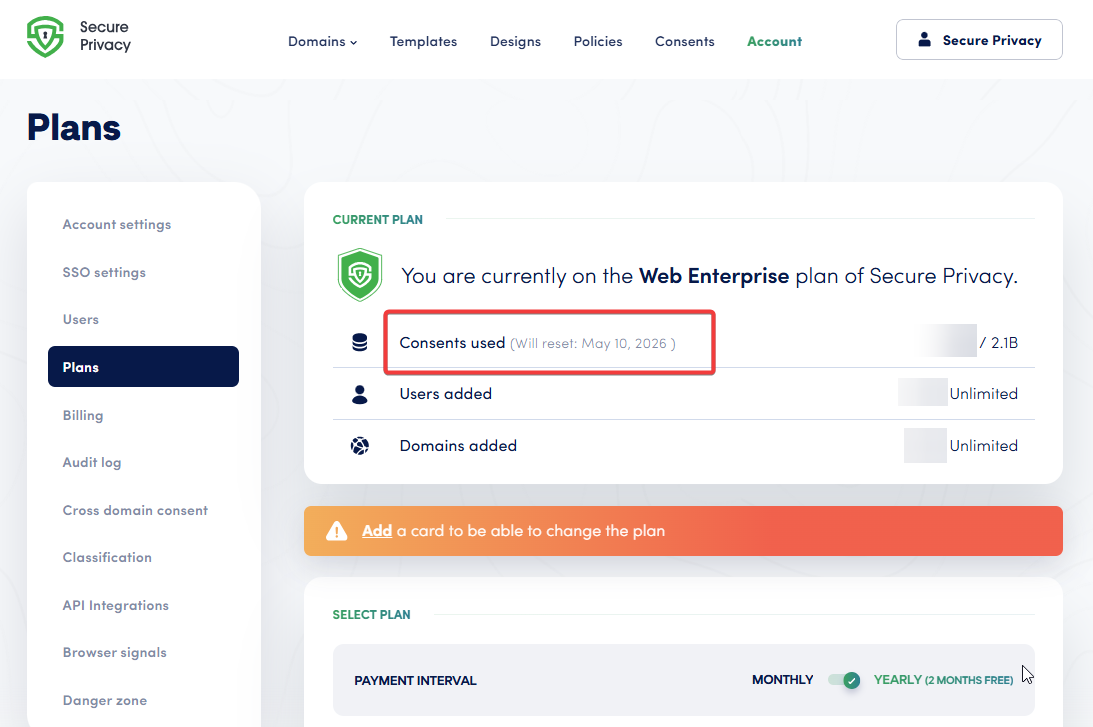
The Current Plan panel shows your consent usage at a glance.
How to Configure Your Extra Consent Budget
Step 1 — Open Billing Settings
Log in to your Secure Privacy dashboard and navigate to the Billing page. Scroll down to the Extra Consents Settings panel.
Step 2 — Set a Monthly Budget Limit
Enter the maximum amount (in USD or EUR) you are willing to spend on extra consents each month. Each consent package costs $10 / €10 per 100,000 consents. For example, setting a budget of $30 allows up to three additional packages (300,000 extra consents) per billing cycle. If your budget is lower than $10, no extra packages will activate.
The default value for all accounts is $0 (feature disabled).
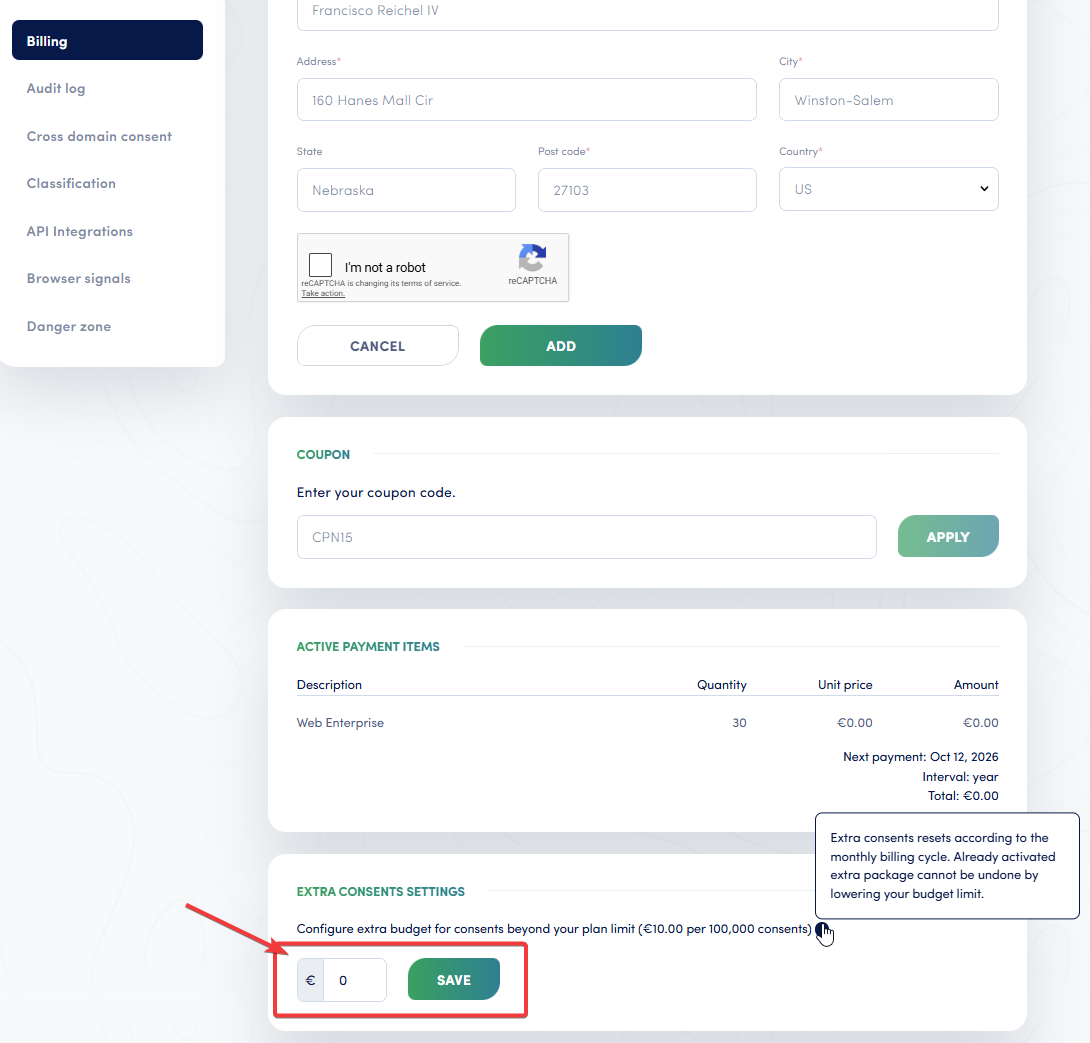
Enter your monthly budget cap in the Extra Consents Settings panel under Billing.
Step 3 — Save and Confirm
Click Save. From this point forward, Secure Privacy will automatically activate an extra consent package whenever your recorded consents exceed the plan limit — as long as your remaining budget covers the next $10 / €10 package.
How Extra Consent Packages Are Activated and Billed
Automatic Activation
When a visitor accepts or declines cookies and that consent pushes your count past the plan limit (plus any previously activated extra consents), the system checks your budget. If there is enough budget remaining, a new package of 100,000 consents is activated instantly, and the consent is recorded to the database without interruption.
First-Activation Email
The first time an extra package activates in a billing cycle, Secure Privacy sends you an email notification. This is a one-time alert per cycle so you know overage recording has begun. No action is required on your part — the charge will appear on your next invoice automatically.
Invoicing for Monthly Plans
For monthly subscriptions, a usage-based line item is added to your existing subscription. You will see it on the Billing page under Active Payment Items with the current quantity of activated packages. The charge appears on your regular monthly invoice alongside your plan fee.
Invoicing for Annual Plans
Annual subscriptions handle extra consents slightly differently. Instead of attaching a usage-based product to the subscription, Secure Privacy generates a separate invoice every 30 days for any extra consent packages used during that period. These invoices appear in your Billing History list and are charged to the payment method on file.
What Happens After You Change or Remove the Budget
You can update your budget limit at any time. If you reduce it to $0 (or remove it entirely) after packages have already been activated in the current cycle, those packages remain active until they are used up. The consents already allocated will continue to be recorded, and the corresponding charge will still appear on your next invoice. No consents are lost.
From the next billing cycle onward, no new packages will activate unless you set a budget again.
Troubleshooting
I set a budget but consents are still not being recorded
Make sure your budget is at least $10 / €10. Any amount below the cost of a single package will not trigger activation. Also confirm that your payment method is valid and has not expired.
I do not see the Extra Consents Settings panel
The panel is only visible on paid plans. If you are on a free trial or the Free plan, you will need to upgrade before the option appears.
My annual plan invoice does not show extra consent charges
For annual plans, extra consent charges are billed on separate invoices generated every 30 days — not on the main subscription invoice. Check your Billing History and adjust the date filter if needed, as these invoices may be dated slightly ahead of the current date.
Frequently Asked Questions
What happens when I exceed my cookie consent limit?
Your cookie banner continues to appear, but consents are only stored locally in the visitor's browser — they are not recorded in the Secure Privacy database. Enabling extra consent packages prevents this gap by automatically activating additional recording capacity.
How much do extra consent packages cost?
Each extra package provides 100,000 additional consents for $10 or €10. Packages are only activated when needed and only if your monthly budget allows it — you will never be charged more than the limit you set.
Can I use extra consents on a free trial or Free plan?
No. The Extra Consents feature is available only on paid monthly or annual plans. You will need to upgrade before you can set a budget limit.
Do extra consent charges differ between monthly and annual plans?
The per-package price is the same. The difference is in billing: monthly plans add the charge to your regular subscription invoice, while annual plans generate a separate invoice every 30 days for any extra consent usage.
What if I lower my budget mid-cycle after packages have activated?
Already-activated packages stay active until the consents are used up, and the charge still applies to your next invoice. New packages will not activate once the budget is reduced below the required threshold.