
Every consent banner is one careless save away from a problem. A teammate edits the wrong policy, a translation gets overwritten, or a domain assignment quietly changes, and nobody notices until a visitor does, or worse, a regulator. If you have ever searched for how to recover an overwritten cookie policy, undo privacy policy changes, or prove GDPR policy change history during an audit, you already know how much time that costs.
Most teams improvise. They keep a manual cookie policy backup by pasting policy text into a shared doc before every edit, or they ask whoever made the change to remember what it looked like beforehand. That is slow, easy to skip under deadline pressure, and it leaves you with no reliable record of who changed what, and when. Other consent platforms bolt on a basic policy change log that confirms an edit happened but not what the policy actually said before or after, which is exactly the wrong answer at the moment you need the previous wording back in front of visitors.
Secure Privacy handles this natively with built-in policy version history. Every saved change to a cookie or privacy policy is automatically kept as a full, immutable snapshot, reviewable from a dedicated Versions tab, with one-click restore. By the end of this article you will know how versions are created, what a restore does and does not touch, how to read and manage your revision history, and how it fits alongside Secure Privacy's audit log for full compliance traceability.
Who Is This For
This article is for Secure Privacy admins and compliance teams who manage cookie or privacy policies across one or more domains, especially anyone responsible for GDPR, ePrivacy, or internal audit readiness, and anyone who has ever needed to roll back an unwanted policy edit.
Prerequisites
An active Secure Privacy account with at least one saved cookie or privacy policy.
Restoring a version, deleting versions, and bulk-deleting versions all require Admin permissions on the account.
What Is a Policy Version?
A version is an immutable copy of a policy's content at the moment it was saved, together with the identity of the person who saved it. Versions are numbered sequentially per policy starting at 1, and the highest version number always mirrors the current live policy. Nothing beyond the snapshot and its provenance is stored in a version record, and that separation from the audit log is deliberate (more on that below).
When a New Version of a Cookie Policy Is Created
Trigger | Recorded as | Notes |
|---|---|---|
Policy created | Version 1, by the creator | Also applies to a duplicated policy, which starts its own history. |
Policy edited | Next version, by the editor | Only when the save actually changed the stored content. A no-op save writes nothing. |
First edit of a policy created before this feature launched | Baseline version 1, with no named user | The pre-edit state is captured first so it stays recoverable, and the edit itself becomes version 2. |
Version restored | New version, by the person who restored it | A restore is appended rather than rewinding history, so it can itself be undone. |
Policy enabled or disabled | Nothing | Status is an operational change, recorded in the audit log only. |
How to Restore a Previous Cookie Policy Version in Secure Privacy
Restoring copies the stored content onto the live policy and appends a new version. Four settings are deliberately left on their live values, because restoring content must never quietly change where a policy is published or whether it is live.
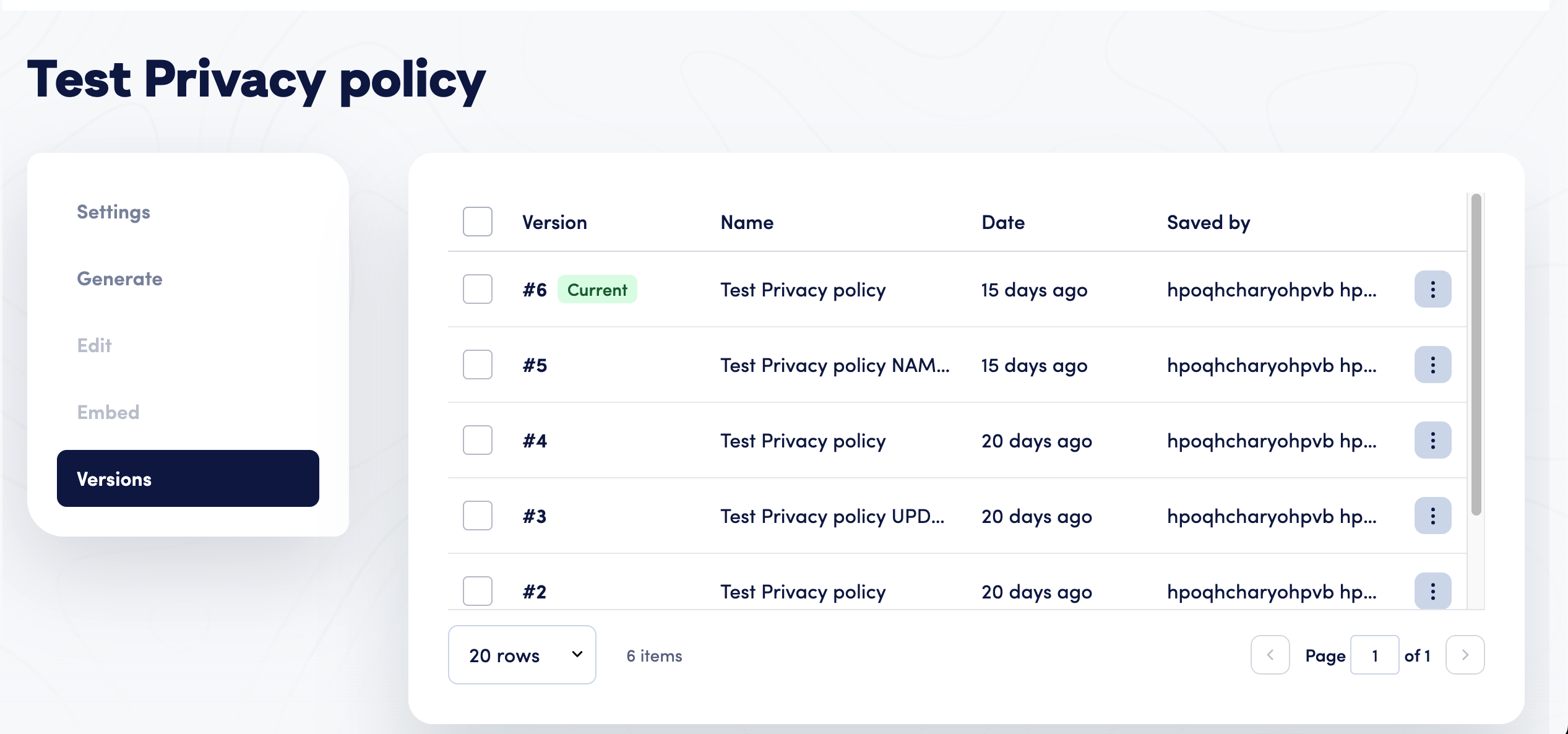
The Versions tab lists every saved revision of a cookie policy, newest first, with restore and delete actions on each row.
Which Fields Are Restored When You Roll Back a Policy
Field | Restored? | Why |
|---|---|---|
Policy name | Yes | Restored with the snapshot, as long as the name is still available. |
Version label | Yes | The customer-facing version label shown on the published policy. |
Existing policy URL | Yes | Part of the policy's stored content. |
Applicable laws | Yes | Part of the policy's stored content. |
Questionnaire answers | Yes | The answers that generate the policy text come back exactly as they were. |
Policy translations | Yes | Every translated version held in the snapshot is restored. |
Enabled languages | Yes | Part of the policy's stored content. |
Domain assignments | No | Unassigning would take a policy off a live site, so it has to be an explicit action. |
Mobile app assignments | No | Same rule as domains. |
Enabled status | No | A restore must not put a disabled policy back in front of visitors. |
Policy type | No | Set only at creation, because it determines which policy a domain is allowed to hold. |
Policy names are unique per account, so a restore is rejected if another policy has taken the snapshot's name in the meantime. Every restore is written to the audit log as a normal policy update, naming the version number that was restored.
Step 1 - Open the Versions Tab
In the Secure Privacy dashboard, go to Templates > Policies, open the cookie or privacy policy you want to review, and select the Versions tab. Revisions are listed newest first, showing the version number (with a Current marker on the live one), the policy name as it was at the time, when it was saved, and who saved it. Hover any date to see the exact UTC timestamp.
Step 2 - Review the Snapshot Before Restoring
Open a specific version to see its full stored snapshot before committing to a restore, so you know exactly what will go live. Check the policy text in each enabled language, the questionnaire answers behind it, and the customer-facing version label, since all three come back with the restore.
Step 3 - Restore the Version
Select Restore on any row except the current version. This action requires Admin permissions. The stored content is copied onto the live policy and a new version is appended, so the restore does not rewind history and can itself be undone later. Domain assignments, mobile app assignments, the Enabled status, and the policy type are all left untouched on their current live values.
Step 4 - Confirm the Live Policy
Return to the policy page to confirm the restored content is live, and check the audit log if you need a record of who performed the restore and which version number was restored.
What Happens After You Restore a Version
A brand-new version is appended to the top of the history, so the restore itself is reversible.
Domain and mobile app assignments, the Enabled status, and the policy type stay exactly as they were before the restore.
The change is logged in the audit trail as a standard policy update, referencing the restored version number.
If another policy has since taken the snapshot's name, the restore is rejected until the naming conflict is resolved.
Deleting Policy Versions and How Long History Is Kept
Delete is available per row and in bulk, and requires Admin permissions. Deletion is permanent: deleting versions removes those snapshots outright, deleting a policy removes its entire revision history, and deleting an account's policies deletes that account's versions along with them.
You do not need to prune history yourself for storage reasons. Secure Privacy retains the 50 most recent revisions per policy and automatically removes only the oldest ones beyond that, so your recent history is always available to restore.
Policy Version History vs. the Audit Log: What Is the Difference?
These two systems deliberately do not duplicate each other. The audit log answers who changed what, and when. It carries field-level differences for names, domains, laws, languages, status, and policy text, including a record of every restore. Version history answers a different question: what did this policy actually say at that point, and can I have it back? A version record has no action type, no changed-field list, and no status flag, so for that level of detail go to the Secure Privacy audit log. Used together, they give compliance teams a complete policy change log: the reason and the record on one side, the exact wording on the other.
Troubleshooting Policy Version History
I do not see a Restore option on a row
Restore is hidden on the current version's row by design, because there is nothing to restore to on the version that is already live.
My restore was rejected
This happens when another policy in your account has already taken the snapshot's name. Rename the conflicting policy, then try the restore again.
I do not have permission to restore or delete versions
Both actions require Admin access. Ask your account owner to grant that role, or to perform the restore or deletion on your behalf.
A very old policy is missing its early versions
Policies created before this feature launched get a baseline version captured on their first edit after launch, with no associated user. This is expected behaviour, not a data gap.
Saved by shows "System" instead of a name
That is expected for baseline versions captured automatically for pre-existing policies rather than saved by a person.
FAQ: Cookie Policy Version History and Restore
Can I recover a cookie policy after it was accidentally overwritten?
Yes. Every saved change is kept as a full snapshot in the Versions tab, so you can open the previous revision and restore it as the live policy at any time.
Does Secure Privacy back up my privacy policy automatically?
Yes. There is no manual backup step. Each save that changes a policy's content writes a new immutable snapshot to that policy's version history automatically.
Does restoring an old policy version change which domains it is published to?
No. Domain assignments, mobile app assignments, the Enabled status, and the policy type are always left on their current live values. A restore only brings back the policy content and questionnaire answers.
How many previous versions of a cookie policy does Secure Privacy keep?
Up to 50 revisions per policy. Once a policy passes that number, only the oldest versions are automatically pruned, so your most recent history is always retained.
Who can restore or delete a policy version?
Restoring a version and deleting versions, individually or in bulk, both require Admin permissions on the account.
Can I see who changed a cookie policy and when?
Yes. Each version row shows who saved that revision and when, with the exact UTC timestamp on hover. For a field-level record of what changed, including every restore, use the audit log alongside version history.
What is the difference between policy version history and the audit log?
Version history stores what a policy actually said at each save so you can bring it back. The audit log stores who changed what and when, including field-level differences and a record of every restore. The two are complementary, not duplicates.
Is deleting a policy version permanent?
Yes. Deleting a version removes that snapshot outright, and deleting a policy removes its entire version history. There is no separate recovery step after that.
Related Articles
Not using Secure Privacy yet? Version history is part of the Secure Privacy consent management platform, alongside automatic policy generation, cookie scanning, and audit-ready change records. Start a free trial and keep every policy change recoverable from day one.