
Your cookie scan lists cookies in the Unclassified category, and you're not sure what they do. Under the GDPR and the ePrivacy Directive, only strictly necessary cookies may load before consent, and visitors can't give informed consent to a cookie with no stated purpose.
The usual workarounds fall short. Blocking every unknown cookie can break carts, logins, and checkouts for anyone who hasn't clicked Accept. Ignoring unclassified cookies leaves a compliance gap your scan keeps flagging. Auditing cookies by hand in browser tools and spreadsheets is slow and goes out of date with every new plugin or marketing tag.
Secure Privacy's cookie scanner matches known cookies to the right consent category and labels anything it can't identify as Unclassified. Unclassified cookies are not blocked automatically, so nothing your site may depend on is switched off before you review it. Once you assign a category in the Classification tab, automatic cookie blocking holds the cookie until the visitor consents, whenever consent is required.
By the end of this guide, you'll know how Secure Privacy treats unclassified cookies, why classifying them is your decision as the website owner, and how to find, classify, and verify each one on your domain.
Important: Secure Privacy does not block cookies in the Unclassified category until you assign them a consent category. As the website owner and data controller, you are responsible for classifying every cookie on your site. We strongly recommend having each classification confirmed by your legal team or Data Protection Officer (DPO).
Who Is This Guide For?
Website owners and marketing teams who see Unclassified cookies in their Secure Privacy scan report
Privacy managers, DPOs, and legal advisors who confirm cookie categories for GDPR compliance
Teams comparing cookie consent tools who want to know how a CMP handles unknown cookies
What Are Unclassified Cookies?
Unclassified cookies are cookies and trackers that Secure Privacy's scanner found on your website but could not match to a known purpose in its cookie database. Until you classify them, they have no consent category (Necessary, Preferences, Analytics, or Marketing) and no purpose description in your cookie declaration.
They usually come from custom first-party scripts, niche or newly launched vendors, or recently added plugins and tags. Almost every website has a few, so seeing them is normal. Leaving them unclassified is what creates risk.
Does Secure Privacy Block Unclassified Cookies Before Consent?
No. Secure Privacy does not automatically block unclassified cookies before consent. Blocking applies once a cookie has a category that requires consent.
Cookie category | Blocked before consent? | Why |
|---|---|---|
Necessary | No | Required for the website to work, so no consent is needed |
Unclassified | No | Purpose is unknown and the cookie may be necessary, so blocking it could break your website |
Preferences | Yes | Consent is required |
Analytics | Yes | Consent is required |
Marketing | Yes | Consent is required |
Unclassified cookie in a service that also sets Preferences, Analytics, or Marketing cookies | Yes, until the visitor consents to that category | The service shows Multiple categories, and a block action takes precedence over an allow action |
Why Secure Privacy Doesn't Block Unknown Cookies Automatically
An unknown cookie is not the same as a non-essential cookie. Session IDs, security tokens, load-balancing cookies, and cart or checkout cookies are often custom-built and unrecognized by any cookie database. Blocking them by default could lock visitors out of logins, checkouts, and forms. Secure Privacy keeps your website working, flags the cookie clearly, and leaves the classification decision with the people who know your website best.
Who Is Responsible for Classifying Cookies on My Website?
You are. Under the GDPR, the organization operating the website is the data controller and decides why personal data is processed, including through cookies. Secure Privacy provides the scanning, classification tools, and consent-based blocking, but the assessment of each cookie's purpose and lawful basis belongs to your organization. Have your legal team or DPO confirm every classification. If you don't have in-house privacy expertise, Secure Privacy's DPO as a Service can help.
Not Sure What a Cookie Does? Choose the Safer Default
If you can't determine a cookie's purpose, treat it as requiring consent. Classify it as Marketing, the most restrictive category, so it is blocked until the visitor consents. Then test your website with consent declined. If something stops working, the cookie is probably necessary, and you can reclassify it as Necessary once your developer and legal team confirm it.
Prerequisites
An active Secure Privacy account with your domain added and at least one completed scan
Dashboard access with permission to edit the domain's Classification settings
Access to your website developer or agency, and a legal contact or DPO to confirm categories
How to Find and Classify Unclassified Cookies in Secure Privacy
Follow these steps to identify unclassified cookies on your domain, assign the correct GDPR consent category, and confirm that consent-based blocking works.
Step 1 - Review Unclassified Cookies in Your Scan Report
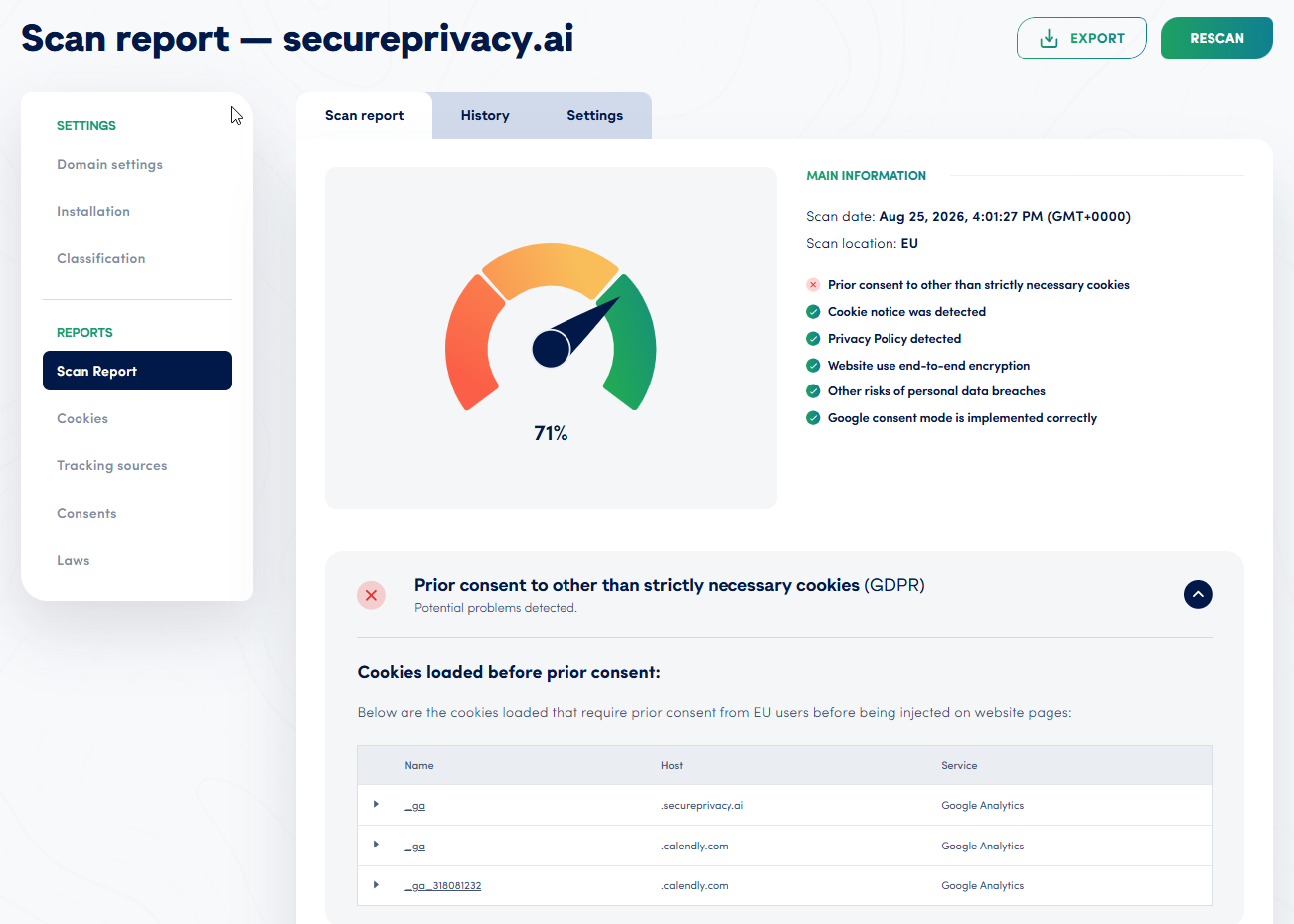
Log in to your Secure Privacy dashboard, open Domains, and select your domain. Under Reports, click Scan Report. For every cookie in the Unclassified category, note its name, its host (the domain that sets it), and any related service.
Step 2 - Identify What Each Unclassified Cookie Does
For first-party cookies (the host is your own domain), ask your developer or web agency which script sets the cookie and why. For third-party cookies, check the vendor's cookie or privacy documentation, or contact the vendor. Searching the cookie name online often turns up public documentation too.
Step 3 - Confirm the Correct Category With Your Legal Team
Agree with your legal team or DPO on a category for each cookie: Necessary, Preferences, Analytics, or Marketing. Write a short, plain-language purpose description, because visitors will see it in your cookie declaration. If the purpose is still unclear, use the safer default described above.
Step 4 - Assign the Consent Category in the Classification Tab
In your domain, open the Classification tab, then the Services tab. Find the service the cookie belongs to, click the three-dot menu (⋮), select Edit, choose the correct Category, and add the script source URL if it is missing so Secure Privacy can block the service before consent. Save your changes.
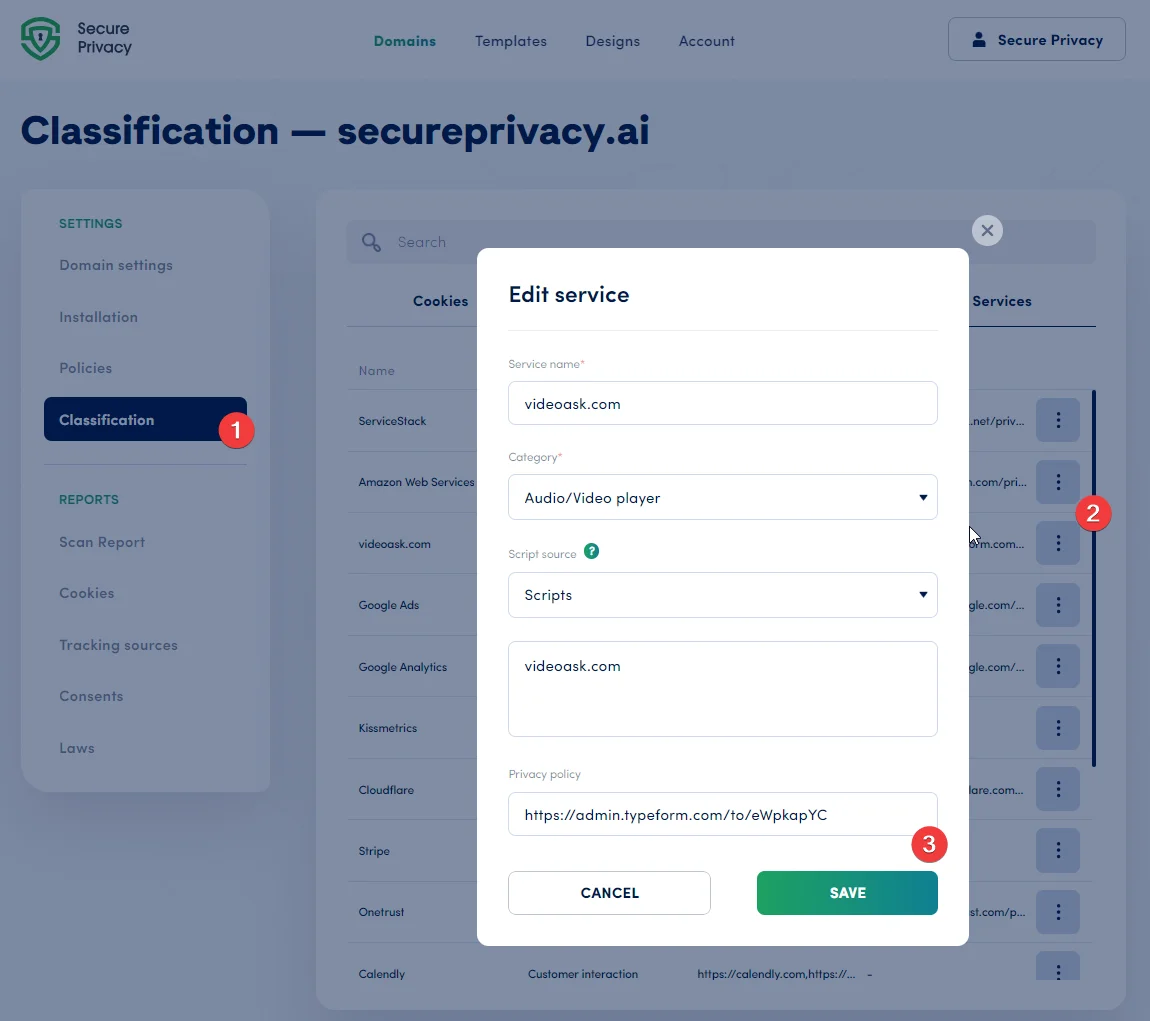
If the cookie isn't listed, open the Cookies tab, click Add Cookie, and link it to a service with the correct category. Note that account-level classification overrides domain-level classification, so change account-level items at the account level.
Step 5 - Rescan Your Domain to Apply the Changes
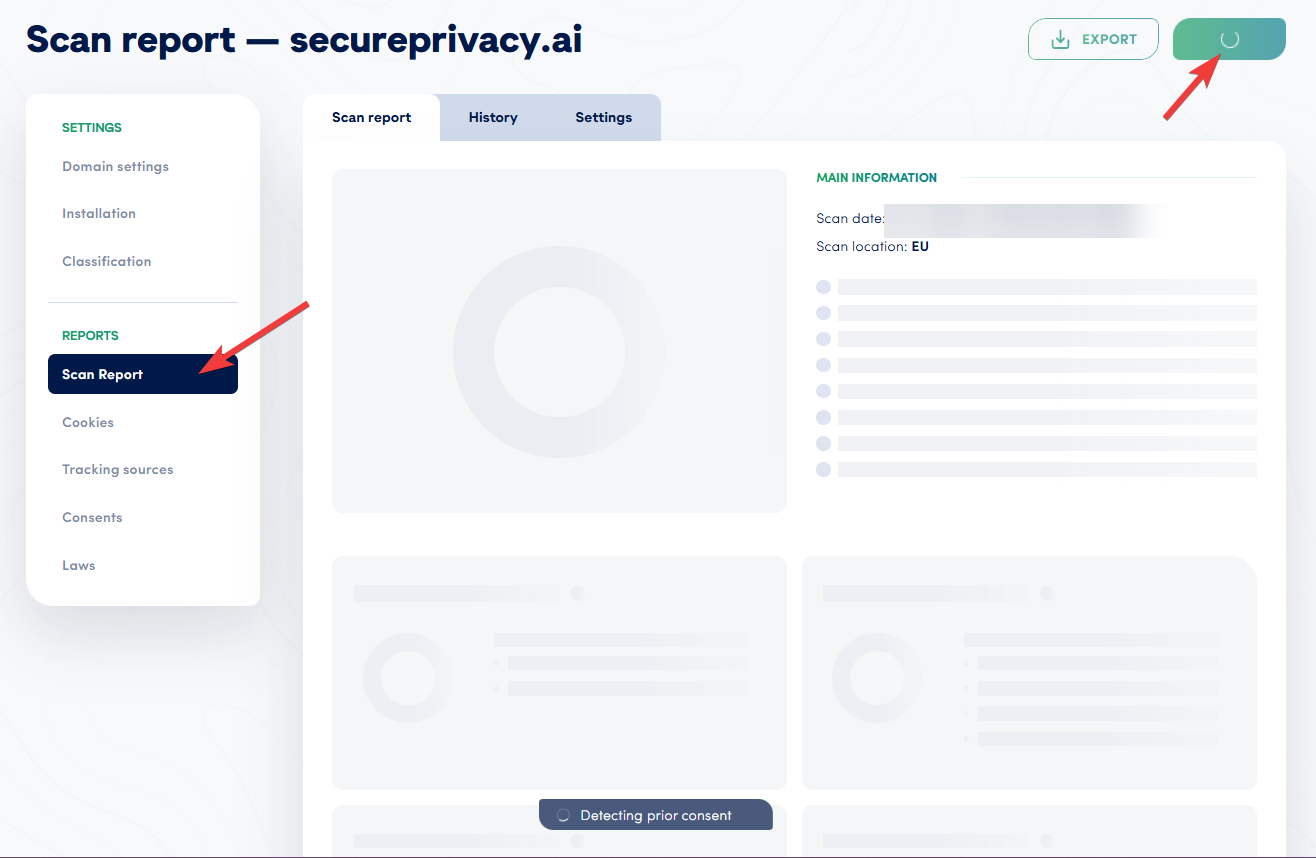
Classification changes are applied when you rescan. Go to Reports > Scan Report and run a new scan so your updated categories appear in your scan report and public cookie declaration.
Step 6 - Verify Blocking and Test Your Website
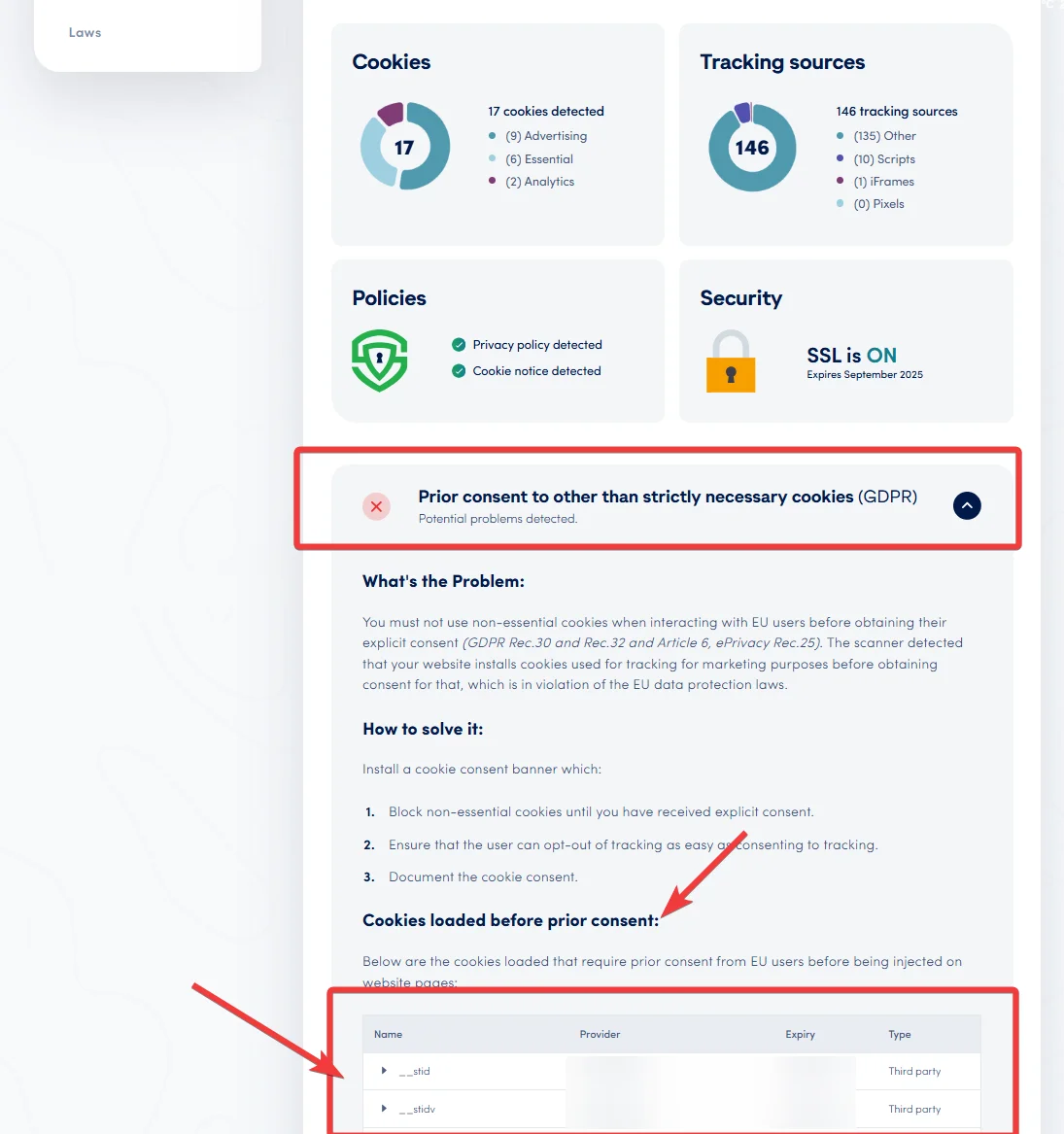
In the new scan report, open Prior consent to other than strictly necessary cookies (GDPR) and check that none of your newly classified Preferences, Analytics, or Marketing cookies appear under Cookies loaded before prior consent. Then browse your site with consent declined and confirm logins, carts, checkout, and forms still work.
What Happens After You Classify Unclassified Cookies
Necessary cookies keep loading for every visitor, while Preferences, Analytics, and Marketing cookies wait for consent and appear in your cookie declaration with their purpose descriptions. Because new plugins and tags can introduce new unclassified cookies at any time, enable monthly automated scans with email reports in your Scan Report settings and review the Unclassified category in every report.
Troubleshooting Unclassified Cookie Issues
A cookie still shows as Unclassified after I changed its category
Run a new scan from Reports > Scan Report, since changes only appear after a rescan. If it is still unclassified, check whether the cookie is configured at the account level, which overrides domain-level changes.
My website stopped working after I classified a cookie as Marketing
The cookie is probably strictly necessary. Confirm its purpose with your developer, get approval from your legal team or DPO, reclassify it as Necessary, and rescan.
A service shows Multiple categories
Its cookies have been assigned different categories, so the whole service can be blocked when a visitor declines any one of them. Edit the service and align its cookies under the correct category.
Frequently Asked Questions About Unclassified Cookies
What are unclassified cookies?
Unclassified cookies are cookies a scanner detected on your website but couldn't match to a known purpose. They have no consent category until you classify them.
Are unclassified cookies a GDPR violation?
Not automatically, but they are a risk. If an unclassified cookie turns out to be non-essential and loads before consent, it may breach the GDPR and the ePrivacy Directive, so classify them as soon as they appear.
Why doesn't my cookie consent banner block unclassified cookies?
An unknown cookie may be strictly necessary, and blocking it could break your website. Secure Privacy flags it instead and blocks it once you assign a category that requires consent.
Who is responsible for classifying cookies on my website?
The website owner, as the data controller under the GDPR. Your CMP provides the tools, but your organization, ideally with its legal team or DPO, decides each cookie's category.
How often should I check my website for unclassified cookies?
At least monthly, and whenever you add a new plugin, marketing tag, or third-party integration. Monthly automated scans with email reports make this routine.