
Secure Privacy has introduced a series of improvements to the Laws Report — enhancing data mapping accuracy, expanding visitor tracking coverage, improving geolocation detection, and delivering a more consistent UI across all regions and templates.
Who Is This For?
Compliance teams using the Laws Report to monitor consent activity and regional visitor data
Website administrators reviewing regional compliance coverage and report accuracy
Privacy officers using Secure Privacy reporting to demonstrate regulatory compliance across jurisdictions
What's New in the Laws Report
Refactored data mapping logic
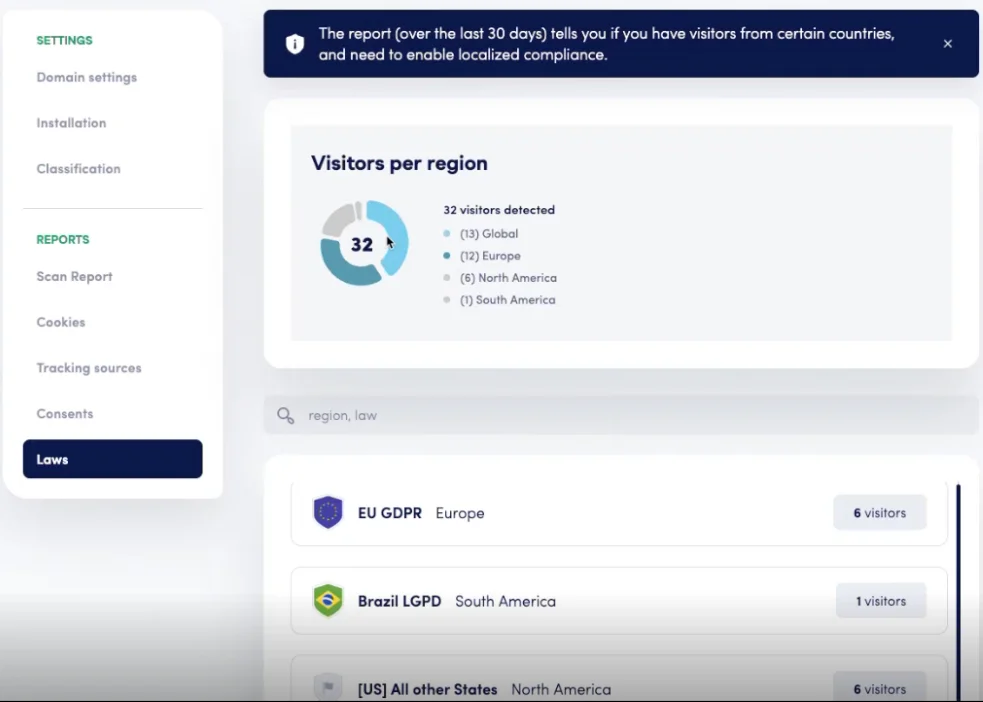
Previously, the Laws Report chart was mapped using template names — which could produce inconsistent or misleading visualizations when templates were renamed or restructured. The updated implementation maps data based on predefined geographic regions, delivering cleaner, more meaningful chart visualizations that accurately reflect where visitor interactions are occurring.
Visitor tracking update
The Laws Report now tracks visitor data rather than consent data alone. This broader tracking scope is supported by improved backend logic — providing more accurate reporting and enabling region-specific insights into both visitor volume and consent behavior across jurisdictions.
Geolocation detection improvements
Region detection has been enhanced to more accurately classify visitors by geographic area. For example, visitors from India are now correctly mapped under the Asia region — ensuring regional reporting is accurate and that compliance coverage gaps are correctly identified in the report.
UI and UX Enhancements
Fixed icon mapping: Resolved icon mapping issues that affected newly created or recently modified templates — icons now display correctly for all active template configurations.
Fallback icons for unmapped regions: Added fallback icons for regions without a specific template association, ensuring UI consistency across all report views regardless of regional coverage gaps.
Improved region-based display handling: Enhanced how region-based data is rendered in the report interface — improving visibility and usability when reviewing multi-region compliance data.
Frequently Asked Questions
Will these changes affect my existing Laws Report data?
The refactored data mapping logic changes how data is visualized — mapping by predefined region rather than template name — but does not alter your underlying consent records. Historical data may appear differently organized in the updated chart view, but no consent records have been modified.
Why does the report now show visitor data instead of only consent data?
Tracking visitor data alongside consent data gives a more complete picture of your compliance posture — showing not just how many consent interactions were recorded, but how many visitors were present in each region and whether they were presented with the appropriate consent banner. This enables more accurate identification of coverage gaps.
What should I do if a region is still displaying incorrectly in my Laws Report?
If you notice incorrect region classification or missing icons after these updates, contact Secure Privacy support at [email protected] with details of the affected region and template configuration.