
The Privacy Policy section in Secure Privacy allows you to either link an existing privacy policy or generate a new one using Secure Privacy's built-in policy generator. This guide explains both options and walks through every field in the generator — from legal basis and entity type through to third-party services, security measures, and DPO details — so you can create a comprehensive, GDPR-compliant privacy policy for your website or app.
Who Is This For?
Website owners and administrators creating or linking a privacy policy for their domain in Secure Privacy
Compliance officers and legal teams configuring privacy policy generator inputs for GDPR and CCPA compliance
Developers setting up the Privacy Policy tab within the Secure Privacy Preference Center
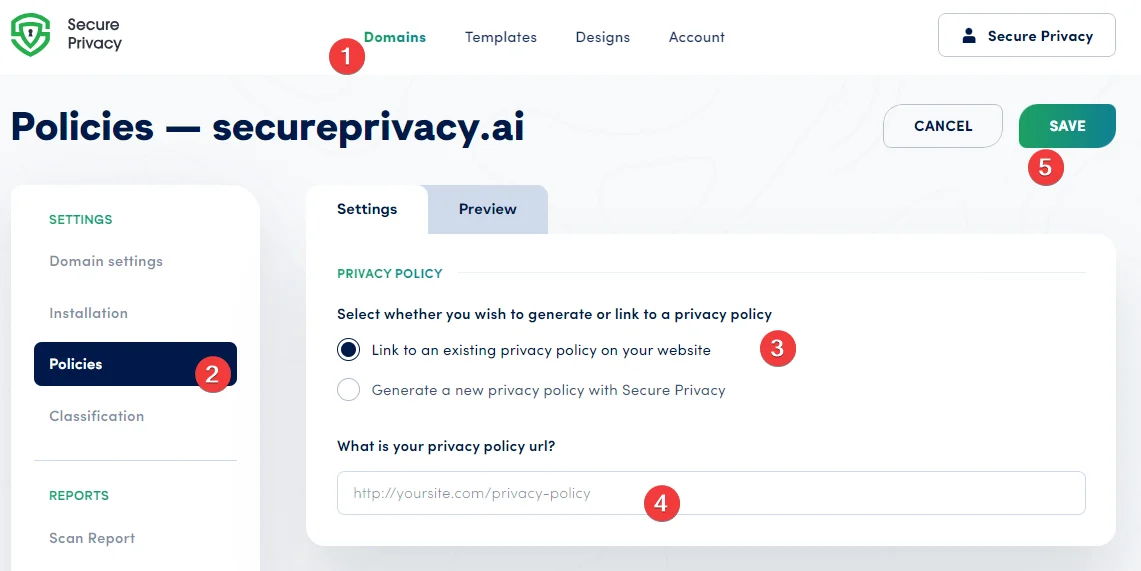
Option A: Link Your Existing Privacy Policy
If you already have a privacy policy published on your website, you can link it directly in Secure Privacy. Enter the URL where your policy is hosted — this link will be displayed to visitors in the Privacy Policy tab inside the Preference Center UI.
Option B: Generate a New Privacy Policy with Secure Privacy
If you do not have an existing privacy policy, use Secure Privacy's built-in generator to create one. Complete the questionnaire below — each field contributes to a specific section of your generated policy.
1. Cookie and Privacy Policy Generator
Select the generator option to pre-configure your Privacy and Cookie Policy using the input fields. Your responses are used to automatically populate the relevant sections of the generated policy document.
2. Language
Select the language in which the policy content should be generated and displayed to your website visitors.
3. Where Will the Policy Be Used?
Specify whether the policy is for a website, a mobile app, or both. Provide your website URL and site name — these will appear throughout the generated policy.
4. Legal Basis for Data Processing
Specify the lawful basis under which you collect and process personal data — consult your legal team before completing this field. Options typically include consent, contract, legitimate interests, legal obligation, public interest, or vital interests. This information is required under GDPR Article 13.
5. Entity Type
Specify whether your website is operated by a business or an individual. Business options include corporations, limited liability companies, non-profits, partnerships, and sole proprietorships. This determines aspects of how the policy is worded and what disclosures are required.
6. Personal Information Collected
Clearly specify what categories of personal data you collect — including names, contact information, location data, and digital identifiers such as IP addresses. Transparency about what is collected is a core GDPR requirement under the right to information.
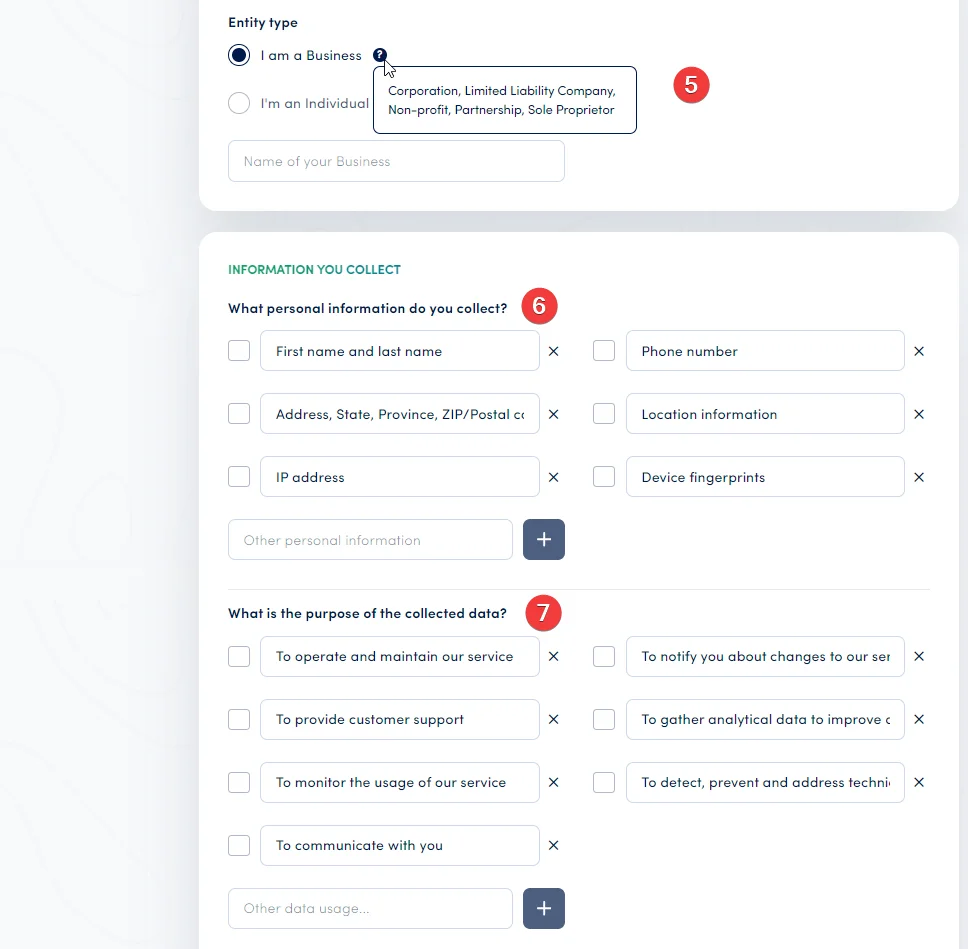
7. Purpose of Data Collection
Describe why you collect personal data. Common purposes include service operation and maintenance, customer support, analytics, technical issue detection, and marketing communications. Each stated purpose will appear as a processing purpose in your generated policy.
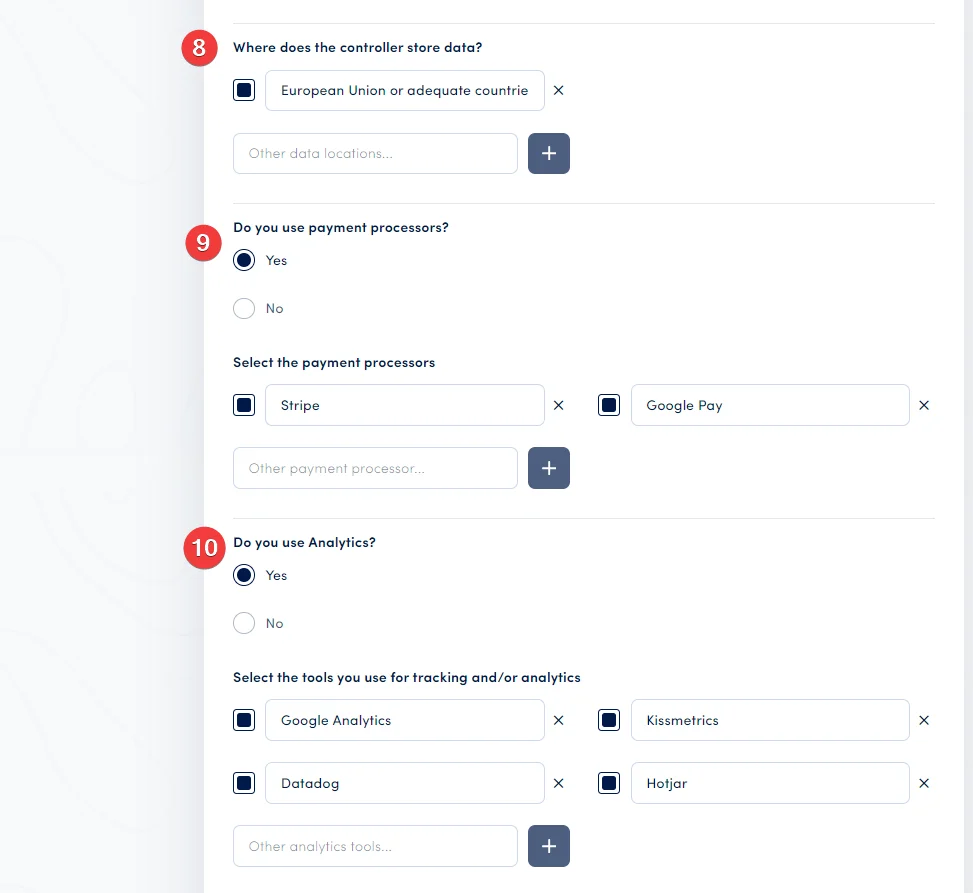
8. Data Location and Storage
Specify where personal data is stored and processed — including the geographic location of your servers or data processors. This is particularly important for GDPR compliance when data is transferred outside the EU/EEA.
9. Payment Processors
If your website processes payments, disclose the payment services you use — such as Stripe, Google Pay, Apple Pay, or others. These are third-party processors that handle financial personal data on your behalf.
10. Analytics Tools
List the analytics tools you use to monitor site traffic and user activity — such as Google Analytics, HotJar, or Kissmetrics. Each tool you disclose will be included in the relevant section of your generated policy.
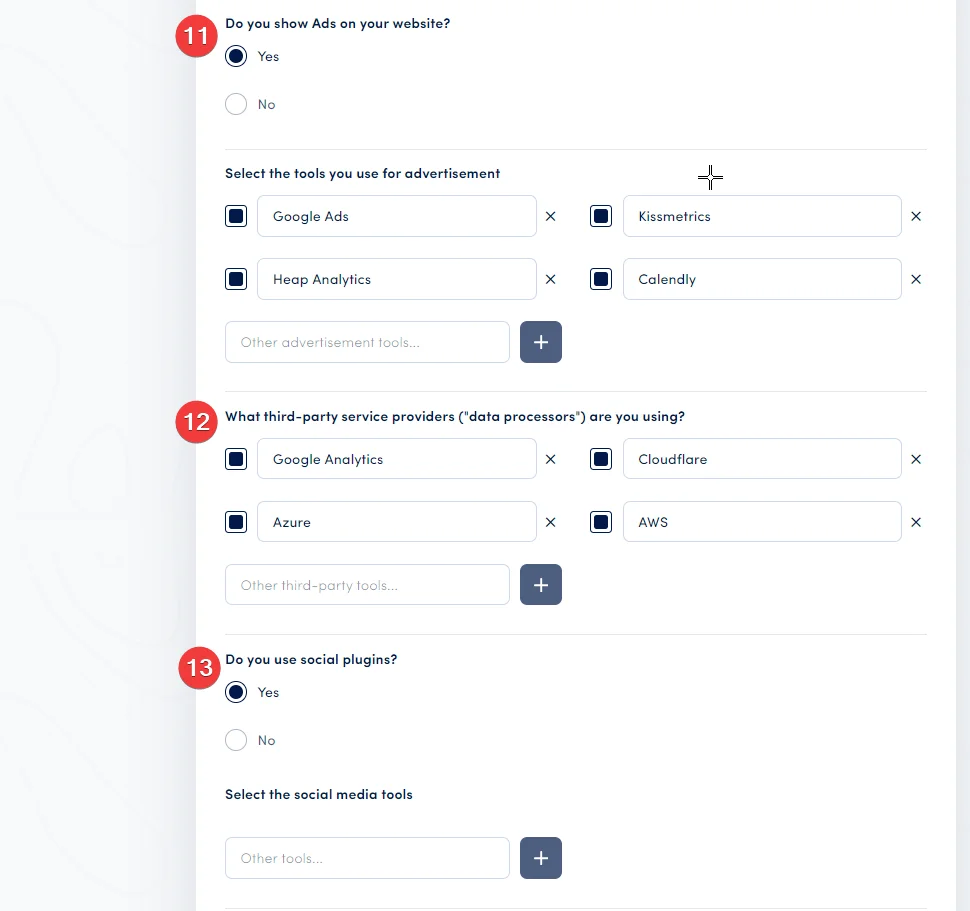
11. Advertising Service Providers
If you display advertising on your website, disclose the ad tools and platforms used — such as Google Ads, Heap Analytics, or Calendly. Advertising tools typically involve significant personal data processing and must be transparently disclosed in your policy.
12. Third-Party Service Providers (Data Processors)
List any third-party service providers — also known as data processors — that process personal data on your behalf. Examples include Google Analytics, Microsoft Azure, and Cloudflare. GDPR requires that data processors be identified in your privacy policy.
13. Social Plugins
Specify whether you use social media tools or plugins on your website — such as Facebook Like buttons, Twitter embeds, or LinkedIn share buttons. Social plugins typically set their own cookies and process visitor data.
14. Backup Practices
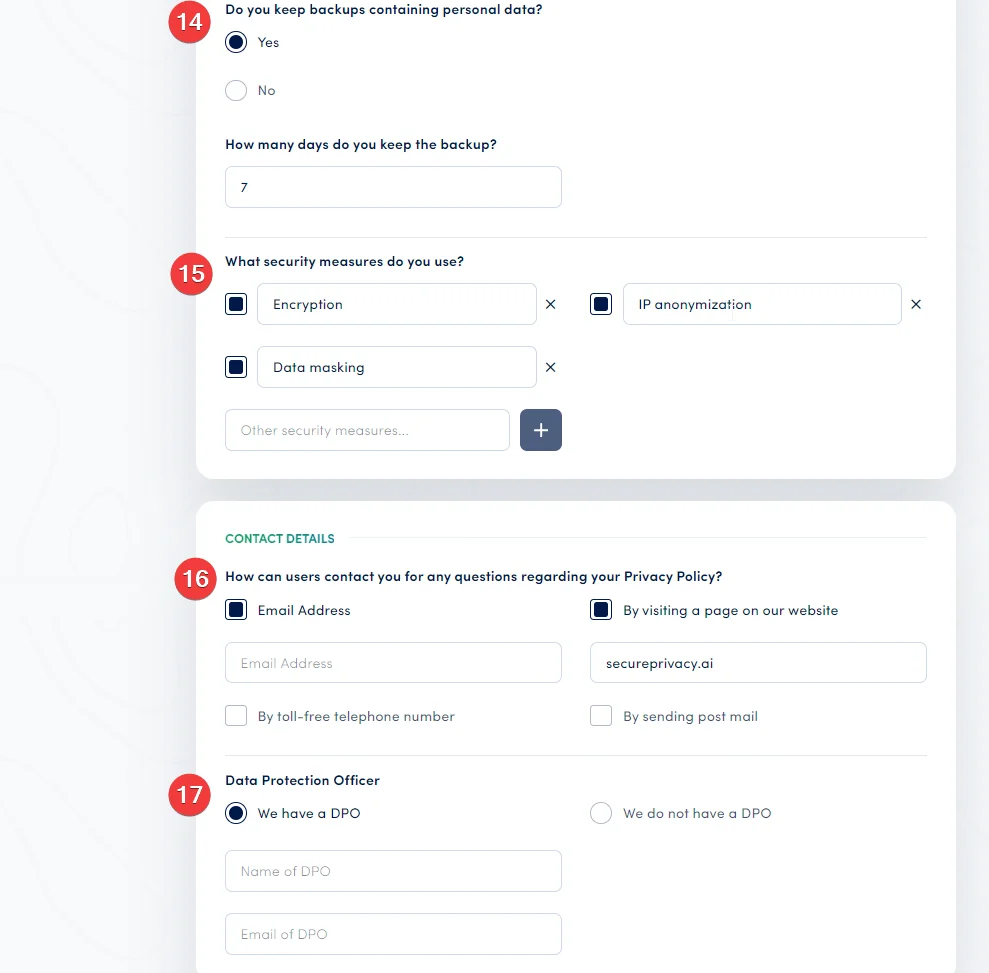
Disclose whether you maintain backups that contain personal data. Transparent disclosure of backup practices reassures users that their information is stored responsibly and securely.
15. Security Measures
Describe the technical and organizational security measures in place to protect personal data — such as IP anonymization, encryption, data masking, access controls, and regular security audits. These disclosures strengthen user trust and satisfy GDPR Article 32 requirements.
16. Contact Information
Provide clear contact options for users who have questions or concerns about your privacy policy — including an email address, contact form URL, phone number, or postal address. GDPR requires that contact details be included in your privacy notices.
17. Data Protection Officer
Specify whether your organization has a Data Protection Officer (DPO) and provide their contact details if applicable. Under GDPR Article 37, a DPO is mandatory for certain organizations — and their contact details must be publicly disclosed in your privacy policy.
18. Disclosure of Personal Information to Third Parties
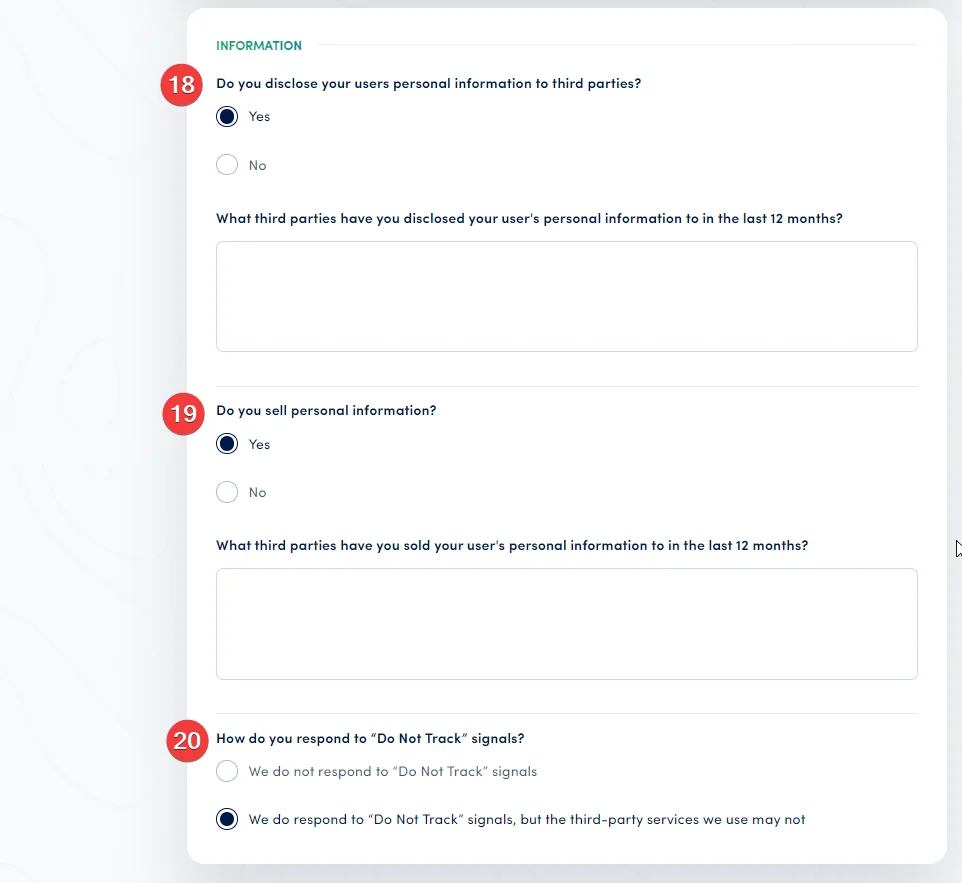
Specify whether you disclose user personal information to third parties and, if so, which parties. Users have a right under GDPR to know whether their data is shared, and with whom, before providing consent.
19. Selling Personal Information
Specify whether you sell personal information to third parties — and if so, name those parties. This disclosure is particularly important for CCPA/CPRA compliance, where users have a right to opt out of the sale of their personal data.
20. Do Not Track Responses
Specify whether your website responds to browser-level "Do Not Track" (DNT) signals. Disclosing your DNT policy provides users with a clear understanding of your commitment to browser privacy preferences.
After completing all fields, scroll back to the top of the section and click Save to generate your privacy policy.
Frequently Asked Questions
Do I need to complete every field in the generator?
You should complete every field that is relevant to your website's data practices. Leaving fields blank where they are applicable may result in an incomplete policy that does not meet GDPR transparency requirements. Fields covering legal basis, contact information, and data categories are particularly important and should always be completed.
Can I edit the generated policy after it is created?
Yes. Once generated, the policy can be edited using Secure Privacy's block-based Policy Editor — allowing you to adjust any section, add custom text, or insert tables. Remember to replace all placeholder text in square brackets with your actual business information before publishing.
How often should I update my privacy policy?
Your privacy policy should be updated whenever there is a material change to your data practices — such as adding a new analytics tool, changing your data storage location, appointing or changing a DPO, or when new regulations come into effect that affect your processing activities. An annual review is also recommended as part of your compliance audit cycle.