
Your cookie banner only covers your website. The consent your business actually relies on is collected in email signups, WhatsApp threads, CRM fields and partner forms. This guide shows you how to bring all of it into one audit-ready consent record using Secure Privacy Universal Consent and Custom Consent Integrations.
A visitor accepts marketing emails on a Mailchimp signup form in March. In June they opt in to WhatsApp updates. In September a sales rep records a data processing consent in the CRM. Then a regulator, or the customer themselves, asks a simple question: what exactly did this person consent to, when, and through which channel?
Most teams answer that question in one of three painful ways. They keep a checkbox column in the CRM and hope the timestamp holds up in an audit. They export spreadsheets from three or four systems and stitch a consent history together by hand the week before a review. Or they ask engineering to build a custom consent table, which then has to be maintained, versioned and re-explained to legal every time an opt-in is reworded. None of these produce a single defensible record, and all of them break the moment consent is collected somewhere new.
Universal Consent Recording in Secure Privacy is the simpler path. You create a Custom Consent Integration for each source of consent, receive one Integration ID, and any form, app, backend or partner system can send consent records to a single API endpoint. Every record lands in the same Consents dashboard as your cookie banner consents, with a timestamp, a source, a user identifier and a full breakdown of what was accepted. Consent management for marketing and legal teams, without a custom build.
By the end of this guide you will have: a live Custom Consent Integration in your Secure Privacy dashboard, an Integration ID wired into your email, WhatsApp, CRM or partner-form flow, consent events flowing into a centralized consent dashboard, and a GDPR consent audit trail that shows who consented, when, where and through which source.
Who is this guide for?
Privacy, legal and compliance owners who need one GDPR consent audit trail instead of five partial ones spread across marketing tools
Marketing and lifecycle teams running email, SMS or WhatsApp campaigns who need provable opt-in behind every send
Sales and revenue operations teams syncing consent preferences from a CRM so outreach reflects current choices
Developers building signup flows, customer portals or preference centers that need to record consent via API
Support teams and administrators who field data subject requests and need to look up a consent record quickly
Agencies and consultants setting up multi-channel consent tracking on behalf of clients
No prior API experience is required. Creating and reviewing an integration is point-and-click; only the sending step involves code, and a working example is included below.
Prerequisites
An active Secure Privacy account
Appropriate dashboard permissions to access and manage Custom Consent integrations
A source of consent you want to record: an email marketing tool, a WhatsApp flow, a CRM, a partner form, a portal or a backend service
The ability to send an HTTP POST request from that source, if you plan to record consent through the Universal Consent API
Agreement internally on your user identifier format and consent type names before you start, so records stay consistent from day one
Why record consent collected outside the cookie banner
Custom Consent Integration helps your organization centralize consent collected outside the Secure Privacy banner, such as through email marketing, WhatsApp conversations, CRM processes, partner forms, or other customer touchpoints.
By bringing these consent events into Secure Privacy, support teams and administrators can maintain a unified view of each user's preferences, strengthen audit readiness, and support a consistent compliance posture across channels.
Key capabilities of Custom Consent Integration
Custom Consent Integration enables you to:
Define consent sources such as Email Marketing, WhatsApp, Partner Forms, and CRM systems.
Capture consent from external channels and centralize it in Secure Privacy.
Map consent activity to Secure Privacy consent records for easier oversight.
Audit and track consent events in one dashboard.
Support compliance requirements with clear traceability of who consented, when, where, and through which source.
All custom consents are stored alongside your native CMP consents, providing a unified view of your consent landscape.
How to create a Custom Consent Integration in Secure Privacy
Follow these three steps to define a consent source, generate an Integration ID, and confirm the setup before you record live consent from an external channel.
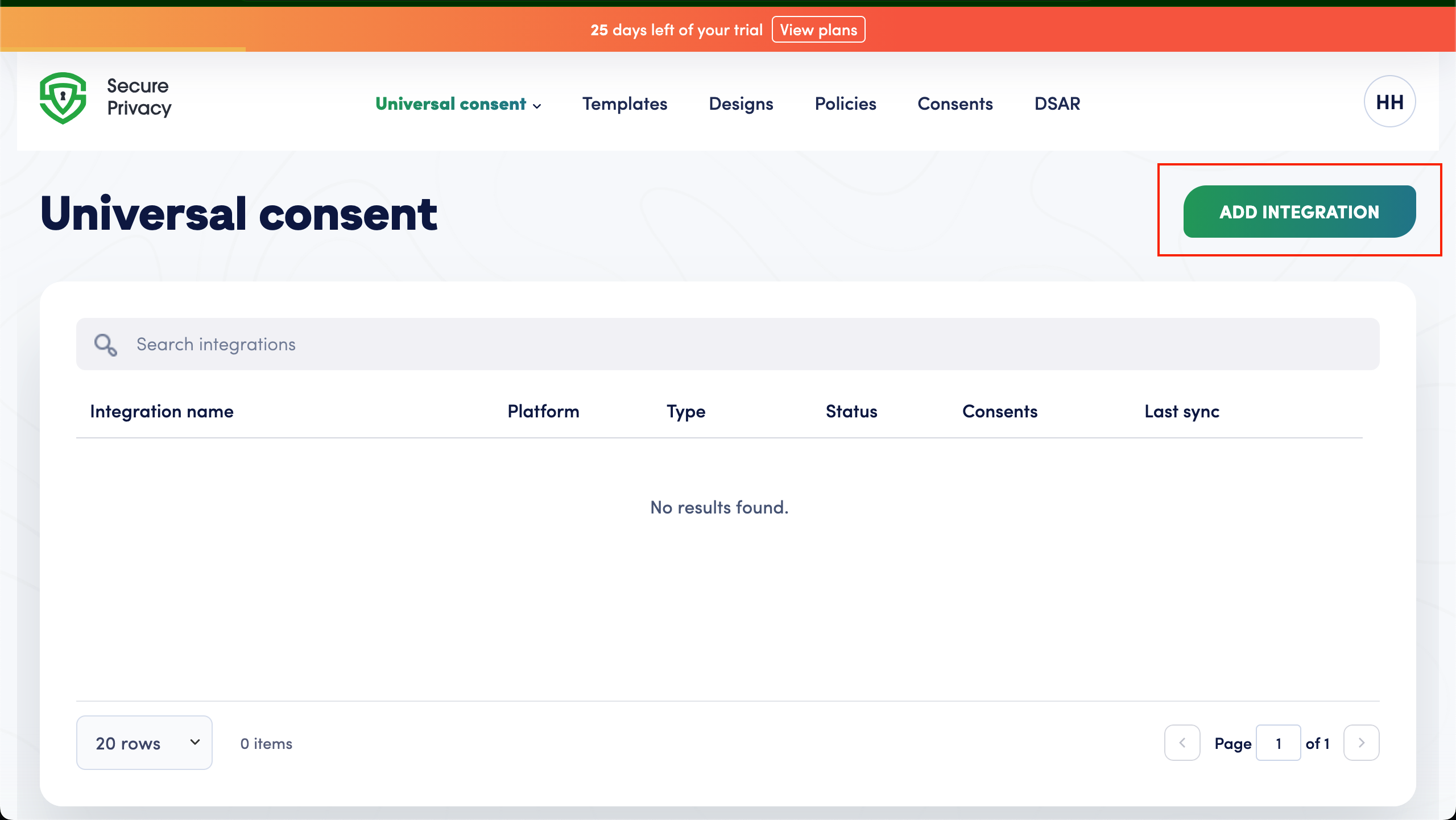
Step 1 - Access Universal Consent in your dashboard
Log in to your Secure Privacy dashboard.
Navigate to Universal Consent from the main menu.
Click Add New Integration.
Step 2 - Configure the integration and name your consent source
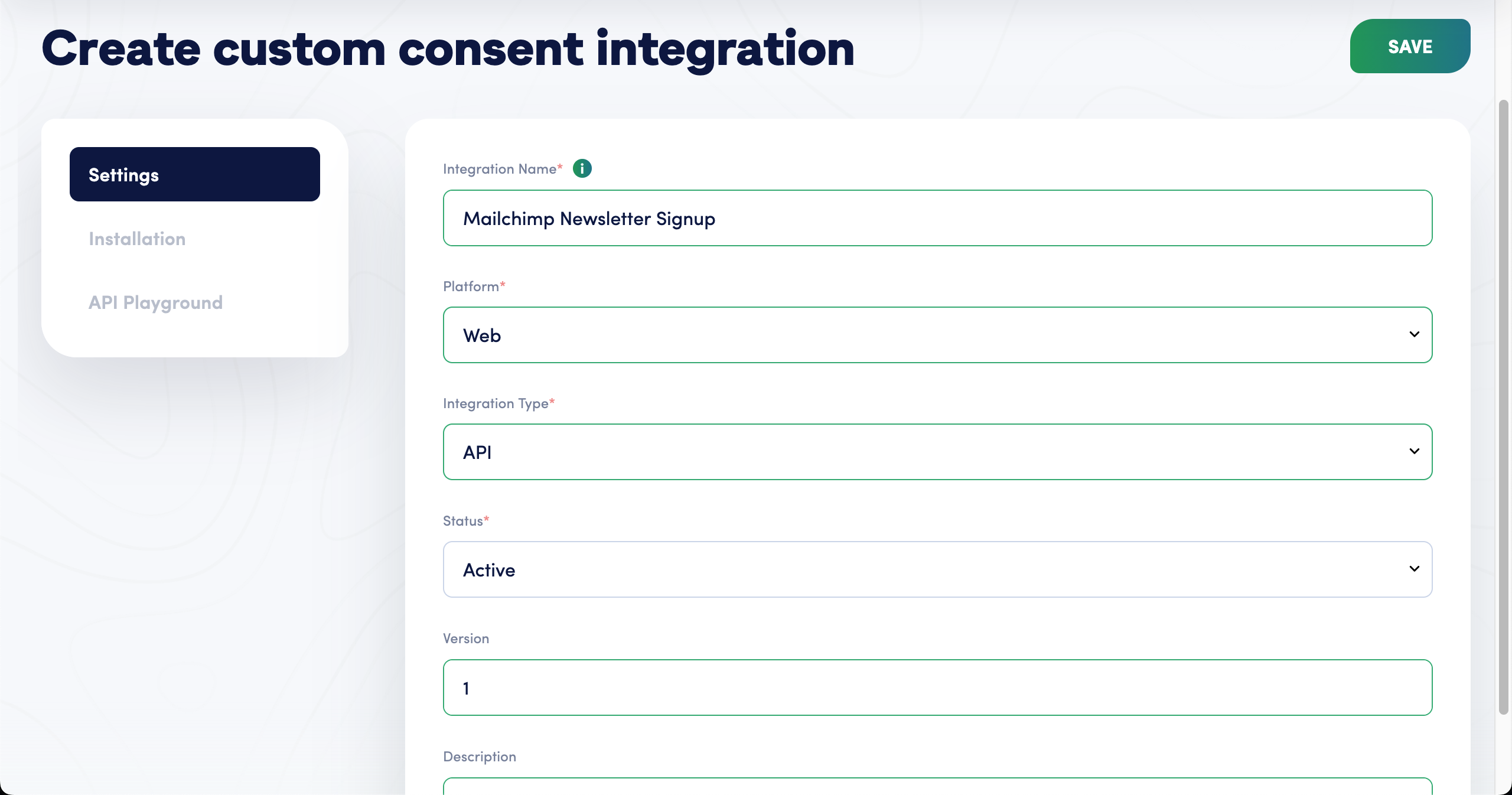
When creating a new integration, provide the following details:
Integration Name
Use a descriptive name that identifies the source of consent, such as "Mailchimp Newsletter Signup," "Salesforce CRM," or "WhatsApp Consent Flow."
Purpose
Describe what this integration will be used for and how consent will be collected.
After the integration is created, Secure Privacy generates a unique identifier for tracking consent activity from that source. This helps the system link future consent records to the correct integration.
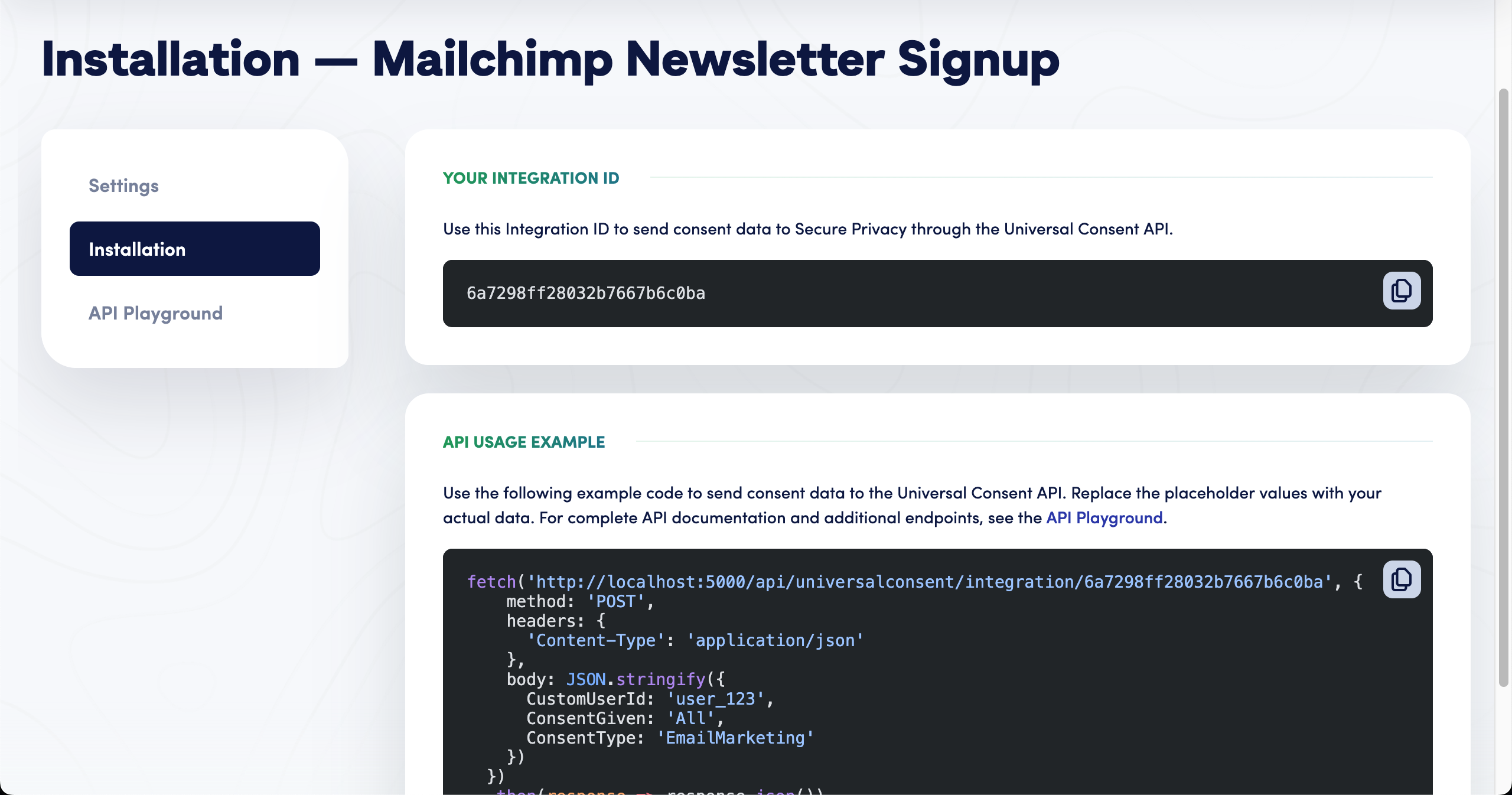
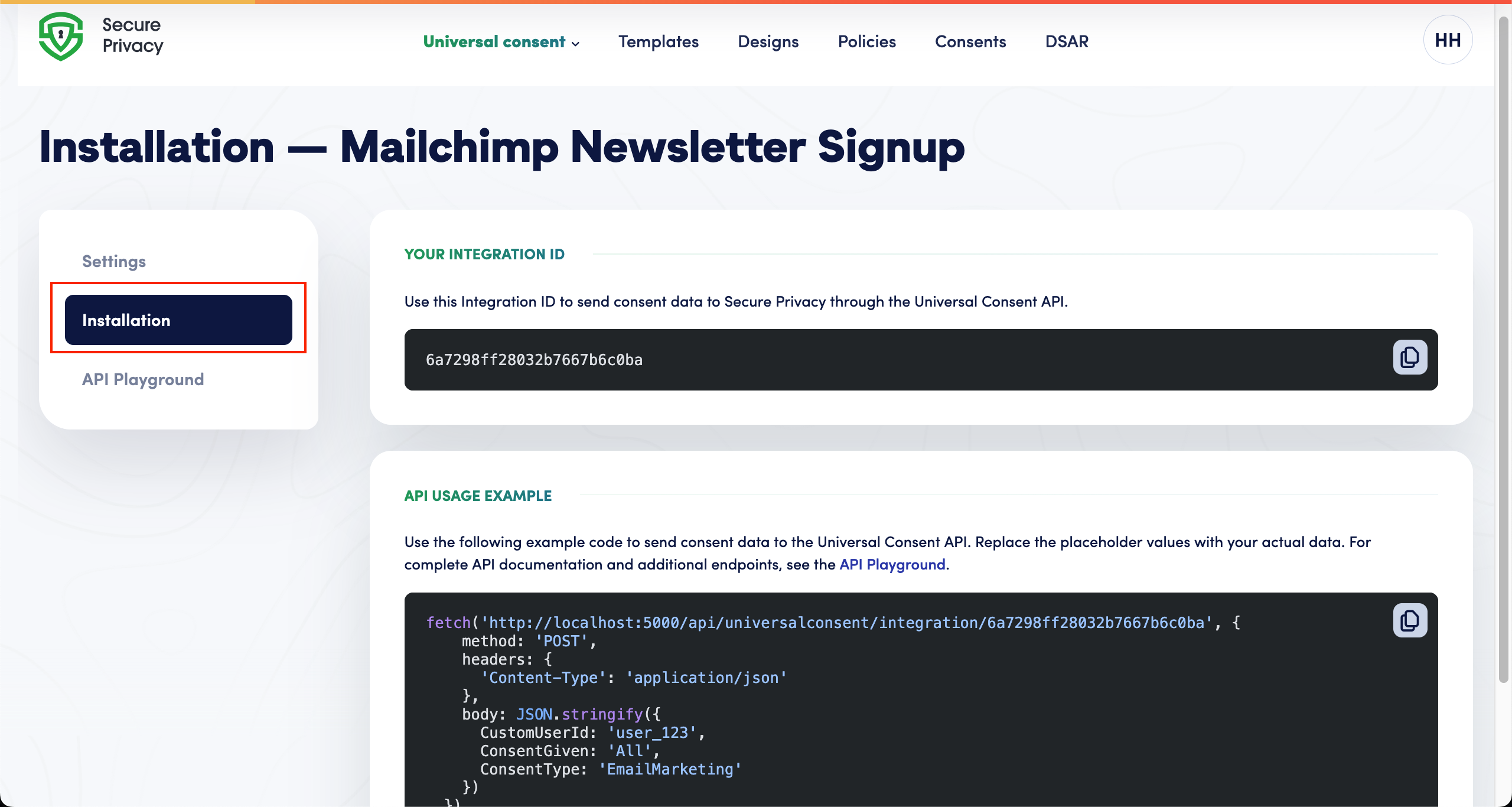
Step 3 - Review integration details and copy your Integration ID
Open the integration from the Custom Consent section.
Review the Installation or setup details available in the dashboard.
Copy the Integration ID shown under Your Integration ID. This is the value your form or application will send consent to.
Confirm that the name, purpose, and tracking details are correct before using the integration in your consent process.
Recording consent via the Universal Consent API
Once you have an Integration ID, any system that can send an HTTP POST request can create a consent record: a signup form, a mobile app, a CRM automation, a WhatsApp bot, or a partner's backend.
API endpoint
POST https://api.secureprivacy.ai/api/universalconsent/integration/{INTEGRATIONID}Example request body
{
  "CustomUserId": "[email protected]",
  "ConsentGiven": "All",
  "ConsentType": "EmailMarketing",
  "Metadata": {
    "source": "Mailchimp Newsletter Signup",
    "firstName": "Jane",
    "lastName": "Doe"
  }
}
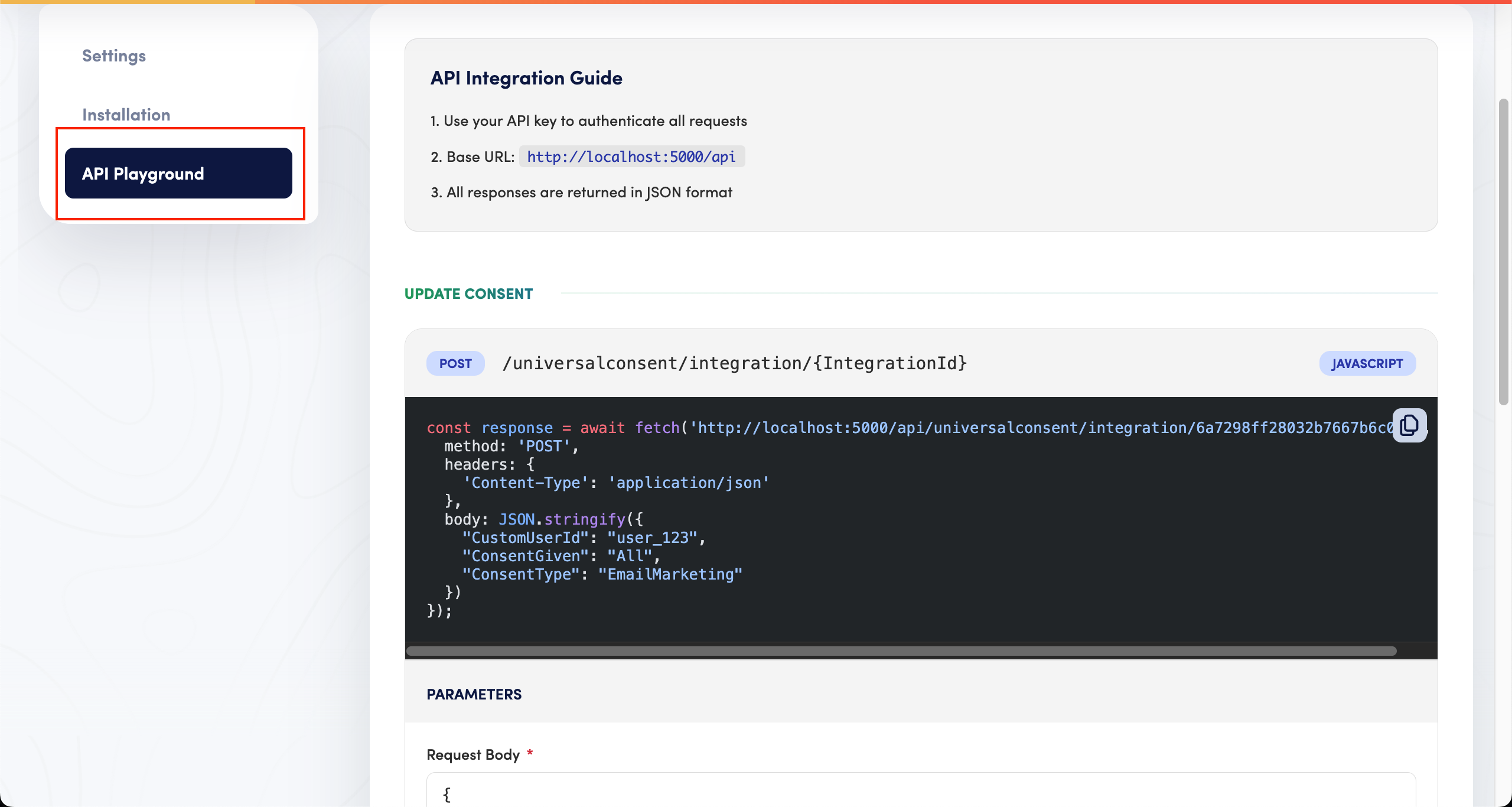
ConsentGiven accepts All, Partial, or None. CustomUserId is your own identifier for the person, such as an email address, phone number or customer ID. For the exact base URL, the full parameter list and additional endpoints for your account, open the API Playground in your integration settings.
How consent is captured from external channels
Once a Custom Consent Integration is set up, consent events from external channels can flow into Secure Privacy automatically. This allows your organization to keep consent records centralized even when the user interaction happens outside the Secure Privacy banner.
Common use cases include:
Email Marketing: Recording newsletter or promotional email consent from signup forms.
WhatsApp: Recording user preferences collected through WhatsApp conversations or automated flows.
CRM: Syncing consent preferences managed by sales or customer success teams.
Partner Forms: Capturing consent collected through partner-hosted forms or campaigns.
Each consent event is associated with the relevant source, user identifier, consent type, status, and timestamp so that it can be reviewed later in the dashboard.
Viewing and auditing custom consent records
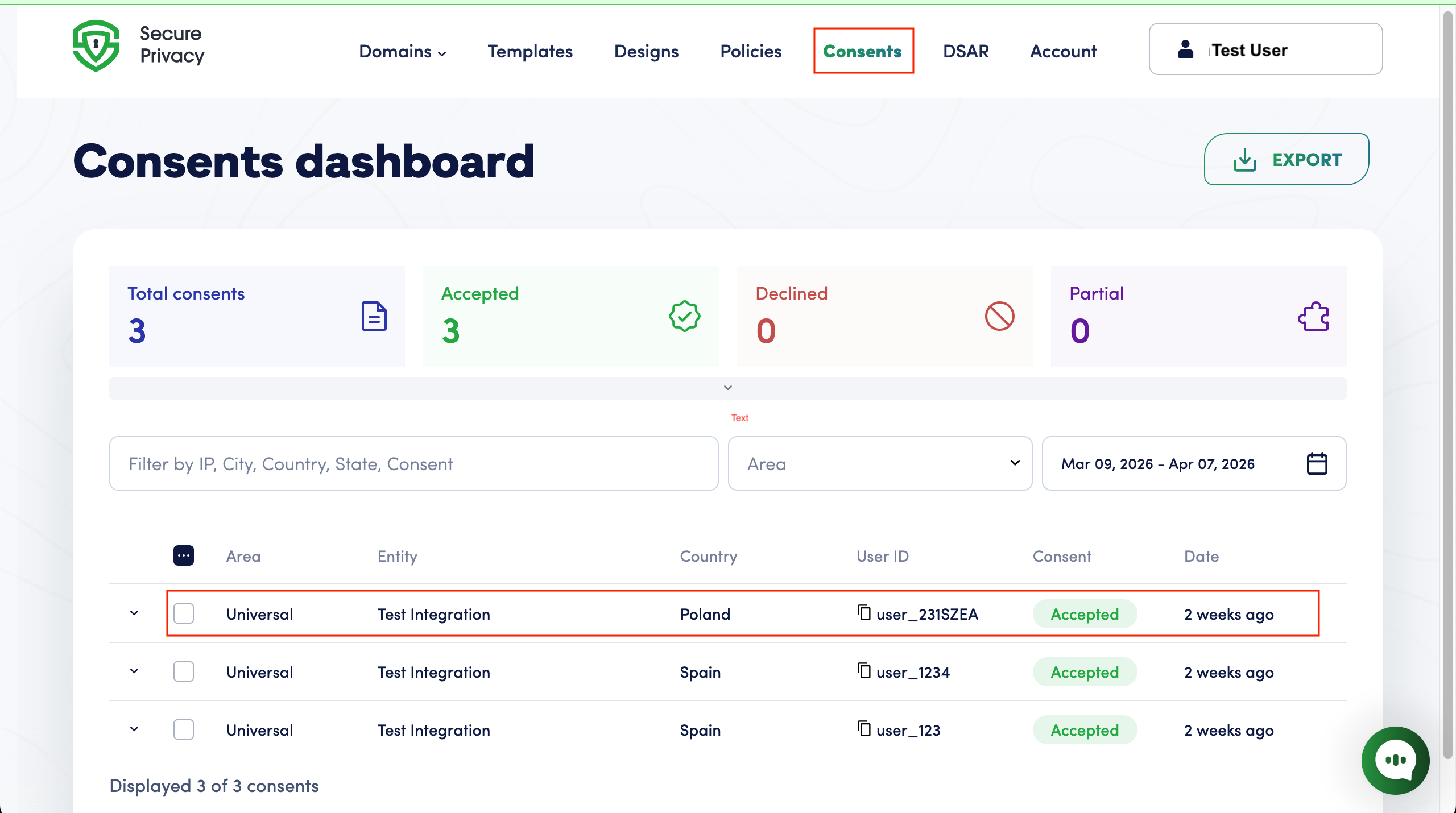
Finding consent records in the dashboard
Navigate to Consents in your dashboard.
Consent information displayed
For each consent record, you'll see:
Client ID: Unique identifier for the consent record.
Custom User ID: The user identifier provided by your organization, such as an email address, phone number, or customer ID.
Consent Type: The category of consent captured.
Consent Status: The user's current consent preference, such as full consent, partial consent, or withdrawal.
Timestamp: When the consent was recorded.
Source: Which integration captured this consent.
Filtering and searching consent records
Use the built-in filters to:
Search by Client ID or Custom User ID.
Filter by consent type.
Filter by date range.
Filter by consent status.
Review consent activity from a specific source.
For a fuller walkthrough of the reporting views, see the in-depth guide to navigating your Secure Privacy consent dashboard.
Managing your Custom Consent Integrations
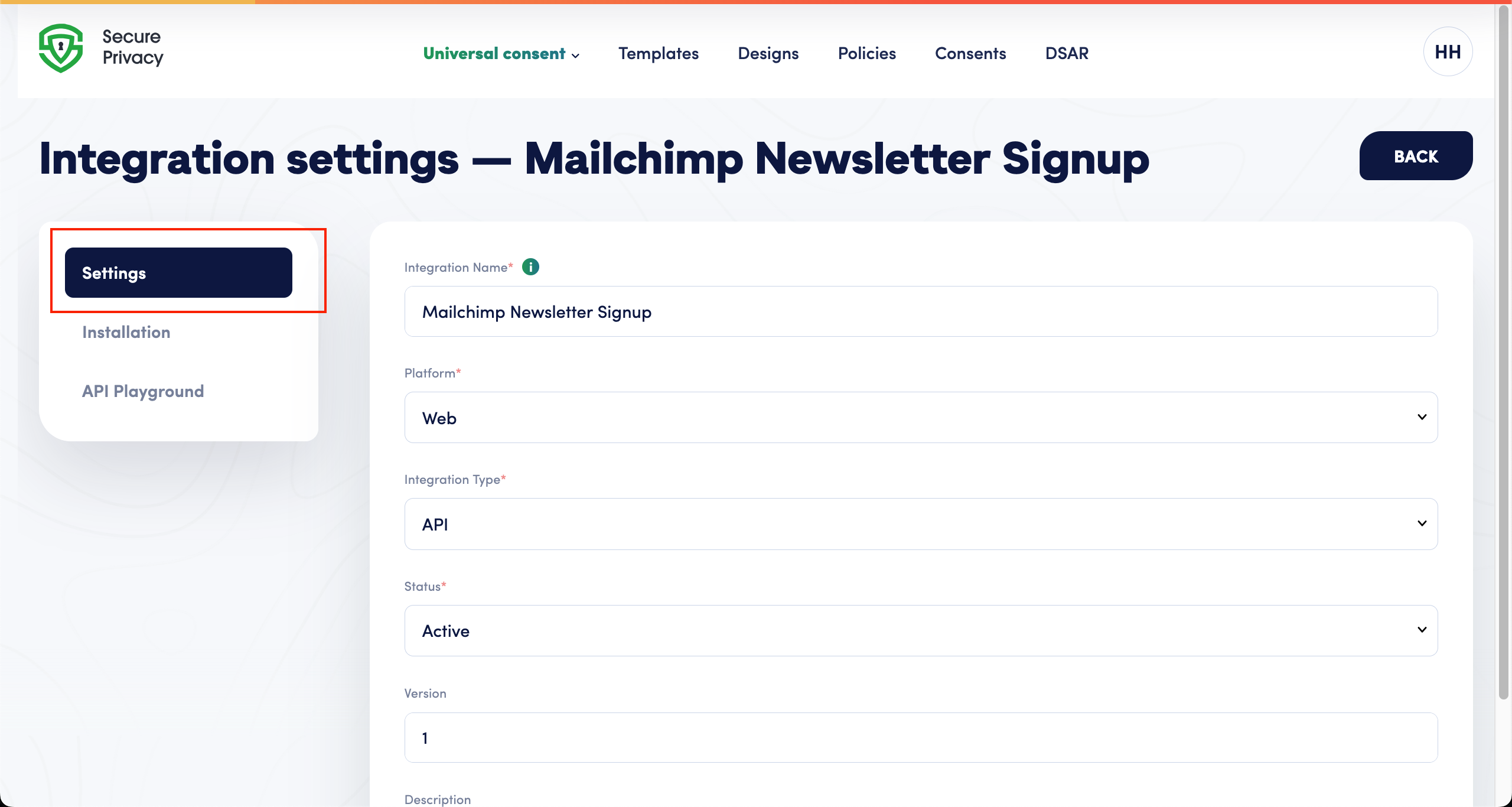
Editing an integration
Go to Universal Consent.
Click the integration you want to edit.
Navigate to Settings.
Update the integration name, purpose, or other available details.
Click Save Changes.
Viewing setup details
Select your integration from the Universal Consent section.
Open the Installation or setup tab.
Review the tracking details and setup guidance shown in the dashboard.
Share the relevant setup information with the appropriate internal team if needed.
Testing your integration before going live
Use the built-in testing tools or test console in the dashboard to:
Confirm that consent records can be created successfully.
Check that consent status information appears as expected.
Review test results before using the integration in a live consent process.
Validate that the correct source, consent type, and user identifier are displayed.
What happens after a consent record is created
The record is stored immediately in the Consents dashboard with its timestamp, source, user identifier and status.
Later submissions override earlier ones. Send a new consent record with the same user identifier and the latest state becomes the current preference.
History is preserved. Previous consent states remain in the audit trail, which is what you need when demonstrating compliance rather than only reporting current status.
The same Integration ID keeps working across additional forms and flows, so extending consent capture to a second or third touchpoint needs no new setup.
Records are available for audits and data subject requests alongside your cookie banner consents, searchable by Client ID or Custom User ID.
Best practices for multi-channel consent recording
1. Use meaningful integration names
Choose clear, descriptive names that indicate the source of consent:
Good: "Mailchimp Newsletter Signup"
Avoid: "Integration 1"
2. Keep user identifiers consistent
Use a consistent identifier format across your integrations:
Email addresses for email-based consents.
Phone numbers for SMS or WhatsApp consents.
Customer IDs for CRM-based consents.
3. Use clear consent types
Use specific, descriptive consent types so records are easy to understand and audit:
Email Marketing for promotional emails.
Email Transactional for service-related emails.
WhatsApp Marketing for WhatsApp messages.
SMS Notifications for SMS alerts.
4. Review records regularly
Periodically review consent records in the dashboard to confirm that sources, statuses, and timestamps are being captured correctly.
5. Align consent types with your notices
Make sure your consent types match the language used in your privacy notices, consent messages, and internal policies.
Compliance and legal validity
Ensuring legal validity of consent collected off-site
Custom consents can maintain the same legal validity as consents captured through the Secure Privacy banner, provided you:
Clearly inform users about what they're consenting to.
Obtain explicit consent where required by law.
Record the context of consent collection in your systems.
Allow users to withdraw consent through your available channels.
Traceability of every consent record
Every consent record includes:
Timestamp: Exact date and time of consent.
Source: Which integration captured the consent.
User Identifier: The custom user identifier provided by your organization.
Client ID: Permanent Secure Privacy identifier.
Consent Details: Type and status of consent.
GDPR compliance
The Custom Consent Integration supports GDPR requirements by:
Maintaining detailed consent records.
Allowing consent withdrawal by submitting a consent withdrawal through the appropriate channel.
Providing audit trails.
Supporting data subject access requests.
If you handle access requests regularly, pair this with the GDPR Article 15 DSAR compliance process and DSAR form setup in Secure Privacy, so a request and its matching consent history can be resolved together.
Troubleshooting Custom Consent Integrations
Integration not found
Confirm that the integration still exists in the Custom Consent section.
Check that the correct integration is selected.
If the integration was deleted, create a new one or contact your administrator.
Access denied
Confirm that your user role has permission to view or manage Custom Consent integrations.
Ask an account administrator to review your access level.
Log out and log back in after permissions are updated.
Invalid or incomplete consent data
Check that the user identifier is present and follows your organization's chosen format.
Confirm that the consent type is clear and matches your internal naming guidance.
Review the dashboard test results to identify missing or inconsistent information.
Consent records are not appearing in the dashboard
Confirm that the integration is active.
Verify that the request is using the correct Integration ID.
Check filters and date ranges in the Consents view.
Use the test console to confirm that records are being captured as expected.
Frequently asked questions
What is Universal Consent Recording in Secure Privacy?
Universal Consent Recording is the part of Secure Privacy that captures consent collected outside the cookie banner. You create a Custom Consent Integration for each source, such as email marketing or a CRM, receive an Integration ID, and any form or application can then send consent records to a single API endpoint. Every record is centralized in the Consents dashboard alongside your banner consents.
Do I still need consent records if I already have a cookie banner?
Yes. A cookie banner records consent for tracking technologies on your website. It does not cover a newsletter opt-in, a WhatsApp preference, a data processing consent captured during onboarding, or a preference a customer changes six months later. Universal Consent records those in the same dashboard, so you keep one consent history per person rather than several partial ones.
How do I prove consent for email marketing under GDPR?
Demonstrating compliance usually means showing when consent was given, what purposes it covered, and how it has changed since. A checkbox value in a marketing tool captures only a yes or no. A Custom Consent Integration stores each submission as a dated record with a source, a user identifier, a consent type and a status, and keeps earlier states in the audit trail.
Can I record consent collected over WhatsApp or by phone?
Yes. Any channel that can send an HTTP POST request can create a consent record, including WhatsApp automation platforms, call center tooling and internal back-office systems. Use a phone number as the Custom User ID for WhatsApp and SMS consents so records stay consistent across those channels.
Where do I find my Secure Privacy Integration ID?
Open Universal Consent in the main menu and select your integration, then open the Installation tab. The Integration ID is shown under "Your Integration ID" with a copy icon next to the value.
Can I use one integration for multiple consent sources?
You can reuse a single Integration ID across multiple forms and applications. Create separate integrations when you want to report on distinct consent sources independently, because the integration name appears as the source on every consent record.
What happens when someone withdraws or changes consent?
Send a new consent record with the same Custom User ID. The latest record becomes the current preference, and earlier records remain in the audit trail so the full history of the person's choices stays intact.
Are consents collected outside the banner legally valid?
Custom consents can carry the same legal validity as banner consents provided you clearly inform users what they are consenting to, obtain explicit consent where the law requires it, record the context of collection, and give people a way to withdraw. Secure Privacy stores the evidence; the wording and lawful basis remain your organization's responsibility, so confirm both with your legal team or DPO.
Why is my consent record missing from the dashboard?
The usual causes are an incorrect Integration ID in the request, an integration whose status is not set to Active, and a filter or date range in the Consents view that excludes the record. Check those three in order, then use the test console to confirm records are being created at all.
Which consent types should I use?
Use specific names that match the wording in your privacy notices, for example Email Marketing, Email Transactional, WhatsApp Marketing or SMS Notifications. Generic types make records harder to interpret during an audit, and mismatched wording between your notice and your records is difficult to explain later.
Summary
You now know how to:
Create a Custom Consent Integration for each source of consent
Copy your Integration ID and record consent through the Universal Consent API
Capture consent from email marketing, WhatsApp, CRM systems and partner forms
Review, filter and audit every consent record in one dashboard
Keep custom consents traceable and defensible for GDPR and data subject requests
That is multi-channel consent recording without a custom build, and without gaps between your website, your marketing tools and your CRM. Secure Privacy is a Google Gold CMP Partner, SOC 2 Type II certified, and covers 65+ privacy laws.
Start a free Secure Privacy trial or schedule a demo to see Universal Consent recording against your own channels.
Support and resources
Additional resources
Secure Privacy documentation: browse the full Secure Privacy product documentation
Dashboard help: Use the guidance available in the Custom Consent setup and testing areas.
Getting help
If you need assistance:
Use the built-in testing tools in your dashboard to check setup results.
Review the setup guidance in the Installation or setup tab.
Visit the Secure Privacy documentation site.
Contact our support team at [email protected].
Related articles
How to track GDPR consent in HubSpot CRM with Universal Consent
Mailchimp GDPR consent integration: capture and sync email marketing consent
Shopify Customer Privacy API integration: automatic consent sync
GDPR consent and compliance guides on the Secure Privacy blog
Want to see consent management in action?
Bring every consent record into one dashboard, whatever channel it came from. Explore Consent Management or book a demo with a privacy expert. 30-day free trial, no credit card required.