
Secure Privacy now supports the Shopify Customer Privacy API out of the box. When your consent banner runs on a Shopify storefront, visitor choices are synchronized with Shopify's own consent signals automatically. There is nothing to enable, no theme file to edit and no developer ticket to raise.
The problem: your banner says no, but Shopify keeps tracking
Most Shopify merchants discover the same gap the first time they audit their store. A visitor in the EEA or UK clicks "Reject" on the cookie banner, the banner blocks the scripts it controls, and yet Shopify's own layer - web pixels, marketing tags, personalization and data sharing - carries on as if nothing happened. Your cookie consent looks compliant on the surface, but the storefront underneath it never received the signal.
That happens because Shopify manages tracking consent through its own Customer Privacy API. A consent banner that does not talk to that API is only doing half the job, and the workarounds merchants reach for are all uncomfortable:
Custom Liquid and theme edits. Hand-written
setTrackingConsentcalls scattered across theme files break the next time you change themes, and every store needs its own version.Running Shopify's native banner alongside a CMP. Visitors see two banners, the two consent records disagree, and neither one is authoritative.
Ignoring it and hoping the pixels behave. Shopify's sandbox only restricts pixels that are configured correctly, so third-party apps and custom pixels keep collecting data you never had permission to collect.
A developer retainer for consent plumbing. Expensive, slow, and it has to be revisited every time Shopify or Google changes a specification.
Secure Privacy removes that work entirely. Because we are a Google-certified Gold CMP partner and our banner already handles regional targeting, category mapping and consent storage, the Shopify integration simply rides on top of what you have. Detection is automatic, mapping is built in, and the storefront stays aligned with the choice the visitor actually made.
By the end of this article you will know exactly which Secure Privacy categories map to each Shopify consent key, when consent is sent, how the integration behaves when a visitor withdraws consent or returns on a later session, and how to verify in your browser console that the sync is working on your own store.
At a glance
What it does: Sends Secure Privacy banner consent to Shopify's Customer Privacy API so Shopify analytics, marketing, personalization and sale of data follow the same decision.
Setup required: None. The integration activates when the banner detects a Shopify storefront.
Non-Shopify sites: Inactive, with no effect on your existing configuration.
Availability: All Secure Privacy plans, all banner templates.
Who is this for
Shopify and Shopify Plus merchants selling to visitors in the EEA, the UK, Switzerland, Brazil, California or any region where consent is required before non-essential tracking.
Headless and Hydrogen storefronts where the Secure Privacy banner is served on a Shopify-backed domain.
Agencies and marketing teams managing consent across a portfolio of stores who want one consistent behaviour without per-store code.
Privacy and legal teams who need Shopify's consent record to match the record held by the CMP.
Prerequisites
The integration is automatic, but three things on the Shopify side determine what Shopify does with the signal it receives:
The Secure Privacy banner is installed on the storefront and loads before your tracking scripts.
Shopify regions are configured. In your Shopify admin, open Settings > Customer privacy > Regions and content and confirm the regions where consent should apply. If every region is switched off, Shopify will not restrict tracking even when it receives a denied signal.
Shopify's native cookie banner is turned off. Secure Privacy is your consent interface. Running both produces two banners and two competing consent records.
How the Shopify Customer Privacy API integration works
Shopify storefront detection
The banner identifies whether it is running on a Shopify storefront before sending any consent information. If the site is not a Shopify storefront, no Shopify-specific action is performed and nothing else in your setup changes.
Passing the visitor's choice to Shopify
As soon as a visitor makes a choice, Secure Privacy tells Shopify what they decided. Accept everything, reject everything, or pick and choose in the preference center: whatever the visitor selects is what Shopify is told, and Shopify applies it to its own tracking from that moment on. The same choice is passed again on every following page, so the storefront never drifts out of step with the banner.
Only the categories that have a direct Shopify equivalent are passed across. If one of your banner categories has no matching Shopify setting, Secure Privacy leaves it alone and Shopify keeps its own default for it. The next section shows exactly which category maps to which Shopify setting.
If Shopify's privacy system happens to be slow to load on a page, nothing breaks. Your banner carries on as normal and the choice is passed across on the next page view.
Consent category mapping: Secure Privacy to Shopify
Shopify uses four consent keys: analytics, marketing, preferences and sale_of_data. Secure Privacy maps its banner categories to those keys as follows.
Secure Privacy category | Shopify consent key |
|---|---|
Site analytics |
|
Advertising |
|
Preferences |
|
Customer interaction |
|
Essential, Social media, Comments, Audio/video player, Unclassified | Not sent |
Mapping rules
Advertising controls sale of data. Secure Privacy does not use a separate "sale or sharing of personal data" category. For Shopify, the visitor's Advertising choice is therefore also used for
sale_of_data.The most restrictive choice is applied. Both Preferences and Customer interaction can map to Shopify's
preferenceskey. If both categories are present, Shopify receives consent forpreferencesonly when the visitor has consented to both.Unused keys are omitted. If your banner does not include a category that maps to a Shopify key, Secure Privacy does not send that key. Shopify then keeps its own regional default for it.
Essential activity is not sent. Essential consent is not forwarded because strictly necessary activity is always allowed by Shopify.
When consent is synchronized with Shopify
Moment | What is sent to Shopify |
|---|---|
Visitor accepts, rejects, or saves a selection in the banner or preference center | The mapped consent categories selected by the visitor |
Visitor withdraws consent | All mapped Shopify consent keys are sent as not granted |
Page load on a return visit | The stored consent is replayed so Shopify remains synchronized across pages and sessions |
No banner template applies to the visitor's region | All four Shopify consent keys are treated as granted, consistent with the behaviour used for other integrations such as Google Consent Mode, Microsoft UET, Clarity and Meta |
How to verify the Shopify consent sync is working
A two minute check in your browser confirms that Shopify is receiving the same consent decision your visitors make in the banner.
Step 1 - Open your storefront in a clean session
Use a private or incognito window so no stored consent is applied, and open your store from a region where your banner template is configured to appear. Open the browser developer tools and switch to the Console tab.
Step 2 - Make a consent choice in the banner
Reject all non-essential categories, or save a partial selection such as analytics only. This triggers the relay to Shopify's Customer Privacy API.
Step 3 - Read Shopify's stored consent back
In the console, run window.Shopify.customerPrivacy.currentVisitorConsent(). Shopify returns its record of the visitor's choice for analytics, marketing, preferences and sale of data. The values should match the categories the visitor selected, following the mapping table above.
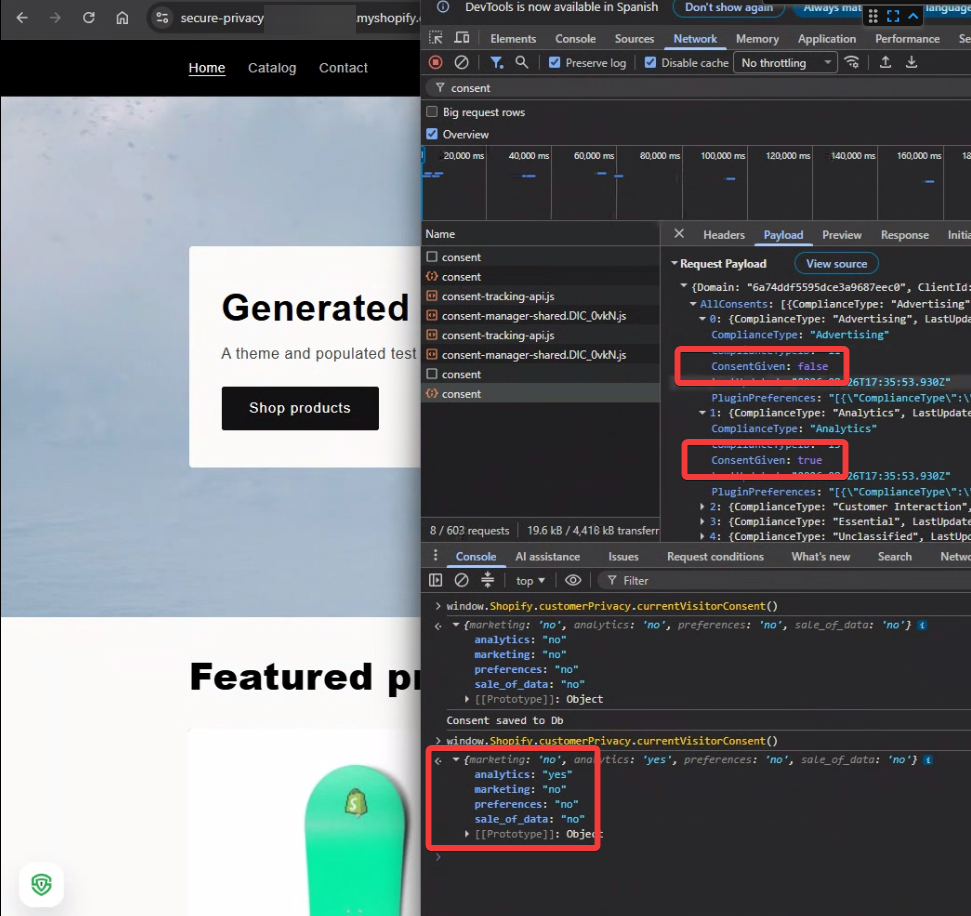
window.Shopify.customerPrivacy.currentVisitorConsent() returns a matching Shopify consent record of analytics: 'yes' with marketing, preferences and sale_of_data set to 'no'.Step 4 - Change the choice and confirm it updates
Reopen the preference center, change a category, save, and run the same command again. The returned values should change immediately without a page reload. If they do, your storefront and your CMP are in sync.
What this means for your store
Once the sync is running, Shopify's tracking behaviour and your consent record tell the same story. Analytics, marketing pixels, personalization and data sharing on the storefront follow the visitor's decision, and that decision is logged in Secure Privacy as proof of consent if a regulator or a customer ever asks.
For merchants this removes a recurring source of manual configuration: no per-store Liquid, no consent logic to re-apply after a theme change, and one consistent experience across the Secure Privacy banner and Shopify's own privacy controls. It also complements your existing signal integrations, so a single visitor choice reaches Shopify, Google Consent Mode v2, Microsoft UET and Meta together.
Troubleshooting
Shopify still shows tracking as allowed after a visitor rejects
Check Settings > Customer privacy > Regions and content in your Shopify admin. If the visitor's region is not enabled there, Shopify accepts the signal but does not restrict tracking for that region.
Two cookie banners appear on the storefront
Shopify's native cookie banner is still switched on. Disable it in the Shopify admin so Secure Privacy is the single consent interface and the single consent record.
The console shows "Shopify Customer Privacy API unavailable"
The API had not loaded on that page view. The integration does not interrupt the visitor's consent flow: the banner continues to operate normally, the synchronization is skipped for that attempt, and it is retried during the next relevant consent action or on the next page load.
A category in my banner is not reaching Shopify
Only categories with a direct Shopify equivalent are sent. Essential, Social media, Comments, Audio/video player and Unclassified are intentionally omitted, and Shopify keeps its own regional default for any key your banner does not cover.
Preferences shows as denied even though the visitor accepted it
This is the most restrictive rule working as designed. When your banner uses both Preferences and Customer interaction, Shopify receives consent for preferences only when the visitor has consented to both categories.
Frequently asked questions
Do I need to enable the Shopify Customer Privacy API integration in Secure Privacy?
No. The integration is automatic and works out of the box. When the Secure Privacy banner detects a Shopify storefront, consent synchronization is activated with no additional configuration, template setting or storefront change. On non-Shopify websites it remains inactive.
What is the Shopify Customer Privacy API?
It is Shopify's mechanism for recording a visitor's tracking consent and applying it across the storefront. It stores four consent keys - analytics, marketing, preferences and sale of data - and consent management platforms write to it using the setTrackingConsent method so that Shopify's own tracking respects the visitor's choice.
Does a Shopify store need a cookie consent banner for GDPR?
If you have visitors from the EEA or the UK, you need consent before setting non-essential cookies, so a banner is required in practice. Shopify's built-in banner covers a narrow slice of that requirement. Third-party apps, custom pixels and advertising platforms that require their own consent signals sit outside it, which is why merchants use a certified CMP. This is general information, not legal advice.
Can I use Secure Privacy instead of Shopify's native cookie banner?
Yes, and that is the recommended setup. Turn off Shopify's native banner and let Secure Privacy collect consent, then the integration relays each decision to Shopify's Customer Privacy API so the storefront behaves accordingly.
Which Secure Privacy category maps to Shopify's sale_of_data key?
Advertising. Secure Privacy does not use a separate sale or sharing category, so the visitor's Advertising choice is used for both the marketing and sale_of_data keys.
Does the integration work with Google Consent Mode v2 at the same time?
Yes. The Shopify sync runs alongside the existing Google Consent Mode v2, Microsoft UET, Clarity and Meta integrations. A single visitor decision is mapped to each destination in the format that destination expects.
What happens if a visitor is in a region where no banner is shown?
All four Shopify consent keys are treated as granted, which matches the behaviour Secure Privacy already applies to other consent signal integrations for regions outside the scope of your banner templates.
Does the integration work on headless or Hydrogen storefronts?
Yes, provided the Secure Privacy banner is loaded on the storefront and Shopify's Customer Privacy API is available on the page. Detection and relay behave the same way as on a standard Online Store theme.
Will consent be remembered when a visitor returns later?
Yes. On page load during a return visit, the stored consent is replayed to Shopify so the storefront stays synchronized across pages and sessions without asking the visitor again.
How do I check that Shopify received the consent signal?
Open your browser console on the storefront and run window.Shopify.customerPrivacy.currentVisitorConsent(). The returned values for analytics, marketing, preferences and sale of data should match the choice made in the banner.
Related articles
How to implement Google Consent Mode Advanced with Google Tag Manager
Google Consent Mode: Basic vs Advanced, a full comparison guide
Secure Privacy as a Google-certified consent management platform
Shopify developer documentation for the Customer Privacy API
Get consent right on Shopify without the complexity
Secure Privacy is a Google Gold CMP partner covering 65+ privacy laws and 70+ languages, with Shopify Customer Privacy API support included on every plan. Start a free 30-day trial of Secure Privacy, no credit card required, or schedule a demo with our team to review your storefront setup.