
Summary: Google Consent Mode lets websites adjust how analytics and advertising tags behave based on each user's consent choices. This guide explains how Basic and Advanced Consent Mode differ in data collection, conversion modeling, privacy compliance, and tag behavior—and how Secure Privacy's Google-certified consent management platform (CMP) makes implementation seamless.
Who Is This Guide For?
This article is intended for website administrators, marketers, developers, compliance managers, and privacy officers who manage analytics, user privacy, and regulatory requirements under frameworks such as GDPR and CCPA.
Key Takeaways
- Basic Consent Mode blocks all Google tags until the user explicitly consents—maximum privacy, but significant analytics data gaps.
- Advanced Consent Mode loads tags immediately and sends anonymous "cookieless pings" before consent, enabling conversion and behavioral modeling while remaining privacy-compliant.
- Both modes help websites meet GDPR, CCPA, and Google's EU User Consent Policy requirements.
- Secure Privacy is a Google-certified CMP that supports both modes with a code-free, guided setup.
What Is Google Consent Mode?
Google Consent Mode is a privacy framework that integrates with your consent banner, giving your website precise control over how Google tags (Google Analytics, Google Ads, etc.) operate based on a user's consent decision.
It helps websites comply with privacy laws such as GDPR and CCPA, while still capturing valuable—even if limited—analytics and advertising insights through modeling.
Understanding Google Consent Mode: Basic Mode
Simple Setup: Basic Consent Mode is quick and beginner-friendly. Minimal configuration makes it ideal for teams that want a straightforward, privacy-first solution without deep technical integration.
Strict Data Practices: Google tags only fire when users explicitly grant consent. If users do not consent, no data—including the consent status itself or any page events—is sent to Google. This ensures maximum user privacy, but results in significant analytics data blind spots.
Conversion Modeling (Limited): Google can provide broad conversion estimates for non-consenting users, but without behavioral data, important optimization insights are lost.
For step-by-step setup instructions, see Implementing Google Consent Mode in Basic Mode.
Understanding Google Consent Mode: Advanced Mode
Granular Tag Control: Advanced Consent Mode gives you full configuration of tag behavior for every user consent state—granted, denied, or pending. This allows customized compliance while maximizing data opportunities within privacy boundaries.
Preemptive Tag Loading: Google tags load as soon as a user lands on your site. If consent is not yet granted, only "cookieless pings"—tiny, non-identifying data packets—are sent to Google's servers, enabling privacy-compliant analytics while awaiting user action.
Enhanced Conversion & Behavioral Modeling: Advanced Consent Mode enables both conversion modeling and behavioral modeling, even when users do not consent—giving you aggregated insights for marketing optimization without violating privacy laws.
Conversion modeling uses existing consented data to estimate conversions for non-consenting users, providing a more complete picture of your marketing funnel's effectiveness.
Behavioral modeling analyzes aggregated user actions to understand browsing patterns and support website optimization. By understanding how users interact with your site, you can improve personalization and conversion rates—without identifying individuals.
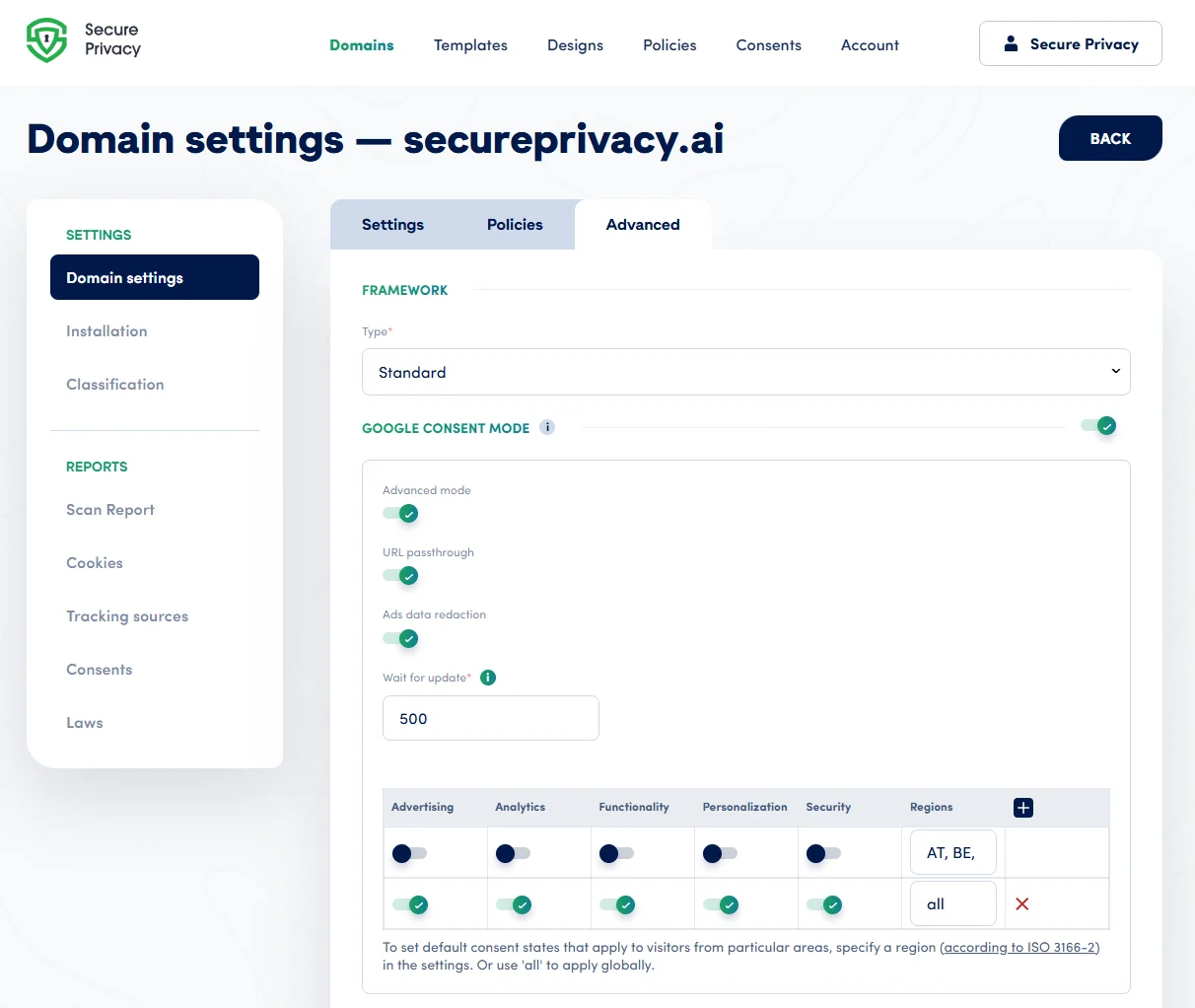
For expert setup using Google Tag Manager, see Implementing Google Consent Mode in Advanced Mode using Google Tag Manager.
How Google Consent Mode Affects Analytics: Real-World Scenarios
Scenario 1: Basic Consent Mode – User Does Not Consent
Tag Behavior: All Google tags are blocked entirely until the user grants consent.
Data Impact: No network requests—not even the consent status—are sent to Google. Your analytics and advertising tools will have significant data gaps, with only limited conversion modeling available and no user journey or engagement metrics.
Privacy Level: This is the strictest implementation, offering users total privacy at the cost of actionable analytics data.
Scenario 2: Advanced Consent Mode – User Does Not Consent ("Cookieless Pings")
Tag Behavior: Google tags load on all pageviews. When a user denies consent, only "cookieless pings"—basic, functional, non-identifiable signals—are transmitted to Google's servers.
Data Impact: These pings enable enhanced conversion modeling and some behavioral analysis. While full consent-based data isn't available, you still gain pageview and funnel information to aid optimization and advertising—without breaching privacy laws.
Privacy Level: User anonymity and regulatory compliance are fully maintained, with significantly higher data utility than Basic Mode.
Basic vs Advanced Google Consent Mode: Which Should You Choose?
| Feature | Basic Consent Mode | Advanced Consent Mode |
|---|---|---|
| Setup complexity | Low – beginner-friendly | Moderate – code-free with Secure Privacy |
| Tags fire without consent? | No | Yes (cookieless pings only) |
| Conversion modeling | Limited | Enhanced |
| Behavioral modeling | Not available | Available |
| GDPR / CCPA compliant | Yes | Yes |
| Analytics data gaps | Significant | Minimal |
| Best for | Strict privacy-first sites | Data-driven marketing teams |
Always clearly inform users how their data is used and ensure compliance with all applicable privacy regulations, including GDPR and CCPA.
Common Google Consent Mode Issues & Fixes
Google tags not firing: Verify your Secure Privacy consent banner integration and Google Tag Manager placement. Confirm that the consent mode signals are being passed correctly before tag execution.
Missing analytics or conversion data: Switch to Advanced Consent Mode to enable cookieless pings and improve reporting accuracy for non-consenting users.
Custom consent states not working: Review Secure Privacy's consent mode verification guide, or contact our support team for a personalized review.
Frequently Asked Questions (FAQ)
What is the difference between Basic and Advanced Google Consent Mode?
Basic Consent Mode blocks all Google tags until a user explicitly consents, resulting in data gaps. Advanced Consent Mode loads tags immediately but only sends anonymous cookieless pings before consent is given, enabling better conversion and behavioral modeling while remaining GDPR-compliant.
Is Google Consent Mode required for GDPR compliance?
Google Consent Mode is not legally required by GDPR itself, but it is required by Google for advertisers using Google Ads and Analytics in the European Economic Area (EEA). It is a key part of meeting Google's EU User Consent Policy and maintaining ad personalization features.
What are "cookieless pings" in Google Consent Mode?
Cookieless pings are small, non-identifying data signals sent to Google when a user has not consented. They contain no personal data or cookies, but help Google model conversion activity and browsing patterns in an aggregated, privacy-safe way. They are only sent in Advanced Consent Mode.
Is Secure Privacy a Google-certified Consent Management Platform?
Yes. Secure Privacy is a Google-certified CMP, meaning it meets Google's technical and policy standards for consent signal integration with Google tags, Analytics, and Ads.
Can I switch from Basic to Advanced Consent Mode later?
Yes. You can upgrade from Basic to Advanced Consent Mode at any time. Secure Privacy's platform supports both modes and offers a code-free setup for Advanced Mode via Google Tag Manager.
Need Further Help? Escalations & Google CMP Certification Support
For additional support, contact our team at [email protected].
For urgent or systemic escalations related to Google Consent Mode, contact our designated escalation point: Andrew Sidorkin. We aim to respond to all escalations within one business day.
For policy questions directed to Google, contact the Google EU User Consent Policy team at [email protected].