
Your company is based in the US and you are about to start selling to European customers. The question usually lands on the website team first: what does our website need before EU visitors start arriving? The short answer is that the GDPR applies to US companies that offer goods or services to people in the EU, even if you have no office, staff or servers there. In practice, that means EU visitors must see a cookie banner that actually blocks tracking until they agree, your privacy policy must meet GDPR transparency rules, and you need a working channel for privacy rights requests.
Most teams try one of three shortcuts first. Some copy their existing CCPA "Do Not Sell" setup, which uses an opt-out model that does not meet EU opt-in rules. Some install a free cookie plugin that shows a banner but lets Google Analytics and ad pixels load anyway. Others paste a generic privacy policy template that never mentions an EU representative, international data transfers or the rights EU users actually have. Each of these looks compliant on the surface and fails the first time a regulator, customer or partner looks closely.
Secure Privacy handles both sides from one account. You keep your US opt-out experience for US visitors and add a geo-targeted GDPR cookie consent banner for the EU, backed by automatic cookie blocking, a GDPR privacy policy generator, a data subject request form and consent records stored in the EU. As a Google Gold CMP Partner covering 65+ privacy laws, it also passes Google Consent Mode v2 signals so your Google Ads and GA4 measurement keeps working in Europe.
By the end of this article you will have a complete EU website compliance checklist, a step-by-step setup in Secure Privacy, and a clear list of the GDPR obligations a US company must handle outside the website itself.
Who Is This For?
- US and other non-EU businesses launching sales, shipping or marketing to customers in the EU or EEA
- E-commerce and B2B teams adding EU markets to a website that was built for US privacy laws such as the CCPA
- Marketing teams running Google Ads, GA4, Meta or LinkedIn campaigns aimed at European audiences
- Website owners, developers and compliance leads who need a practical GDPR checklist to work through with their legal team
Does GDPR Apply to a US Company Selling Into the EU?
Yes, in most cases. Under Article 3(2) of the GDPR, the regulation applies to organizations outside the EU when they either offer goods or services to people in the EU (paid or free) or monitor their behavior, for example with analytics, advertising pixels or profiling. Shipping to EU addresses, pricing in euros, offering EU languages or running ads aimed at EU countries are typical signs that you are targeting the EU market.
Two rule sets meet on your website. The ePrivacy Directive decides when you need consent to place cookies or similar trackers, and the GDPR decides what valid consent looks like and governs everything else you do with personal data. For a primer on the regulation itself, see What Is GDPR? A Simple Guide to GDPR Compliance.
EU Website Compliance Checklist at a Glance
Use this table as your working list. The first seven items live on your website; the last four are organizational obligations that your website content must reflect.
| Requirement | Legal basis | What it means for your website | Where Secure Privacy helps |
|---|---|---|---|
| Prior consent for non-essential cookies | ePrivacy Directive Art. 5(3), GDPR Art. 7 | Analytics, advertising and social cookies stay blocked until the visitor opts in. Rejecting must be as easy as accepting. | Automatic Blocking, opt-in GDPR template |
| Cookie declaration | GDPR Art. 13, ePrivacy transparency | A list of every cookie and tracker with its provider, purpose and duration. | Website scanner and auto-generated cookie declaration |
| Consent withdrawal | GDPR Art. 7(3) | Visitors can change or withdraw consent at any time, as easily as they gave it. | Privacy widget and Preference Center |
| Proof of consent | GDPR Art. 7(1) | You can show who consented, to what, and when. | Consent Dashboard with CSV export |
| GDPR privacy policy | GDPR Art. 13 and 14 | Explains what you collect, why, your lawful basis, retention, recipients, international transfers, user rights and your EU representative. | Privacy policy generator and multilingual policies |
| Data subject rights requests | GDPR Art. 12 to 22 | A clear way to request access, correction, deletion or portability, answered within one month. | DSAR form builder and Self-Service Privacy Rights Portal |
| Google consent signals | Google EU User Consent Policy | If you use Google Ads or GA4, consent choices must be passed to Google through Consent Mode v2. | Built-in Google Consent Mode (Basic or Advanced) |
| EU representative | GDPR Art. 27 | Most non-EU companies must appoint a representative in the EU and name them in the privacy policy. | GDPR representative services (outside the CMP) |
| Lawful EU-to-US data transfers | GDPR Chapter V | Data sent to your US systems and vendors needs a transfer mechanism, such as the Data Privacy Framework or Standard Contractual Clauses. | Consent records stored in the EU; DPO guidance |
| Records of processing | GDPR Art. 30 | An internal register of what personal data you process and why. | Governance Solution Process Register |
| Data Protection Officer check | GDPR Art. 37 | Decide and document whether you need a DPO. | DPO as a Service |
Prerequisites
- A Secure Privacy account with your website domain added (see the account setup and onboarding guide)
- Access to your website's code, CMS or Google Tag Manager to install or verify the Secure Privacy script
- A list of the third-party tools on your site: analytics, ad pixels, chat widgets, video embeds, payment and shipping integrations
- Your company details for the privacy policy, including your EU representative's contact details if you have appointed one
- The list of EU and EEA countries you plan to sell into, plus the UK and Switzerland if they are in scope
How to Set Up an EU-Ready Website With Secure Privacy
Follow these steps to add a GDPR-compliant cookie consent setup for EU visitors while keeping your existing US experience in place.
Step 1 - Scan your website from an EU location
Cookies and scripts can differ by visitor location, so run your first scan as an EU visitor would see your site. In your scan settings, choose an EU scan location and start a scan. Review the results to see every cookie, pixel, iframe and service that loads. See how to configure scan location and frequency and how to read your scan results.
Step 2 - Classify every cookie and service
Assign each detected item to a category such as Essential, Preferences, Analytics, Advertising or Social Media. Secure Privacy does not auto-block cookies that are still unclassified, so this step decides what your banner actually controls. Only cookies that are strictly necessary for the site to work may stay in the Essential category. Follow the domain-level cookie classification guide and read why unclassified cookies are not auto-blocked.
Step 3 - Create a GDPR template geo-targeted to the EU and EEA
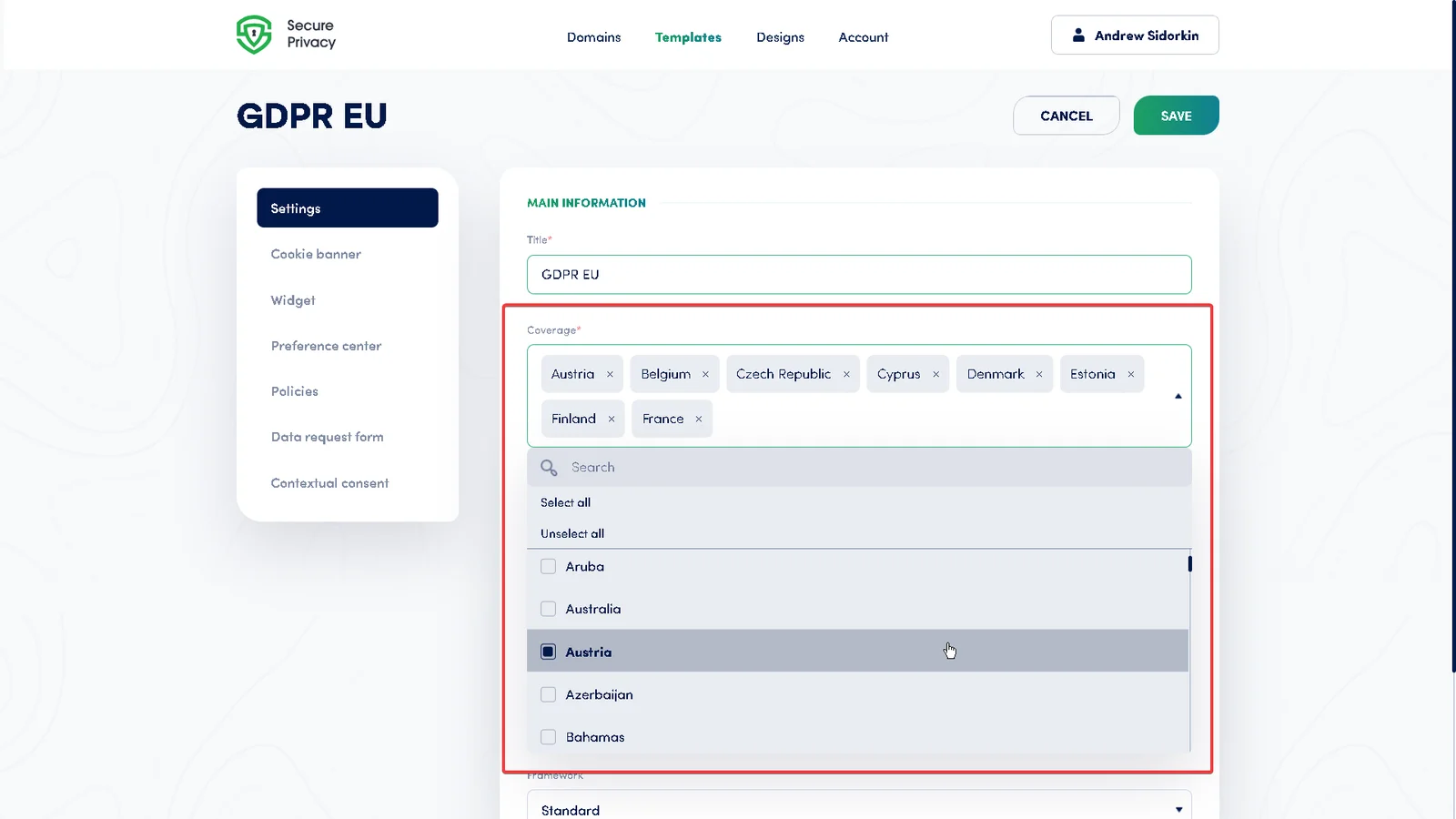
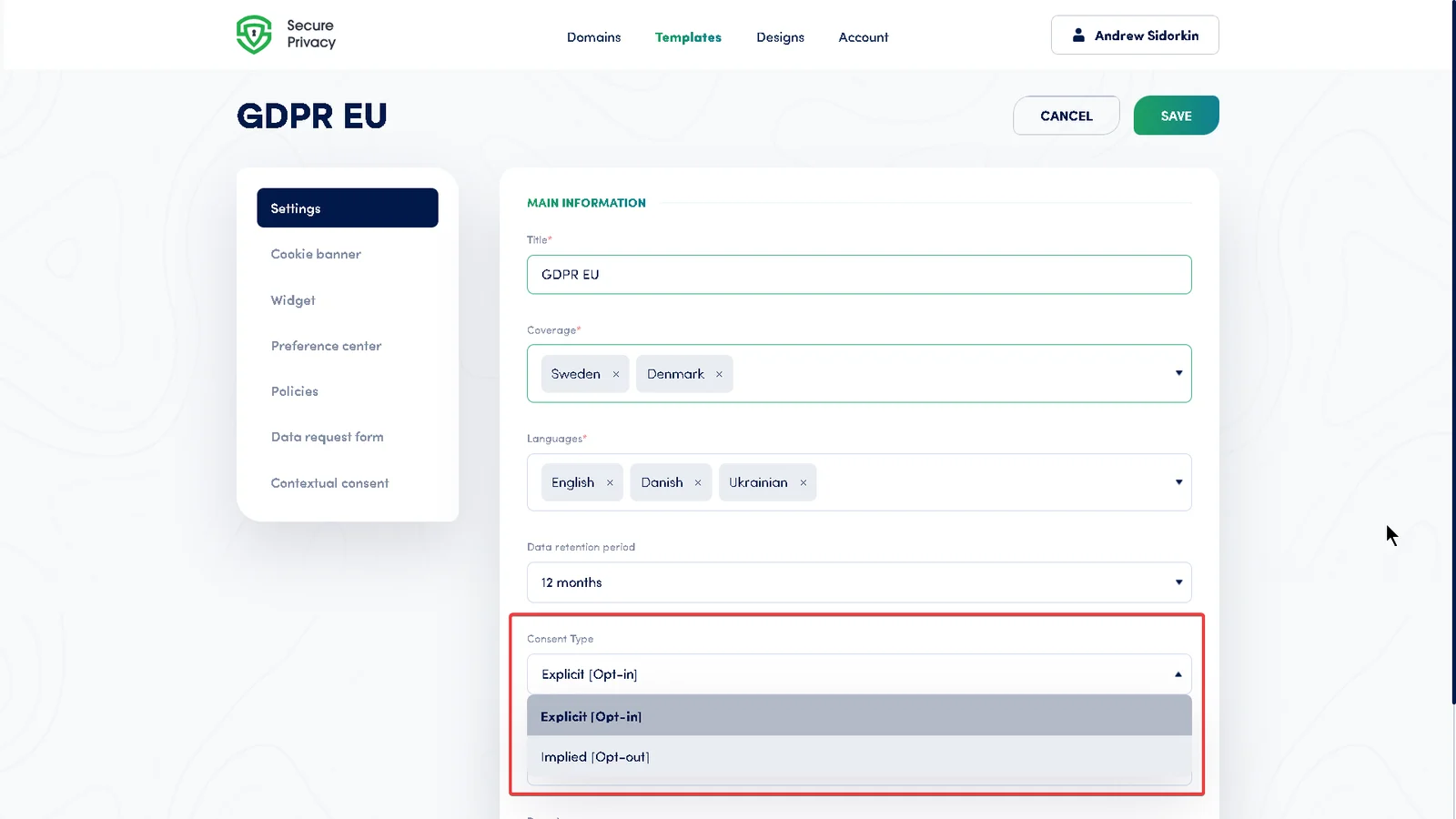
Open the Templates tab and create or edit a GDPR template. In the geo-targeting settings, select the EU member states plus Iceland, Liechtenstein and Norway (the EEA). Set the consent type to Explicit Consent (Opt-In). Keep your existing US template for California and other US states, so each audience sees the banner its laws require. The Templates settings guide explains every option.
Step 4 - Turn on Automatic Blocking for your domain
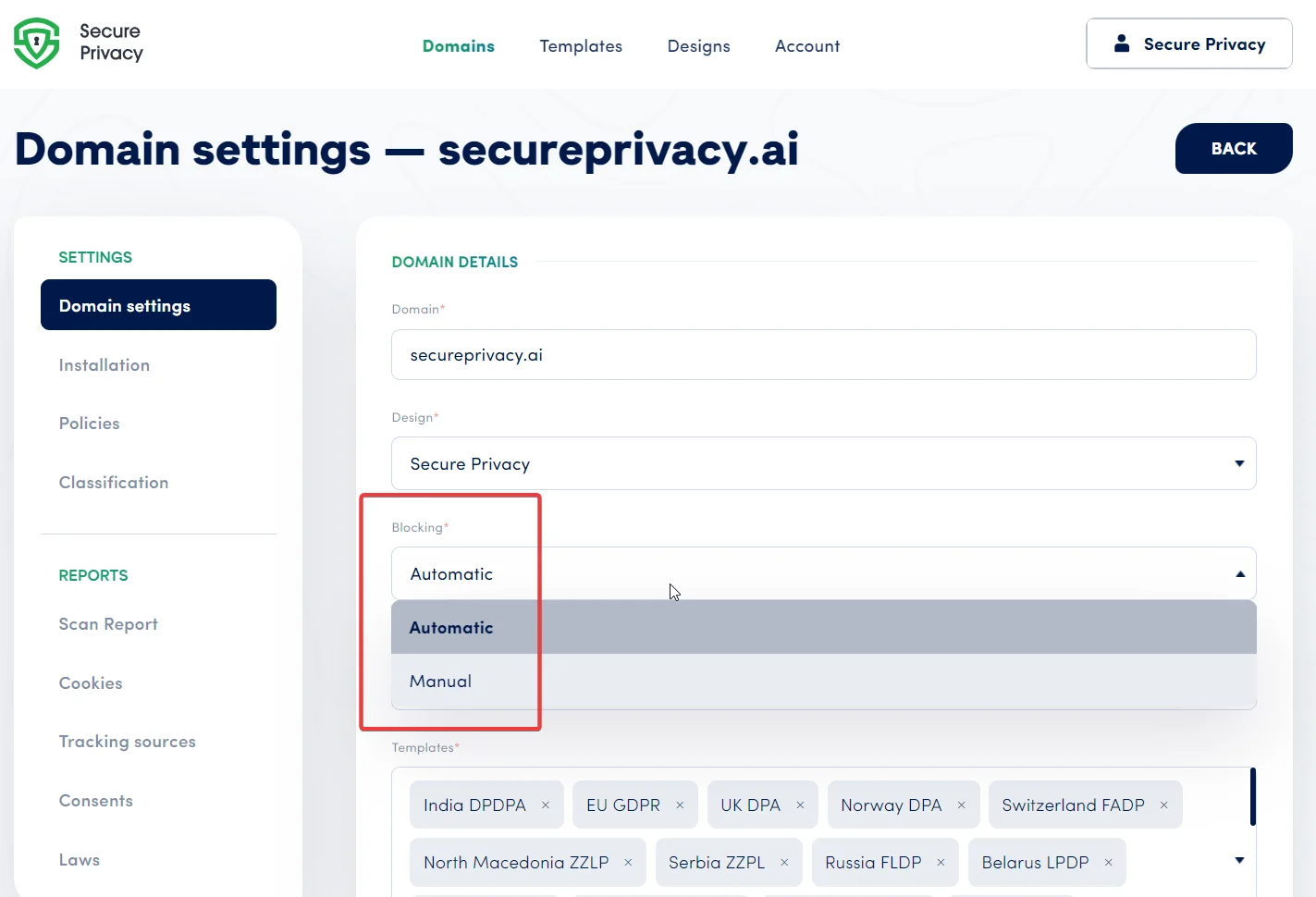
Go to Domains, open your domain and check that the Blocking section is set to Automatic Blocking. This keeps non-essential cookies and trackers from loading until the visitor consents, which is the core requirement for EU visitors. In the same Domain Settings page, assign your GDPR template. See Secure Privacy Domain Settings and the complete guide to blocking cookies for GDPR compliance.
Step 5 - Configure the banner, languages and consent withdrawal
Make sure the first layer of your banner offers Accept and Decline with equal prominence, and that visitors can reach granular category choices in the Preference Center. Add the languages of the countries you sell into; Secure Privacy supports more than 70 languages and shows the right one based on the visitor's browser. Keep a privacy widget, button or footer link on every page so visitors can withdraw consent later. See how to customize your cookie consent banner, what each banner button does and how to add a Preference Center widget.
Step 6 - Enable Google Consent Mode v2 if you use Google Ads or GA4
If you advertise with Google or measure EU traffic in Google Analytics 4, enable Google Consent Mode in your Domain Settings and choose Basic or Advanced. Without valid consent signals for EEA traffic, Google can restrict conversion tracking and remarketing audiences. Compare the modes in Google Consent Mode: Basic vs Advanced and review Google's EU User Consent Policy requirements.
Step 7 - Publish a GDPR privacy policy and cookie declaration
Use the Policies page to generate a privacy policy that covers your lawful bases, retention periods, recipients and processors, international data transfers, user rights, how to complain to a supervisory authority, and your EU representative's contact details. Publish the auto-generated cookie declaration alongside it and link both from your footer and banner. See how to create a GDPR privacy policy in Secure Privacy and how to manage, translate and publish policies.
Step 8 - Add a data subject request (DSAR) form
EU users have the right to access, correct, delete and port their data, and you generally have one month to respond. Build a DSAR form with identity verification and deadline tracking, then link it from your privacy policy and Preference Center. See what's new in the DSAR 3.0 form builder and the Self-Service Privacy Rights Portal.
Step 9 - Install the script and verify the EU experience
Confirm the Secure Privacy script loads first in your page head, before any analytics or ad tags (see the script installation guide). Then test as an EU visitor, for example with a VPN set to Germany or France: the GDPR banner should appear, tracking requests should stay blocked until you accept, and your choice should appear in the Consent Dashboard. Run a fresh scan to confirm nothing fires before consent.
What Happens After Launch
- Consent records build up automatically. Every choice an EU visitor makes is logged, so you can export proof of consent if a regulator or partner asks.
- Your site keeps changing, so rescan. New landing pages, pixels and plugins add cookies. Schedule recurring scans and classify anything new right away.
- Review your setup on a schedule. Use the cookie compliance review checklist each quarter and whenever you add a market or a marketing tool.
- Watch for EU rule changes. The EU's Digital Omnibus proposal could change parts of the cookie consent rules, but it is still being negotiated and today's GDPR and ePrivacy rules apply in full until anything new is adopted. See what the Digital Omnibus could change for cookie consent.
Troubleshooting Common EU Rollout Problems
EU visitors do not see the GDPR cookie banner
Check that the GDPR template is assigned to the domain and that its geo-targeting includes the country you are testing from. When testing with a VPN, clear cookies or use a private window so an earlier consent choice is not reused.
Cookies still load before consent
The usual causes are unclassified cookies, Manual Blocking mode, or analytics tags that load before the Secure Privacy script. Work through how to fix cookies loading before consent. If cookies from an earlier visit are still visible after declining, that is expected; see why cookies stay visible after declining consent.
Google Ads or GA4 shows consent warnings for EEA traffic
Google Consent Mode is off by default. Enable it in Domain Settings, then confirm the signals with how to check if Google Consent Mode is working.
The banner appears in the wrong language
The banner follows the visitor's browser language. Add each language you need to the template; if a language is missing, the banner falls back to the default.
US visitors now see the opt-in GDPR banner
Your GDPR template's geo-targeting probably includes too broad a region. Limit it to EU and EEA countries (plus any others you deliberately treat the same way) and keep your US template for US states.
Frequently Asked Questions
Does GDPR apply to US companies?
Yes, when a US company offers goods or services to people in the EU or monitors their behavior online, for example through analytics or advertising cookies. It applies even if the company has no office, employees or servers in Europe.
Do I need a cookie banner if my company is in the US but sells to Europe?
Yes, if your website uses non-essential cookies or trackers such as Google Analytics, ad pixels or social media embeds. EU rules require opt-in consent before those load, and the banner must actually block them until the visitor agrees.
Do US companies need an EU representative under GDPR?
Usually, yes. Article 27 requires most non-EU companies subject to GDPR to appoint a representative in the EU and list their contact details in the privacy policy. A narrow exemption exists for occasional, low-risk processing that does not involve sensitive data at scale.
Can I use one cookie banner for both CCPA and GDPR?
You can manage both from one Secure Privacy account, but EU and US visitors should see different experiences. Geo-targeted templates show an opt-in GDPR banner to EU visitors and an opt-out experience, such as a "Do Not Sell or Share" link, to visitors from US states.
Is the EU-US Data Privacy Framework still valid?
Yes. The EU General Court upheld it in September 2025 and it remains in force for transfers to certified US organizations. An appeal is pending at the Court of Justice of the EU, so many companies also keep Standard Contractual Clauses in place as a fallback.
What are the fines for GDPR non-compliance?
The most serious violations can lead to fines of up to €20 million or 4% of total worldwide annual turnover, whichever is higher. Regulators can also order you to stop processing, and individuals can file complaints or claim compensation.
Can I use Google Analytics on my website for EU visitors?
Yes, with prior consent. Analytics cookies are not strictly necessary, so Google Analytics must wait for opt-in. With Google Consent Mode v2, GA4 respects each visitor's choice and can use modeling to fill some of the gaps left by visitors who decline.
Does the UK follow the same rules as the EU?
Not exactly. The UK has its own UK GDPR and cookie rules, which are similar to the EU's but not identical. If you sell to UK customers, add the UK to your geo-targeting deliberately and check whether you also need a UK representative.
Will the EU Digital Omnibus change cookie banner rules?
It might in the future, but it is still a proposal under negotiation. Until any changes are formally adopted and take effect, the current GDPR and ePrivacy cookie consent rules apply in full, so plan your EU launch against today's rules.
Ready to Launch in the EU?
Set up your geo-targeted GDPR banner, privacy policy and DSAR form in one place and keep your US experience unchanged. Get started with Secure Privacy for free, or contact Secure Privacy support if you need help with your EU rollout.